SnapRoamer.com – Capturing reflections in smartphone travel photography enhances creativity by adding depth, symmetry, and unique framing. Using specific camera settings, angles, and affordable accessories like clip-on polarizing filters can control reflections and glare, while creative techniques help produce compelling images that stand out in travel photo collections.
“Reflections instantly add: Depth, Symmetry, Leading lines, Visual intrigue, Storytelling layers.” — Conor
How can I optimize my smartphone camera settings for capturing reflections?
Optimizing smartphone camera settings for reflections involves locking focus and exposure, using manual controls where available, and enabling grid lines for straight composition. Apps like Moment offer ISO and shutter speed adjustments to handle tricky lighting, improving clarity and reducing glare in reflection shots.
Locking focus and exposure prevents the camera from constantly readjusting in reflective scenes. On an iPhone, tap and hold on the screen until the AE/AF Lock indicator appears; this stops the camera from shifting focus and exposure mid-shot, which can distort reflections and cause glare. This method is counterintuitive for some users who expect autofocus to improve image clarity, but it actually stabilizes the shot’s lighting and sharpness in reflection photography.
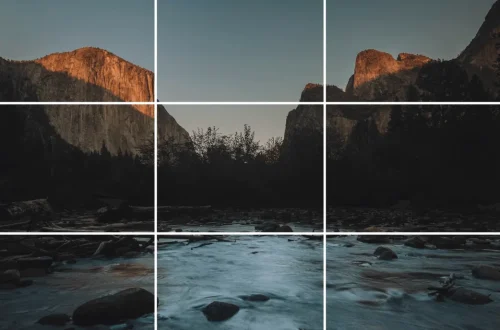
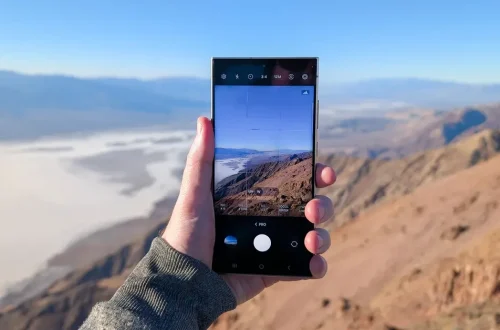
Enabling the camera grid on iPhones via Settings > Camera > Grid helps align reflections and horizons precisely, ensuring straight and balanced compositions. This feature is essential when framing symmetrical reflections like lakes or glass buildings, where slight tilts can ruin the visual harmony.
Using the Moment app, photographers can adjust ISO down to 32 and shutter speed manually, a significant improvement over native camera apps that restrict these settings. For instance, setting ISO to 32 reduces noise, while longer shutter speeds capture subtle light in reflections without overexposure. However, longer shutter speeds require steady hands or a tripod to avoid blur—a frequent failure mode when shooting handheld.
Moment’s manual exposure controls are accessed via the app’s interface, where sliders allow precise ISO and shutter speed adjustments. This flexibility is essential when shooting reflections under varying light intensities, such as bright sunlight versus shaded water surfaces. Users should note that automatic exposure often overcompensates for bright reflections, leading to blown highlights.
- Lock focus and exposure by tapping and holding on the iPhone screen until AE/AF Lock appears
- Enable the camera grid via Settings > Camera > Grid for accurate alignment
- Use the Moment app to manually set ISO (as low as 32) and shutter speed (up to several seconds)
- Beware of camera shake during long exposures—use a tripod or steady surface
- Avoid relying solely on autofocus, as it can shift focus and exposure unpredictably in reflective scenes
Using the Moment app for manual exposure control
Moment offers manual ISO and shutter speed adjustments, unlike default camera apps. Its interface provides sliders to set ISO values as low as 32 and shutter speeds up to several seconds. These capabilities help capture reflections with better highlight control and less noise, especially in challenging lighting conditions.
For example, when photographing artwork reflections indoors, setting ISO to 32 and a 3-second shutter speed reduces grain and captures subtle light, as demonstrated by Neil Oseman’s technique for iPhone artwork photography.
Activating the iPhone Camera Grid for better framing
To activate the grid, navigate: Settings > Camera > Grid. This overlays a 3×3 rule-of-thirds grid on the camera viewfinder, assisting in aligning reflections symmetrically. Brian Brown, a Los Angeles-based travel photographer, advocates grid use to maintain level horizons and proportionate framing in reflection shots, preventing common tilt-induced composition errors.
What affordable accessories improve reflection photography on smartphones?
Clip-on polarizing filters and polarized sunglasses can reduce unwanted glare and deepen colors in reflection photos. These affordable accessories help control reflections on water and glass surfaces, enhancing clarity and adding a natural vignette effect to smartphone travel images.
- Clip-on polarizing filters for smartphones
- Polarized sunglasses used as makeshift filters
Polarized sunglasses, when held slightly in front of the smartphone lens, darken skies and minimize surface glare, as Conor describes. This inexpensive hack enhances colors and contrast in reflections, especially on water surfaces and shiny glass.
Clip-on polarizing filters designed for smartphones typically cost under $30 and attach securely over the phone’s camera lens. These filters rotate to adjust the polarization angle, allowing photographers to control the amount of reflected light entering the lens. This is particularly useful for shooting reflections on lakes or windows in bright daylight, where glare can wash out details.
However, a failure mode occurs when using polarized filters on phones with multiple lenses, such as the iPhone 12 Pro, where misalignment can cause vignetting or uneven polarization effects across lenses. Users must ensure the filter aligns precisely with the active lens.
How polarized sunglasses enhance reflection shots
Polarized sunglasses act as accessible circular polarizers. By holding them just in front of the smartphone lens and rotating them, colors deepen and reflections become clearer. Bryan Esler recommends this method for outdoor reflection shots when clip-on filters are unavailable, particularly to reduce water surface glare.
Using clip-on polarizing filters for smartphones
Clip-on polarizers attach directly to the phone’s camera module and often feature a rotating ring to adjust polarization. These filters cost around $20-$40 on major e-commerce sites. They improve reflection clarity by cutting down glare and increasing color saturation, which is crucial for travel photography in bright sunlight or near water. Users should test filter alignment carefully to avoid distortion and vignetting.
How do different smartphone models and apps compare in capturing reflections?
Smartphones like the iPhone 12 Pro with 12-megapixel ultra-wide, wide, and telephoto lenses offer versatile apertures (f/1.6 to f/2.4) ideal for reflection photography. Apps like Moment provide manual controls, while default cameras vary in handling glare and focus, affecting reflection quality.
| Smartphone Model / App | Lens Aperture | Megapixels | Manual Controls | Reflection Handling Quality |
|---|---|---|---|---|
| iPhone 12 Pro (Wide) | f/1.6 | 12 | Limited (default app) | Good, but struggles with glare |
| iPhone 12 Pro (Ultra-wide) | f/2.4 | 12 | Limited (default app) | Moderate, less sharp in reflections |
| iPhone 12 Pro (Telephoto) | f/2.0 | 12 | Limited (default app) | Good for close-up reflections |
| Moment App (on iPhone 12 Pro) | N/A (app control) | Uses phone sensor | Full manual (ISO, shutter speed) | Excellent control, best for reflections |
| Default Android Camera App | Varies | Varies | Usually limited | Variable, often poor glare control |
This table highlights the advantage of using apps like Moment that unlock manual controls versus relying on default apps. Contrary to popular belief, having more megapixels does not guarantee better reflection photos; aperture and manual control play a more critical role. For example, the iPhone 12 Pro’s wide lens at f/1.6 captures light better, improving reflections in low light compared to its ultra-wide lens at f/2.4.
Aperture differences across iPhone 12 Pro lenses
The wide lens aperture of f/1.6 allows more light, capturing reflections with better brightness and depth. The ultra-wide lens aperture is smaller at f/2.4, resulting in darker, less detailed reflections, especially in shaded or low-light environments. The telephoto lens at f/2.0 is useful for isolating reflective details but requires steadier hands due to narrower depth of field.
Manual control benefits in camera apps
Moment app’s manual control over ISO and shutter speed is pivotal when capturing reflections. Setting ISO as low as 32 minimizes noise, while adjusting shutter speed up to seconds controls exposure accurately. Default apps tend to use automatic exposure, often overexposing highlights in reflections, causing loss of detail. Thus, manual control substantially improves image quality in reflective scenes.
What are advanced creative techniques for using reflections in smartphone travel photography?
Advanced techniques include using small mirrors for picture-within-a-picture framing, rotating reflections to create alternate realities, flipping phones for water-level shots, and integrating foreground elements to complement reflections, enhancing storytelling and visual intrigue.
- Using a pocket mirror to frame reflected subjects
- Rotating reflections 180 degrees to create surreal alternate realities
- Flipping the phone upside down to shoot water-level reflections
- Adding foreground elements that complement reflections
Employing a small mirror near the smartphone lens can create a “picture within a picture,” framing the subject in its reflection. Conor highlights this technique as transformative, especially in urban settings with reflective storefronts or architectural features. This approach layers the composition, adding complexity and narrative depth.
Rotating a reflection image by 180 degrees after cropping closely can simulate an alternate reality window, a creative effect Tomaso Bellini demonstrates. This counterintuitive method tricks the eye and invites viewers to engage more deeply with the photo.
Flipping the smartphone upside down to get closer to water surfaces helps exaggerate reflections and foreground elements like ripples, producing dramatic symmetrical images. This technique requires careful handling to avoid water damage and often benefits from waterproof cases.
Foreground elements such as leaves or branches introduced near reflective surfaces complement the reflections naturally, creating balanced layers. Bryan Esler advises this technique for rainy reflections, where natural elements soften and enrich the composition.
One failure mode occurs when reflections are distorted by ripples or surface imperfections; however, this distortion can also add artistic texture if composed intentionally.
Using mirrors for creative framing
Holding a pocket mirror angled near the phone lens captures reflected parts of a scene within the frame. This technique allows framing that contrasts reflected and direct views, crafting surreal or layered images. It is especially effective in busy urban environments or when shooting portraits with reflective backgrounds.
Rotating reflections for alternate reality effects
Cropping tightly around a reflection and rotating the image 180 degrees creates the illusion of looking through a portal or window into another world. This technique leverages human perception and symmetry to craft compelling travel photos that stand out.
How can I troubleshoot common challenges when photographing reflections with a smartphone?
Common challenges include persistent reflections despite lens contact, glare from sunlight, distracting background elements, and accidental photographer reflections. Solutions involve adjusting angles, waiting for light shifts, using polarizing filters, and careful composition to avoid these pitfalls.
Photographer reflections often spoil shots when angles are not chosen carefully. MIOPS warns: “One of the common mistakes in reflection photography is getting an image of yourself caught in the reflection.” Avoid this by positioning yourself out of the reflection’s direct view or using zoom to isolate the subject.
Sunlight glare can overpower the composition. Avoid shooting with the sun in frame or use polarizing filters to reduce brightness. Mike James recommends shooting from shaded angles or during golden hours to minimize glare. Distracting foreground elements, like sewer drain artwork or clutter, can ruin a reflection photo’s impact; composition must isolate clean reflective surfaces.
Avoiding photographer reflections
Move around the reflective surface to find an angle where your reflection does not appear. Using zoom lenses or cropping in post-processing can also help exclude yourself. Sometimes, a slight shift in camera height or orientation eliminates unwanted reflections.
Handling sunlight glare
Polarizing filters reduce glare effectively, but if unavailable, waiting for clouds or shooting during early morning or late afternoon light helps. Avoid direct sun in the frame, as it causes harsh highlights that degrade reflection visibility.
How can reflections be framed effectively for printing and physical display?
For physical display, reflections should be framed using minimalist frames with anti-glare glass and proper matting to reduce unwanted reflections. Organizing photos into themed collections or photo books enhances presentation and preserves the creative impact of reflection shots.
Brian Brown recommends minimalist frames to prevent distraction from the photo’s reflective qualities. Anti-reflective glass or acrylic panels reduce glare from ambient light in galleries or homes, preserving image clarity. Using mats with a neutral color also helps isolate the photo visually.
Counterintuitively, overly elaborate or glossy frames amplify reflections on the glass surface, distracting from the photo itself. Less is more in framing reflective images.
Organizing smartphone reflection photos into themed photo books or portfolios can maintain narrative coherence. It also protects images from physical damage while showcasing the creative journey behind the shots.
Using minimalist frames to enhance reflection photos
Minimalist frames with thin profiles and anti-glare glass provide a clean presentation that lets the reflection photo’s depth and symmetry stand out. This framing style avoids competing textures or colors that could visually clash with the photo’s subtle nuances.
Organizing smartphone photos for framing
Grouping reflection photos by location or theme in photo albums or digital portfolios helps convey storytelling layers that Conor highlights. This approach aids in selecting the best candidates for physical display and ensures a cohesive visual experience.
What ethical and cultural considerations should I keep in mind when photographing reflections during travel?
Respect privacy by avoiding reflections of people or private spaces without consent. Cultural sensitivity is essential when capturing reflections in public or sacred places to maintain respect for local customs and individuals’ rights.
Many cultures consider reflections of people or sacred objects private or sensitive. Taking photos of reflections in windows or mirrors that include individuals without permission can violate privacy norms or legal restrictions. Ethical travel photography involves asking permission where possible and refraining from intrusive shots.
Public spaces with reflective surfaces may still have implicit rules. For example, photographing reflections inside religious sites might be disrespectful if it captures worshippers or sacred imagery. When in doubt, err on the side of caution to maintain respect.
How can I integrate foreground and background elements with reflections for storytelling in photos?
Integrating complementary foreground elements like leaves or branches with reflections adds layers and storytelling depth to photos. This technique enhances visual interest without distracting from the reflected subject, creating balanced and engaging compositions.
- Choose natural elements that complement the reflected subject
- Frame foreground and reflection to maintain focus balance
- Use depth of field to keep reflections sharp and foreground softly blurred
Photographers should select foreground elements that harmonize with the reflected image’s theme. For example, when capturing tree reflections in water, including nearby leaves or twigs provides context and texture. Bryan Esler endorses this method for rainy reflection shots to enrich composition without clutter.
Balancing layers through careful aperture choice and positioning prevents the foreground from overpowering the reflection. Using portrait mode or adjusting aperture on apps like Moment achieves this selective focus, keeping the reflection crisp while subtly blurring foreground elements.
A counterintuitive insight is that adding some imperfection or slight distortion in the foreground enhances storytelling by suggesting environment and mood rather than striving for sterile clarity.
Choosing complementary foreground elements
Look for natural or architectural items that echo the reflection’s subject or colors. Leaves, branches, or textured surfaces near water reflections add harmony and depth without distraction.
Balancing layers in reflection compositions
Use manual focus and aperture settings to ensure the reflection remains the focal point, while foreground elements provide subtle framing and context. This balance heightens visual storytelling.
What post-processing workflows enhance reflections in smartphone photos without losing naturalness?

Post-processing with apps like Snapseed allows adjustment of brightness, contrast, and saturation to enhance reflections subtly. Using filters carefully preserves natural appearance while improving clarity and depth, making reflection details stand out without artificiality.
- Adjust brightness and contrast to reveal reflection details
- Increase saturation moderately to deepen colors without oversaturation
- Use selective editing tools to target reflections specifically
- Avoid heavy filters or HDR effects that create unnatural looks
Snapseed’s selective adjustment tool lets users enhance reflection areas without affecting the entire image. For instance, increasing contrast on the reflection while keeping the background neutral maintains naturalness. Over-editing can cause reflections to look fake or overly processed, a common failure mode in smartphone photography.
Using Snapseed to adjust reflection photos
Snapseed enables precise edits; start by opening the photo and selecting Tools > Selective. Tap the reflection area, then adjust brightness, contrast, or saturation sliders to enhance the reflection subtly. This method preserves the photo’s original atmosphere while improving visual impact.
Avoiding over-editing in reflections
Resist the urge to apply heavy filters or excessive HDR, which flatten or distort reflections. Maintaining subtlety ensures the photo retains its natural appeal and storytelling power.
FAQ
What is the best way to avoid unwanted reflections when shooting through glass?
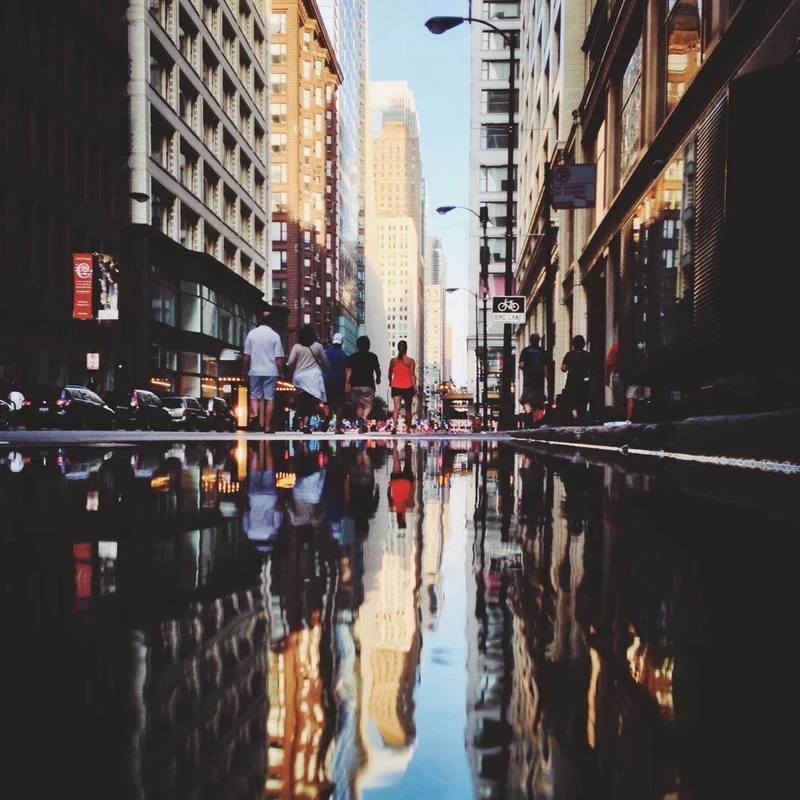
Pressing the smartphone lens directly against the glass reduces reflections significantly; waiting for light to shift or cropping vertically can also help, according to Jefferson Graham’s advice on reducing reflections.
Can reflections improve the storytelling aspect of travel photos?
Yes, reflections add depth, symmetry, and visual intrigue, creating storytelling layers that enrich travel photography, as noted by Conor and supported by multiple photography experts.
How do polarized filters help in reflection photography?
Polarized sunglasses or clip-on filters reduce glare, deepen sky colors, and improve reflection clarity, enhancing photo quality, as explained by Conor and Bryan Esler.
What common mistakes should be avoided when photographing reflections?
Avoid capturing yourself in reflections, shooting with the sun in frame, and including distracting foreground elements to prevent ruining the shot, warns MIOPS and other professional photographers.
Which smartphone camera settings are recommended for reflection shots?
Use focus and exposure lock, enable grid lines for alignment, and consider manual controls like ISO and shutter speed adjustments via apps such as Moment for optimal reflection photos.