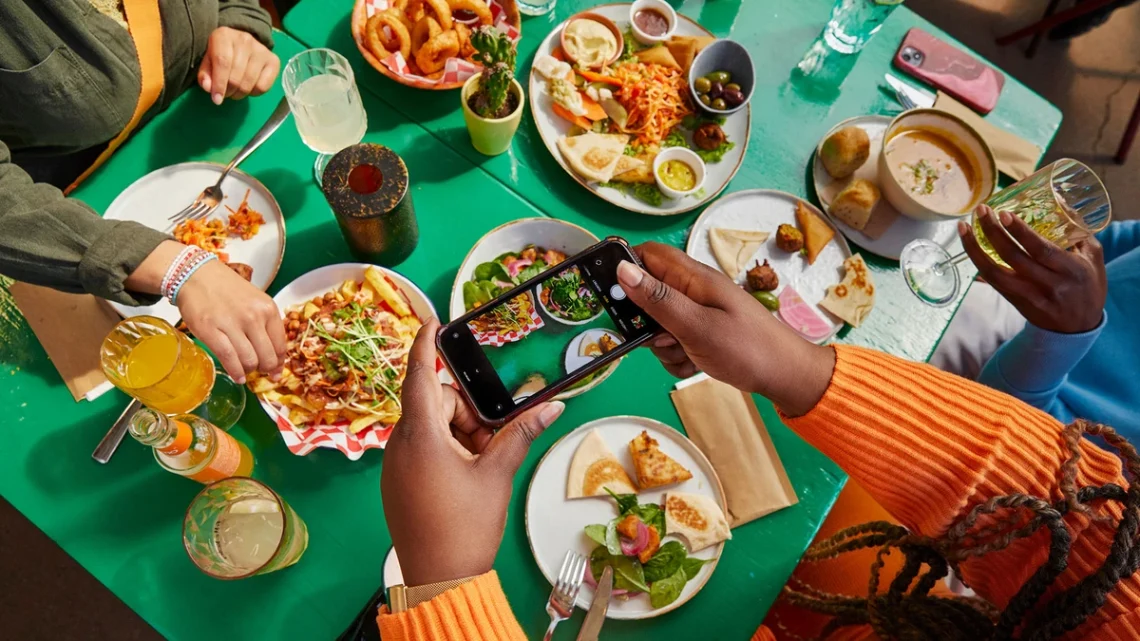
SnapRoamer.com – To capture local food culture with a smartphone, move beyond static plates by using ‘Contextual Food Shots’ that include the vendor’s hands, steam, or the bustling market background. Use portrait mode for subject separation, avoid digital zoom to prevent graininess, and prioritize odd-numbered compositions to create a balanced, appetizing scene.
Kav Dadfar notes that markets are fascinating places to photograph and are always on a shot list, a perspective that shifts the focus from the food as a mere product to the food as a centerpiece of a living, breathing environment.
The Sensory Capture Framework: Moving Beyond the Plate
Document the environment alongside the meal to capture food culture. Use Burst Mode or slow-motion to record steam rising from a bowl, the action of a vendor chopping ingredients, or the pouring of sauces to convey the atmosphere and movement of the local culinary scene.
A common failure mode in food photography is the “isolated plate” syndrome, where the subject feels disconnected from its origin. To avoid this, practitioners utilize Market Storytelling techniques. This involves documenting the vendor while they are serving customers, making food, or taking money. If the vendor is not busy, taking the time to talk to them, asking questions, and then asking for permission to take pictures improves the overall experience and authenticity of the shot.
Capturing Motion: Steam, Sizzle, and Pouring
Static images often fail to communicate the heat and freshness of street food. Use these methods to inject life into your mobile captures:
- Steam and Vapor: Use a dark background to make white steam visible. High-speed burst mode can freeze a single plume of vapor.
- Liquid Dynamics: Capture the exact moment a sauce is poured or a drink is ladled. Slow-motion video is particularly effective here.
- Action Elements: Focus on the “action” of the market, such as the rhythmic chopping of ingredients or the sizzle of a hot wok.
The Human Connection: Photographing the Vendor
Implement New Angle Exploration to move the narrative from “what is being eaten” to “how it is being made.” Try crouching down to look up at the vendor or standing directly over subjects like a pair of chopsticks to create an immersive, intimate result.
Mobile Macro Hacks: Getting Close Without Losing Detail
To achieve macro-style shots on a smartphone, utilize the built-in ‘Macro Mode’ or the ultra-wide lens rather than relying on digital zoom, which degrades image quality. For better results, maintain a steady hand or use a compact tripod to avoid the motion blur common in close-up mobile photography.
| Technique | Best Use Case | Potential Pitfall |
|---|---|---|
| Digital Zoom | Quickly framing distant objects | Reduced image quality and graininess |
| Switching Built-in Lenses | Close-up textures or wide scenes | Requires physical movement to frame |
| Even Number Composition | Symmetrical, formal arrangements | Can create competition between elements |
| Odd Number Composition | Natural, balanced food scenes | Can feel “unbalanced” to those used to symmetry |
Avoid excessive digital zoom because it can reduce image quality and create grainy photos. Physically move the phone closer to the subject or switch to the dedicated macro lens if your device supports it.
Warning: Relying on digital zoom is a primary cause of “mushy” textures in food photography. When you zoom in digitally, the sensor is simply stretching existing pixels, which destroys the fine details of spices, grains, or meat fibers.
Optimizing Smartphone Settings for Food Environments
According to Ana Mireles, manual mode is the best camera mode for food photography, allowing you to control every camera setting, which is essential when lighting conditions change rapidly in a market or street stall.
Mastering Manual Mode on Mobile
Controlling the exposure manually prevents the smartphone from overcompensating for bright highlights or deep shadows. To access these features, you may need to navigate to your camera app’s settings or use a dedicated “Pro” mode. For example, on many Android devices, you can find these options via Camera > More > Pro. Controlling the ISO and shutter speed allows you to manage light effectively. Two Loves Studio notes that low ISO and fast shutter speeds provide the best quality images.
When to Use Portrait vs. Night Mode
Leverage specific smartphone automation to handle varying lighting environments:
- Portrait Mode: This is highly effective for local food photography to create a shallow depth of field, separating the dish from a cluttered background. However, be aware that it can occasionally blur parts of hats, glasses, or architectural details incorrectly.
- Night Mode: Essential for dimly lit night markets. This mode uses long exposure processing to pull light from dark areas, but it requires the phone to remain perfectly still.
- HDR mode: Useful when there is a massive difference between a bright sky and a shaded food stall, helping to balance the highlights and shadows.
Compositional Balance and the Rule of Odds
Using odd numbers while composing your scene will add more symmetry and balance than even numbers, which can create competition between the elements and divide the viewer’s attention.
When arranging your shot, aim for 3 to 5 elements. This might include the main dish, a set of utensils, and a small garnish or a napkin. This creates a visual hierarchy that guides the eye naturally through the frame. Avoid “even” compositions where two identical objects sit side-by-side, as this often leads to a static and uninteresting image.
Navigating the Messy Reality of Street Food Photography
Low light conditions and busy atmospheres can make photographing markets somewhat challenging. Managing these environments requires technical precision to combat unpredictable lighting.
| Issue | Cause | Solution |
|---|---|---|
| Motion Blur | Shutter speeds slower than 1/80 or 1/100 sec | Use a tripod or increase ISO |
| Image Noise | Raising ISO too high in dark stalls | Get closer to a light source |
| Loss of Focus | Moving too quickly in crowds | Use burst mode or stabilize hands |
To maintain sharpness, practitioners should avoid shutter speeds slower than 1/80 or 1/100 sec when shooting handheld. If the environment is too dark, instead of simply cranking up the ISO—which introduces grain and noise—try to get closer to a light source. Getting closer to a light source increases the light power available to your sensor.
Shortcut: To stabilize your phone in a crowd, hold the device with both hands, tuck your elbows into your ribs, and exhale slowly before pressing the shutter button.
| Problem | Context | Result |
|---|---|---|
| Blurry Images | Handheld shooting in low light | Loss of texture and detail |
| Grainy Images | High ISO settings | Digital noise/artifacts |
Color, Appetite, and Mobile Post-Processing
Bright colors in the background can detract from the food and even cast unwanted tones onto the dish itself. Managing these color shifts is vital for maintaining a realistic appearance.
Use mobile editing tools to correct color and lighting issues. Focus on these specific adjustments:
- white balance: Adjust this to ensure whites look white and colors look natural under yellow market lights.
- Saturation and Vibrance: Use these sparingly to enhance the natural colors of fresh ingredients without making them look artificial.
- Contrast: Increasing contrast can help define the textures of the food, making it appear more three-dimensional.
Ensure your edits make the food look appetizing rather than heavily processed. If the background is too distracting, use a slight vignette or blur to pull the focus back to the main subject.
FAQ
Is Portrait Mode good for food photography?
Yes, Portrait Mode is effective for local food photography to create background blur, but be careful as it can occasionally blur accessories like hats, glasses, or architectural details incorrectly.
How can I avoid blurry photos in dark markets?
To avoid motion blur in low light, use Night Mode, stabilize your phone with both hands, or use a compact tripod. Avoid shutter speeds slower than 1/80 or 1/100 sec if handheld.
Why does my food look unappetizing in photos?
Bright, clashing colors in the background can cast unwanted tones onto the food. Ensure your white balance is correct and avoid backgrounds that detract from the main subject.