SnapRoamer.com – Smartphone cameras have evolved into powerful tools capable of capturing striking travel images, far surpassing the limitations once associated with mobile photography. The integration of diverse shooting modes—such as HDR, portrait, panoramic, burst, and manual—allows travelers to tailor their shots for a variety of environments, from dynamic cityscapes to serene landscapes. Mastering these modes unlocks creative potential and significantly enhances image quality, enabling users to document their journeys with professional-like results using just their smartphones.
Leading models like the iPhone 12 Pro and Samsung Galaxy Note 9 incorporate advanced hardware features including multiple lens configurations, wide-angle capabilities, and sophisticated image stabilization. Coupled with computational photography and AI-driven processing, these smartphones optimize exposure, focus, and composition automatically or through manual controls. Understanding when and how to apply each camera mode is essential for maximizing output, especially in travel scenarios where lighting and subjects vary widely.
Essential Smartphone Camera Modes for Travel Photography
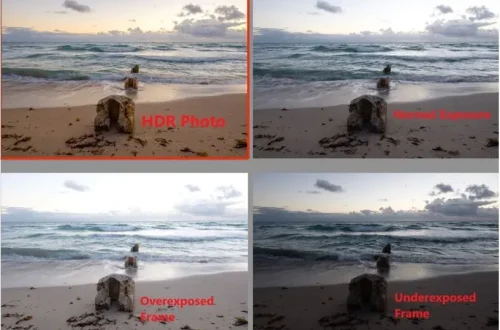
High Dynamic Range (HDR) mode has become fundamental for travelers aiming to capture scenes that include both bright skies and darker foregrounds. By merging multiple exposures into one image, HDR preserves detail in highlights and shadows, preventing washed-out skies or underexposed subjects. For example, when photographing coastal sunsets or urban skylines, HDR mode balances the contrast effectively, producing vibrant yet natural-looking photos without the need for post-processing.
Portrait mode leverages depth-sensing technology to create a shallow depth of field effect, blurring the background and emphasizing the subject. This mode is ideal for capturing people or objects in travel settings, such as street portraits or cultural events, adding a professional aesthetic traditionally achievable only with DSLR cameras. Devices like the iPhone 12 Pro employ LiDAR sensors to refine subject separation, improving edge detection and background blur consistency even in challenging lighting.
Panoramic mode enables wide, sweeping compositions that fit expansive landscapes or large architectural scenes into a single frame. This mode is invaluable for travelers exploring vast natural vistas or historic city squares. Proper execution involves steady panning and awareness of lighting changes across the scene to avoid stitching artifacts. Smartphones with wide-angle lenses further complement panoramic shots by capturing broader perspectives with higher clarity.
Burst mode captures a rapid sequence of photos by holding down the shutter, making it indispensable for action or candid photography during travel. Fast-moving subjects such as wildlife, street performances, or children playing are best documented using burst mode, which increases the chance of capturing the perfect moment. The Samsung Galaxy Note 9’s burst mode can shoot up to 20 frames per second, allowing users to select the sharpest image from the sequence.
Manual or Pro mode offers advanced photographers full control over ISO, shutter speed, white balance, and focus, enabling creative flexibility for challenging conditions. Manual adjustments facilitate long exposure shots for nightscapes or light trails, and fine-tuning exposure can compensate for tricky lighting that automatic modes might misinterpret. Many Android and iOS apps, including Halide, provide intuitive interfaces for manual control, empowering users to experiment beyond default settings.
Practical Techniques to Maximize Smartphone Photography in Travel
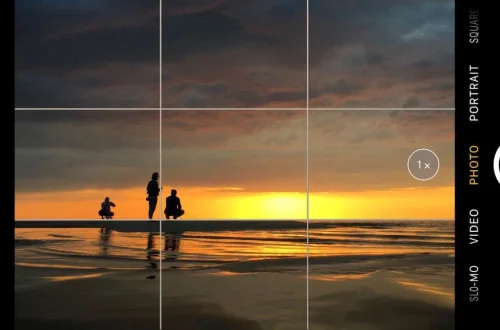
Composition remains central to compelling travel photography. Utilizing grid lines based on the rule of thirds helps position key elements strategically, enhancing balance and visual interest. Smartphones commonly include this feature in their camera settings, guiding users to frame horizons and subjects effectively.
Avoiding digital zoom is critical, as it merely crops and enlarges the image, degrading resolution and clarity. Instead, photographers are encouraged to physically move closer to their subject or use built-in optical zoom lenses available on advanced smartphones. For instance, the iPhone 12 Pro’s telephoto lens provides 2x optical zoom without quality loss, surpassing digital magnification.
Experimenting with unconventional angles and perspectives adds dynamism to travel photos. Low-angle shots can dramatize architecture, while overhead shots using tripods or selfie sticks offer unique vantage points. Wide-angle lenses native to many smartphones reveal more of the environment, enriching storytelling by including contextual surroundings.
Enhancing Mobile Travel Photography with Accessories and Apps
Accessories such as the Gorilla Pod tripod offer stability crucial for low-light and long-exposure shots. Their flexible legs adapt to uneven surfaces, ideal for travel scenarios where conventional tripods are cumbersome. Stabilization accessories reduce camera shake, leading to sharper images and smoother videos.
Photography apps extend smartphone capabilities beyond native camera functions. Halide is renowned for its RAW capture and manual controls, allowing post-processing flexibility and finer adjustments during shooting. Hydra specializes in HDR processing, producing high-quality images in challenging lighting by combining multiple frames intelligently. These apps enhance image quality and creative options, making them essential tools for serious mobile photographers.
Cloud storage solutions address the challenge of limited phone memory during travel. Platforms like Google Photos or iCloud automatically back up images, freeing space and safeguarding against data loss. Efficient photo management ensures uninterrupted shooting sessions and organized archives for future editing.
Limitations of Smartphone Cameras and Complementary Techniques
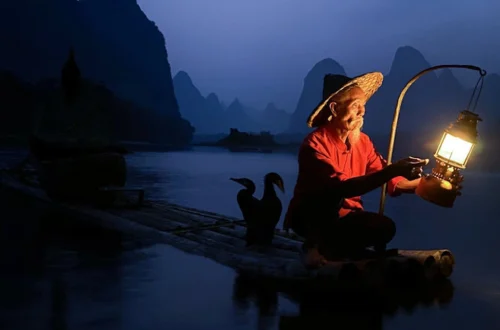
Despite significant advancements, smartphone cameras still face challenges in low-light environments. While AI-driven image stabilization and noise reduction algorithms improve performance, they cannot entirely replace the large sensors and fast lenses of dedicated cameras. Long exposure modes on smartphones offer creative possibilities, but often require stable supports to avoid blur.
Certain travel situations—such as distant wildlife photography or professional-grade landscape captures—may warrant traditional cameras with optical zoom and interchangeable lenses. However, smartphones remain the most accessible and versatile tool for everyday travel photography, especially when combined with informed technique and mode selection.
Employing long exposure modes creatively enables effects like smooth waterfalls or light trails in night cityscapes. Smartphones equipped with Pro mode and tripod support can capture these dynamic scenes, emphasizing motion and atmosphere without additional equipment.
Encouraging Mastery of Smartphone Camera Modes for Travel Storytelling
Travelers equipped with knowledge of smartphone shooting modes can harness their devices to craft visually compelling narratives. Practicing modes such as HDR, portrait, and panorama before trips builds confidence and familiarity, resulting in more intentional and impactful images. Exploring manual settings encourages experimentation, pushing creative boundaries beyond automatic presets.
The combination of hardware innovations, computational photography, and accessory support positions smartphones as indispensable travel companions. By understanding each mode’s strengths and appropriate applications, users maximize their potential to document diverse scenes—from candid street life to breathtaking landscapes—without the need for bulky equipment.
Continued technological progress promises even greater image quality and shooting versatility in future smartphone models. Meanwhile, travelers who master current camera modes and techniques will remain at the forefront of mobile photography, capturing memorable moments with clarity and creativity.
| Camera Mode | Best Use Case | Key Features | Smartphone Examples |
|---|---|---|---|
| HDR Mode | High contrast scenes, sunsets, cityscapes | Combines multiple exposures for balanced light | iPhone 12 Pro, Samsung Galaxy Note 9 |
| Portrait Mode | Portraits, subject emphasis with blurred background | Depth effect, background blur using AI and sensors | iPhone 12 Pro (LiDAR), Samsung Galaxy Note 9 |
| Panorama Mode | Wide landscapes, architectural scenes | Stitches multiple images into one wide frame | iPhone 12 Pro, Samsung Galaxy Note 9 |
| Burst Mode | Fast action, candid moments | Rapid sequence shots for best frame selection | Samsung Galaxy Note 9 (up to 20 fps), iPhone 12 Pro |
| Manual/Pro Mode | Creative control, low light, long exposures | Adjust ISO, shutter speed, focus manually | Halide app (iOS), native Samsung Pro mode |
Frequently Asked Questions
Which smartphone camera mode is best for capturing landscapes while traveling?
Landscape photography benefits most from HDR and panorama modes. HDR balances exposure across bright skies and shaded areas, while panorama captures wide scenes in a single expansive image.
How can I improve low-light travel photos using my smartphone?
Use manual or Pro mode to increase ISO and slow shutter speed combined with a tripod like Gorilla Pod for stability. AI-based HDR and long exposure modes also help enhance detail and reduce noise.
Is digital zoom recommended for travel photography on smartphones?
Digital zoom generally reduces image quality by cropping pixels. Moving physically closer or using optical zoom lenses available on phones like the iPhone 12 Pro is preferred for maintaining sharpness.
What accessories enhance smartphone photography during travel?
Tripods such as the Gorilla Pod improve stability for long exposures and steady shots. Photography apps like Halide and Hydra offer advanced controls and HDR enhancement, while cloud storage solutions manage photo backups efficiently.
When should I consider using a traditional camera instead of a smartphone for travel photos?
Traditional cameras are advantageous for distant subjects requiring optical zoom, complex lighting conditions needing larger sensors, or professional-grade image quality. However, smartphones excel in portability and convenience for everyday travel photography.
For further expert advice on mobile photography techniques and camera mode usage, visit Iceland Photo Tours on smartphone modes and Stewart Travel Group’s smartphone photography tips.