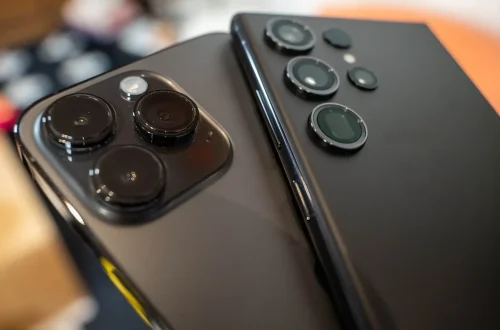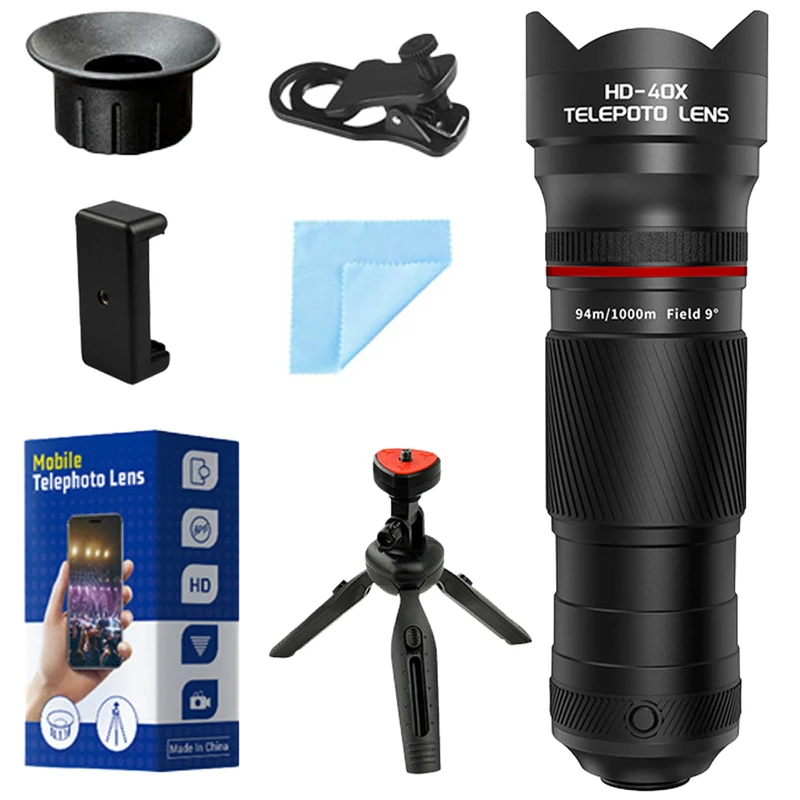
SnapRoamer.com – A smartphone telephoto lens provides optical magnification to bring distant subjects closer without the resolution loss seen in digital zoom. While built-in periscope lenses offer seamless integration in flagships like Samsung or HONOR, external add-on lenses from brands like Moment or Apexel allow users to expand their focal range manually.
The Samsung Galaxy S22 Ultra can achieve a focal length of up to 230mm, providing massive reach in a slim device. This level of magnification allows for detailed capture of distant subjects that would otherwise be impossible with standard wide-angle optics.
The Alignment Nightmare: Mastering Multi-Lens Smartphone Arrays
To avoid the ‘black corner’ or ‘double lens’ effect when using add-on telephoto lenses, you must physically align the external glass precisely with the phone’s specific telephoto sensor. On modern multi-lens arrays, this often requires a specialized mounting case rather than a simple clip to ensure optical centering.
Nearly all smartphones feature a collection of prime lenses interpolated by digital zoom. Attempting to use a single clip-on lens across an entire array can result in vignetting or capturing the edge of the chassis if the glass is not centered over the specific sensor.
Finding the Sweet Spot
When using brands like Apexel, users must identify the exact coordinate of the telephoto sensor. If the lens is slightly offset, the software may struggle to recognize the input, or the user may encounter “mushy images” caused by the phone incorrectly switching to the ultra-wide lens. To ensure accuracy, photographers often check the following:
- Physical alignment with the secondary or tertiary lens module.
- The absence of light leaks around the edges of the add-on glass.
- Verification of the active lens via the software interface.
Case vs. Clip-on Workflows
Professional workflows have shifted away from universal clips toward dedicated mounting systems. While a clip is portable, a specialized case from manufacturers like Moment or ShiftCam provides a fixed, repeatable mounting point. This eliminates the “alignment nightmare” by ensuring the lens is locked into the correct optical path every time. For instance, using a dedicated case allows for more consistent results when trying to achieve specific focal lengths, such as the 60mm reach offered by the ShiftCam LensUltra.
Stability Math: Why Magnification Demands Heavy-Duty Support
Magnification acts as a multiplier for every micro-movement of the hand. While a standard 24mm main camera is relatively forgiving, a lens providing 36x magnification—such as those found in some Apexel kits—will turn a minor tremor into a blurred mess. The math of stability dictates that as focal length increases, the requirement for a rigid mounting platform increases exponentially.
A common mistake is assuming that built-in Optical image stabilization (OIS) can compensate for high-magnification handheld shooting. In reality, at extreme zoom levels, even the smallest movement can cause the frame to jump significantly. Using a tripod is not merely a recommendation but a technical necessity for high-magnification photography to prevent motion blur and “shutter jar.”
Warning: To prevent camera-shake that is magnified at high zoom levels, experts recommend mounting the phone on a tripod. Without a stable base, the physical act of tapping the screen to take the photo causes the entire device to vibrate, creating shutter jar that ruins the composition.
Optical vs. Digital Zoom: The Physics of Image Detail
Optical zoom uses physical glass elements to magnify a subject. This process allows you to zoom in on a subject without noticeable loss in image detail or clarity, as the light is physically converged onto the sensor.
In contrast, digital zoom is a software-driven method used to approximate the same effect. While it can reach levels like 120x, Consumer Reports notes that this process degrades the image quality by cropping and interpolating pixels.
| Feature | Optical Zoom | Digital Zoom |
|---|---|---|
| Mechanism | Physical glass movement/elements | Software cropping/interpolation |
| Image Detail | Maintains full sensor resolution | Degrades; introduces noise |
| Visual Result | Sharp and clear | “Mushy” or pixelated |
| Resolution | True sensor-level detail | Artificial pixel expansion |
To monitor which mode is active, users should check the software interface. On many devices, you can verify the zoom type by navigating to Apps > Camera > Photo and observing the zoom multiplier. If the image begins to look grainy or lose texture, the device has likely transitioned from optical to digital interpolation.
Periscope and Folded Optics: How Flagships Pack Reach
Smartphone manufacturers face a physical limitation: there is no room for a long, traditional telephoto lens inside a slim device. To solve this, companies like Samsung and Apple Inc. have utilized periscope or folded optics to achieve significant focal lengths without increasing the thickness of the phone beyond approximately 6.5 mm.
The Role of Mirrors
Periscope-type systems work by using a mirror or prism at the entry point to reflect light at a 90-degree angle. This allows the light to travel through a lens stack positioned horizontally along the length of the phone’s body. This “folded” path provides the necessary distance for magnification while maintaining a slim profile. This technology is a cornerstone for devices that offer 10x optical zoom capabilities.
Rectangular Aperture Innovations
Recent engineering advancements have explored using sensors with different aspect ratios to optimize space. For example, using a sensor with an aspect ratio of 16:9 can effectively reduce the lens aperture size in the Y-direction, which helps in reducing the overall thickness of the smartphone module. This allows for more complex optical paths to fit within the standard dimensions of modern flagships.
The Cost-per-Quality Matrix: Built-in vs. Add-on Lenses
Users can choose between integrated flagship optics or specialized kits like those from Moment or Schneider. While built-in lenses offer a seamless experience, add-on lenses can outperform built-in digital zoom and provide specific focal lengths for dedicated workflows.
| Feature | Built-in Periscope | High-End Add-on (Moment) | Budget Add-on (Apexel) |
|---|---|---|---|
| Image Quality | Excellent/Integrated | Very High (Glass Quality) | Moderate/Variable |
| Ease of Use | Seamless (One-tap) | Requires Case/Mount | Requires Manual Alignment |
| Approx. Cost | Included in Flagship | High ($100+) | Low |
| Optical Stability | Software/Hardware Integrated | Dependent on User/Tripod | Dependent on User/Tripod |
The financial investment varies widely. For example, a Schneider iPro Case and 2x Telephoto Lens can cost around $155, whereas more basic kits might hover around the $100 mark. While add-on lenses can outperform built-in digital zoom, Consumer Reports notes that an add-on lens can’t turn your smartphone into an SLR due to the inherent limitations of small sensor sizes.
Avoiding Common Telephoto Pitfalls
Technical issues such as chromatic aberration, focus hunting, and shutter jar can compromise your results. To mitigate these issues, photographers should consider shooting in RAW to allow for better noise management and color correction in post-processing. Additionally, using third-party apps can provide the manual control necessary to override automatic software decisions that might otherwise degrade the image.
- Chromatic Aberration: This occurs as color fringing around high-contrast edges, a common issue when using cheaper glass like Apexel lenses.
- Focus Hunting/Jitters: This happens when the lens struggles to lock onto a subject, often occurring when using built-in telephoto lenses for close-range work.
- Mushy Images: A result of the software incorrectly switching to Macro Mode using the ultra-wide lens instead of the dedicated telephoto sensor.
- Shutter Jar: The vibration caused by physical contact with the device during the moment of capture, which is magnified at high zoom levels.
FAQ
Why does my telephoto photo look blurry compared to my main camera?
This is often due to “focus hunting” or the phone incorrectly switching to “Macro Mode” using the ultra-wide lens. Ensure you are in the correct Telephoto Mode via Apps > Camera > Photo > Telephoto (single leaf or tree icon) to ensure the correct sensor is active.
Can an add-on lens make my phone act like a professional DSLR?
While add-on lenses like Moment or Schneider improve optical reach and bokeh, an add-on lens can’t turn your smartphone into an SLR. This is due to the physical limitations of sensor size and depth of field compared to professional camera systems.
Is digital zoom just a fake version of optical zoom?
Digital zoom uses software to crop the image and fill in pixels, which degrades detail. Optical zoom uses actual glass to magnify the light, preserving clarity and maintaining full sensor resolution.