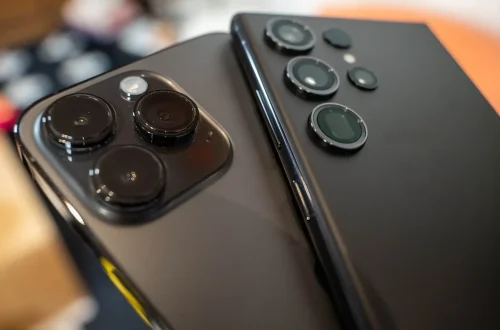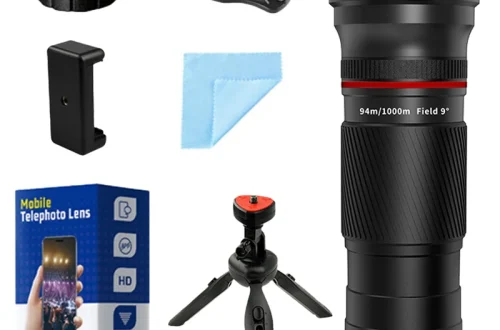
SnapRoamer.com – Smartphone zoom lenses come in two forms: built-in periscope systems that use folded optics for high-quality telephoto reach, and external clip-on accessories that provide additional magnification. While external lenses offer higher raw magnification, they often struggle to replicate the computational stacking and AI-driven sharpness found in modern flagship smartphones.
The global smartphone telephoto lens clip market is valued at $1.27 billion USD in 2024 and is projected to reach $2.74 billion by 2033.
The Computational vs. Optical Conflict
The conflict arises because modern smartphones rely on computational stacking (AI-driven super-resolution) to achieve high zoom levels, whereas external lenses are purely optical. External lenses can actually break these algorithms, resulting in lower sharpness and increased chromatic aberration compared to a phone’s native digital or periscope zoom.
Modern smartphones achieve “100x zoom” via computational stacking. An external lens cannot replicate this. While a user might navigate to the Camera App and select a high magnification level, the software is actually performing complex mathematical interpolations to fill in detail. Nearly all smartphones feature a collection of prime lenses interpolated by digital zoom.
Why AI-driven zoom often beats cheap glass
A counterintuitive reality in mobile photography is that a 10x digital zoom on a flagship device can sometimes produce a cleaner, more usable image than a 10x clip-on lens made of plastic. This happens because the software recognizes the scene and applies sharpening filters that hardware cannot replicate. When using an external lens, the software may misinterpret the optical data, leading to a failure mode where the image appears “muddy” or lacks texture.
The failure of GCam mods with external hardware
Many enthusiasts attempt to use GCam ports to improve their zoom capabilities. However, industry analysts note that GCam mods rarely work with external lenses. These software modifications are highly optimized for native hardware configurations, and they often fail to process the additional optical elements introduced by an external attachment correctly.
- Native digital zoom uses multi-frame integration to reduce noise.
- External hardware introduces physical light refraction errors.
- Computational stacking relies on knowing the exact sensor-to-lens distance, which changes with clip-ons.
Performance Thresholds: When Magnification Becomes Useless
Optical physics and sensor resolution create a limit for magnification. For example, using an 8-24×40 magnification range requires significant light and stability to avoid failing professional standards.
| Magnification Level | Primary Use Case | Image Quality Expectation |
|---|---|---|
| 2x – 5x | Portraits and Street | High (Optical/Native) |
| 10x | Wildlife and Distance | The “Tipping Point” for Stability |
| 36x+ | Extreme Telephoto | Low (Heavy Computational Dependency) |
The 10x mark represents a significant tipping point. In 2020, the industry saw a push toward 10x maximum optical zoom capabilities. Beyond this threshold, most handheld shots suffer from extreme micro-vibrations. While a 36x magnification might look impressive in a product listing, it is rarely “social media usable” without significant tripod support.
Social media usable vs. Professional grade
For social media, a sharp 5x or 10x shot is often sufficient. However, professional-grade work requires the clarity found in native periscope systems. If you are zooming in via an external lens, you must account for the fact that the resolution of your sensor is being spread across a much larger, magnified area, often resulting in a loss of fine detail.
Built-in Periscope vs. External Clip-on Lenses
Built-in periscope systems use ‘folded optics’ to allow telephoto reach without increasing phone thickness, maintaining high image quality through integration. External clip-on lenses provide extra magnification but add optical elements that can degrade edge sharpness and require manual focus patience.
Periscope designs utilize a mirror at the entry point to create a longer optical path within a slim chassis. This allows for telephoto reach without increasing the thickness of the phone. In contrast, external lenses introduce extra optical elements that can increase chromatic aberration and degrade edge sharpness.
| Feature | Built-in Periscope | External Clip-on |
|---|---|---|
| Image Quality | High / Integrated | Variable / Edge Degradation |
| Thickness | Slim / Standard | Increased Bulk |
| Complexity | Automatic / Seamless | Manual / Requires Alignment |
| Software Integration | Full (HDR, Night Mode) | Limited / Potential Conflict |
Wirecutter notes that “any time you put something in front of your camera lens, it degrades the image to some degree.” This is particularly true for external clip-ons that use plastic rather than glass. Glass optics reduce image quality less than plastic lenses, making them the preferred choice for serious mobile photographers.
The Physics of Vignetting and Black Circles
Users of external zoom hardware frequently encounter vignetting, which appears as dark, circular borders around the image.
Vignetting occurs when the light cone from the external lens fails to cover the entire area of the smartphone’s sensor. This optical failure results in edges that are starved of light.
Stability and Gear Requirements for High Magnification
As magnification increases, the margin for error regarding movement decreases. A single millimeter of hand movement can translate to a massive shift in the frame at high zoom levels.
A tripod is strongly recommended for higher-magnification lenses, especially above 10X. If you are attempting to use a lens with an 8-24×40 magnification range, handheld shooting is almost certain to result in motion blur. For those who cannot use a tripod, a gimbal may provide a middle ground, though it cannot entirely eliminate the need for stability at extreme magnifications like 36x.
- Handheld: Only viable for low magnification (under 5x).
- Tripod: Essential for telephoto accuracy and long exposures.
- Gimbal: Useful for video, but mechanical vibrations can still affect high-zoom stills.
Mitigating micro-vibrations
Micro-vibrations are the silent killer of high-zoom photography. Even when using a tripod, the act of pressing the shutter button can shake the camera. To mitigate this, use a remote shutter or the volume button shortcut if your software allows it, and consider using “Night mode” in the Camera App to allow for longer, stabilized exposures.
Maintaining Your Lens and Sensor
The delicate nature of smartphone optics means that improper cleaning can lead to permanent hardware degradation.
Shortcut: To quickly address a blurry lens, open the Camera App, use “Tap to focus” on a subject, and if the image remains soft, check for smudges on the glass.
TechNexa Hub states:
“The first fix is not ‘clean harder.’ It is ‘clean smarter.'”
To maintain your lens properly, use a dry microfiber cloth. Wipe the camera glass gently in small circles. If a film remains, use a dry corner of the cloth to remove it. Only if absolutely necessary should you slightly dampen a corner of the cloth with clean water.
FAQ
Why does my external lens cause black circles in my photos?
This is caused by incorrect alignment between the phone’s camera sensor and the external lens, or a lens diameter that is too small for the sensor size, leading to vignetting.
Can I use GCam with external zoom lenses?
It is rare. GCam mods are highly optimized for native hardware and often fail to process the additional optical elements of external lenses correctly.
Is glass or plastic better for smartphone lens attachments?
Glass optics are superior as they reduce image quality degradation and chromatic aberration significantly more than plastic lenses.