SnapRoamer.com – To choose the best smartphone camera lens, you must first decide between universal clip-on kits for versatility or dedicated case-mount systems for professional optical precision. Match your lens type—macro, anamorphic, or telephoto—to your specific smartphone sensor (Main, Ultra-wide, or Telephoto) to avoid vignetting and software interference.
The iPhone 17 Pro is projected to feature a 50MP telephoto camera resolution by 2026, changing how external telephoto lenses must interact with high-resolution sensors.
Mastering Sensor Alignment: Avoiding the ‘Black Corner’ Effect
Avoid the ‘black corner’ effect by aligning your external lens with the specific sensor intended for use. On multi-camera phones, mismatching a lens with the Main, Ultra-wide, or Telephoto sensor causes vignetting and a loss of image sharpness.
Identifying your primary sensor
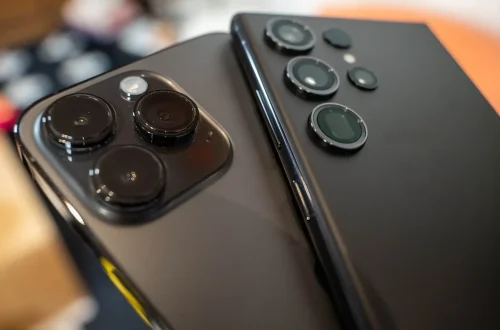
Modern flagship devices utilize multiple optical paths. An iPhone 15 Pro Max, for example, operates with a 13mm equivalent focal length for its wide field of view and a 120mm equivalent focal length for its narrow field of view. If you attach a macro lens intended for the main sensor onto the ultra-wide lens, the resulting image will suffer from severe optical mismatch. Practitioners report that even a 1mm offset can trigger the failure mode where the edges of the frame turn pitch black.
The physics of vignetting on multi-lens arrays
Vignetting occurs when the physical housing of the external lens or the smartphone’s own camera module obstructs the light path reaching the sensor. This is not merely a software issue; it is a geometric reality of light. To ensure alignment, follow these steps:
- Verify the lens diameter against your phone’s specific camera bump dimensions.
- Check if the lens kit specifies compatibility with “Ultra-wide” vs “Main” sensors.
- Use a tripod to ensure the lens sits perfectly perpendicular to the sensor plane.
Digital correction often results in a loss of corner resolution. It is more effective to prevent the shadow than to attempt to brighten it in post-production, as software correction can make the image appear soft and muddy.
The Computational vs. Optical Showdown
External optics provide pure magnification, but smartphone software often utilizes aggressive AI sharpening and digital zoom. These processes can negate the benefits of high-end glass.
Disabling AI sharpening for pure glass optics
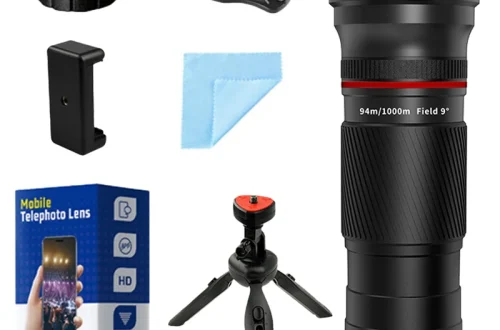
When using a telephoto lens, such as an Apexel 36x magnification attachment, the phone’s internal processing may mistake the optical zoom for digital cropping. This leads to a “watercolor effect” where textures look artificial. To achieve professional results, you must bypass the standard automated processing. On many devices, this involves entering a Pro or manual mode to lock the exposure and focus.
Shortcut: On Xiaomi devices, users can access the Hasselblad Master mode to bypass standard AI processing and gain full manual control over settings.
Using Hasselblad Master Mode on Xiaomi devices
The Google Pixel 10 Pro XL utilizes AI camera features to assist the user, but it aims to help rather than create something fake. For photographers seeking the “pure glass” look, manual control is mandatory. By utilizing specialized modes, you can prevent the sensor from applying heavy-handed noise reduction that often erases the fine detail provided by high-quality external optics.
Choosing Your Mounting System: Clip-on vs. Case-mount
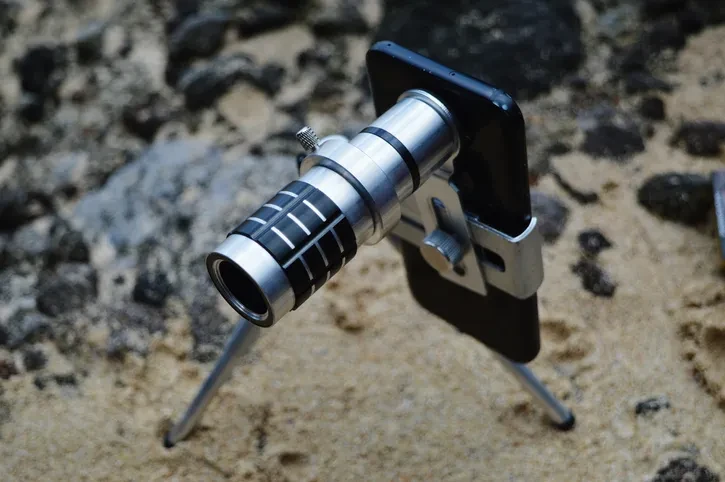
Stability and optical precision depend on the mounting method. Users must choose between the convenience of a universal clip and the rigid alignment provided by a dedicated case.
| Mounting Style | Brand Example | Best For | Stability Risk |
|---|---|---|---|
| Universal Spring Clip | Apexel | Budget hobbyists and versatility | High (prone to slipping) |
| Dedicated Case-mount | Moment | Professional precision and video | Low (highly stable) |
The table above highlights the fundamental divide in the mobile lens market. While Apexel offers a universal spring clip that works across various devices, Moment requires the user to wear a specific Moment-branded case to ensure the lens aligns perfectly with the phone’s camera sensor.
The Apexel advantage: Universal spring clips
Apexel specializes in versatile kits, including microscope attachments with up to 100x magnification. These clips are ideal for users who switch between different smartphones frequently. However, these types of clip-on lenses are prone to slipping out of position and off the phone entirely, which can lead to scratched lenses or dropped hardware.
The Moment ecosystem: Precision through dedicated cases
For those prioritizing optical quality, the Moment ecosystem provides a rigid connection. Because the lens mounts directly to a custom-engineered case, the distance between the lens and the sensor remains constant. This stability is critical for high-end videography, though it limits your ability to use the lens on any phone other than the one with the corresponding case.
The Mobile Cinematography Workflow Progression
mobile photography skill can be developed through a tiered approach, moving from basic composition to advanced anamorphic setups.
Level 1: The Casual Hobbyist (Clip-on kits)
At this stage, users typically utilize budget kits from manufacturers like Criacr or Apexel. These are excellent for experimenting with macro photography or basic wide-angle shots without a significant financial commitment. The focus here is on learning composition rather than technical perfection.
Level 2: The Content Creator (Case-mount systems)
Creators often move toward Moment or ShiftCam systems. This level introduces specialized tools like the Moment 1.33x magnification anamorphic lens. As noted by Wirecutter: “If you’re a budding cineaste or just prefer smartphone photography and are searching for a special look, the Moment Anamorphic 1.33x Mobile Lens lets you get a cinematic, super-wide perspective and cool-looking blue or gold lens flares that set your images apart from the average phone-made fare.”
Level 3: The Mobile Filmmaker (Anamorphic & Rigs)
Professional mobile filmmakers use anamorphic lenses and heavy-duty rigs. This workflow involves:
- Using an anamorphic lens to capture a widescreen aspect ratio.
- Attaching the phone to a cage or gimbal for maximum stability.
- Utilizing external lighting with a high Color Rendering Index (CRI) of 95+ to ensure color accuracy.
Technical Reality Check: Light Loss and Aperture
Adding external glass elements to the optical path can change the effective behavior of your camera. Every lens layer introduced impacts how light reaches the sensor.
Warning: Adding external lenses can decrease your maximum aperture, necessitating higher ISO settings that may increase image noise.
How extra glass layers affect your f-stop
A lens with a maximum aperture of f/1.4 or f/1.8 is considered “fast” because it can pass through more light. When you clip an external lens over your smartphone, you are adding additional glass elements. These elements can absorb or reflect a portion of the incoming light, effectively making your “fast” smartphone sensor behave like a slower one. This is why images shot with external lenses often appear darker than those shot with the naked sensor.
Managing ISO when adding external optics
To compensate for light absorption from external glass, smartphone software may automatically increase the ISO. This increases digital grain. To maintain high image quality, use more ambient light or portable LED lighting with a CRI of 95+ during your shoot.
Troubleshooting Stability and Image Sharpness
Even high-end optics will produce unusable results if the physical connection is unstable. Mobile sensors are extremely sensitive to microscopic movements.
Warning: Handholding a smartphone with a macro lens attached is extremely difficult and often results in blurry images.
Why handholding macro lenses is ‘impossible’
As u/Betorange on Reddit noted: “It’s impossible to handhold a camera phone with a macro lens attached, while staying steady. IMPOSSIBLE!” Macro photography requires an extremely shallow depth of field. Even the slightest tremor from your hand will move the focal plane out of the subject, resulting in a complete loss of sharpness. Using a tripod or a dedicated macro stand is not optional; it is a requirement.
Preventing battery drain from adapter attachments
If you are using vintage lenses via adapters like the FotodioX Pronto, be aware of hardware-related pitfalls. These adapters can sometimes cause a slow drain on the camera battery even when the device is ostensibly off. Additionally, ensure your lens does not exceed the 1.3 lbs weight limit specified for these adapters to avoid damaging the mounting mechanism or the phone’s chassis.
FAQ
Do I need a special case for Moment lenses?
Yes, Moment lenses typically require a specific Moment-branded case to ensure the lens aligns perfectly with the phone’s camera sensor. Without the dedicated case, the lens will not sit correctly over the optical path, leading to severe vignetting.
Can I use vintage lenses on my smartphone?
Yes, using adapters like FotodioX Pronto, you can mount vintage manual focus lenses. However, you must be mindful of weight limits, which can reach up to 1.3 lbs, and be aware that some adapters may cause additional battery drain.
What is an anamorphic lens used for?
Anamorphic lenses, such as the Moment 1.33x, are used to create a cinematic, widescreen perspective. They are highly valued by videographers for producing unique lens flares and a wide-angle field of view that distinguishes mobile footage from standard smartphone video.