SnapRoamer.com – Smartphone cameras have revolutionized photography by putting powerful imaging tools into the hands of millions. Yet beginners often struggle with basic aspects like focus, exposure, and composition that determine photo quality. This tutorial delivers step-by-step guidance on mastering smartphone camera controls to capture sharper, well-exposed, and visually balanced images. It covers essential techniques such as tapping to focus, locking AE/AF, using gridlines for composition, adjusting exposure manually, optimizing natural light, avoiding digital zoom, and leveraging portrait mode and manual camera apps. Practical instructions are paired with expert insights to help beginners improve their smartphone photography skills confidently.
Mastering focus and exposure control is the foundation of great smartphone photography. Tapping on your subject sets the camera’s focus and exposure point, ensuring the image is sharp and properly bright. Holding the tap locks AE (auto exposure) and AF (auto focus), preventing the camera from readjusting mid-shot, which often leads to blurry or poorly lit photos. Natural light is preferred over the smartphone flash, as it preserves colors and detail while minimizing harsh shadows. Applying composition rules like the rule of thirds with gridlines helps produce more balanced and engaging photographs. Avoiding digital zoom by physically moving closer maintains image clarity, while portrait mode and manual camera apps offer advanced options for creative control.
Mastering Focus: Tap and Lock AE/AF
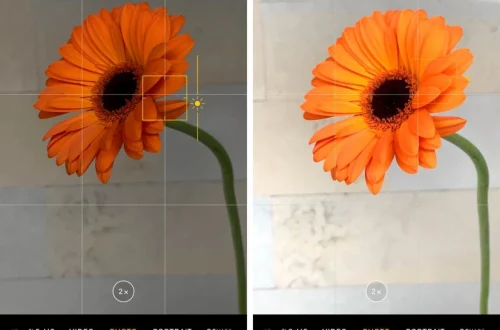
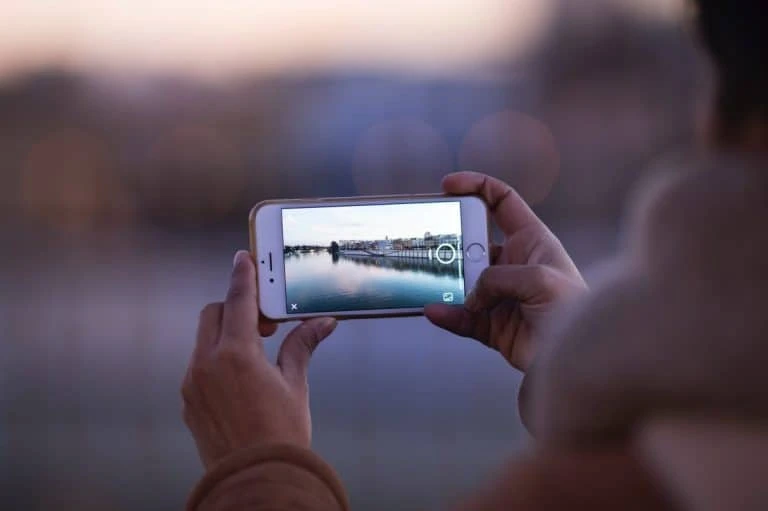
Focus errors and exposure shifts are common reasons for blurry or poorly lit smartphone photos. The simplest and most effective way to achieve sharp focus is to tap the screen on your subject. This action signals the camera to prioritize that area for focusing and exposure calculation. On most smartphones—including iPhones, Android devices, and apps like the Pixel camera app—this tap-to-focus feature is standard.
Locking AE/AF is especially useful when shooting moving subjects or in scenes with inconsistent lighting. Without locking, the camera might refocus or readjust exposure continuously, causing fluctuating brightness and soft focus. For example, when capturing a portrait outdoors with shifting sunlight, locking prevents the camera from overexposing or underexposing the face during the shot.
Common Focus Issues and Solutions
Exposure Adjustment: Brightness Control for Challenging Lighting
After locking focus, you can manually adjust exposure to brighten or darken your photo. Most smartphone cameras allow swiping up or down on the screen near the focus point to change exposure compensation.
This manual control helps balance scenes with mixed lighting, such as a person standing in front of a bright window. Lowering exposure prevents blown-out highlights, while increasing it can reveal details in shadows. In low-light conditions, increasing exposure combined with stable shooting (using a tripod or steady hands) can capture clearer images without excessive noise.
Handling High Contrast Scenes
High contrast scenes challenge smartphone sensors with bright and dark areas. Use exposure adjustment to prioritize important parts of the image. Additionally, consider shooting in RAW format if your camera app supports it, giving more flexibility in post-processing to recover details.
Composition Techniques Using Gridlines and the Rule of Thirds
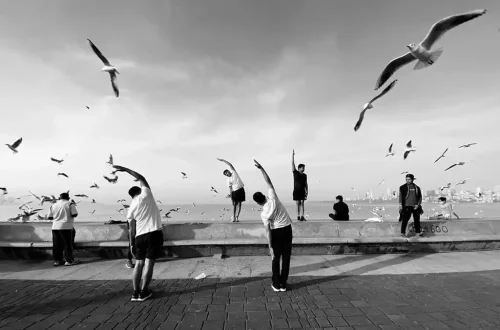
Activating gridlines divides your screen into a 3×3 matrix, providing visual guides to apply the rule of thirds—a foundational composition principle. Positioning key elements along these gridlines or their intersections creates more balanced, natural-looking photos.
The “rule of odds” complements this by suggesting grouping subjects in odd numbers (e.g., three flowers or people) for dynamic compositions. Gridlines also help keep horizons level and frames symmetrical.
Examples of Effective Composition
Lighting Tips: Prioritizing Natural Light Over Flash
Smartphone flashes often produce harsh, unnatural lighting that washes out colors and creates stark shadows. Using available natural light enhances photo quality by preserving true colors and subtle details.
If additional light is needed indoors, supplement with continuous LED lights or reflectors rather than relying on flash. This approach maintains a natural, flattering look.
Tips for Indoor and Outdoor Shooting
Avoiding Common Pitfalls: Digital Zoom and Clutter Removal
Digital zoom reduces image sharpness by cropping and enlarging pixels. Instead of zooming digitally, move physically closer to your subject to maintain high resolution and detail.
Cluttered backgrounds distract from the main subject. Clean your frame before shooting by removing distracting objects or changing angles.
Why Digital Zoom Reduces Quality
Unlike optical zoom, which uses lens adjustments, digital zoom magnifies the image digitally, causing pixelation and loss of detail. This is especially noticeable on larger screens or printed photos.
Utilizing Advanced Features: Portrait Mode and Manual Camera Apps
Portrait mode simulates shallow depth of field by blurring the background (bokeh effect), making subjects stand out with a professional look.
manual camera apps like Camera+, Open Camera (Android), and Adobe Lightroom Camera offer controls beyond default apps:
Step-by-Step for Manual Focus in Camera Apps
Additional Tips: Steady Hands, Editing, and Practice
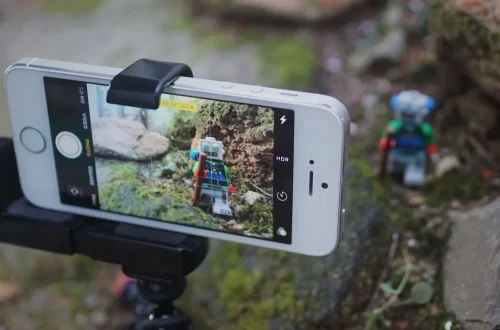
Steadiness is critical for sharp photos, especially in low light or when manually adjusting settings. Use a tripod or stabilize your phone against a fixed surface to avoid motion blur.
Post-processing apps like Adobe Lightroom or Snapseed allow you to enhance colors, adjust exposure, and crop images professionally after capture.
Regular practice is essential for mastering smartphone photography. Experiment with different subjects, lighting, and settings to develop intuition and creativity.
—
| Technique | Description | Best Use Case |
|---|---|---|
| Tap to Focus | Tap screen to set focus and exposure point | All subjects, especially portraits and close-ups |
| AE/AF Lock | Press and hold to lock focus and exposure | Moving subjects or scenes with changing light |
| Manual Exposure Adjustment | Swipe up/down to adjust brightness after focus lock | High contrast scenes, low light |
| Gridlines & Rule of Thirds | Use gridlines for balanced composition | Landscapes, portraits, group shots |
| Portrait Mode | Creates background blur for subject isolation | Portraits, product photography |
—
Troubleshooting Common Smartphone Photography Issues
—
FAQ
How do I lock focus on my smartphone camera?
Tap and hold on your subject in the camera app until an AE/AF lock icon appears. This locks focus and exposure, preventing the camera from readjusting.
Why should I avoid using digital zoom?
Digital zoom enlarges pixels digitally, causing loss of sharpness and detail. Instead, move closer to your subject or use optical zoom if available.
What is the rule of thirds in photography?
It’s a composition guideline dividing the frame into thirds horizontally and vertically, placing key elements along these lines or their intersections to create balanced photos.
When should I use portrait mode on my phone?
Use portrait mode when photographing people or objects you want to isolate from the background with a blurred effect, enhancing subject focus.
Are manual camera apps worth using for beginners?
Yes, manual apps provide greater control over focus, exposure, and ISO, allowing beginners to learn photography fundamentals beyond automatic settings.
—
Mastering these smartphone photography techniques empowers beginners to capture consistently sharp, well-exposed, and artistically composed images. As camera technology and app features evolve, practicing these foundational skills remains essential. Experiment with manual controls, natural lighting, and composition rules to elevate your mobile photography well beyond simple snapshots.
For further expert guidance and detailed tips, see Picfair’s mobile photography tips and Photofocus mobile photography guide.