SnapRoamer.com – To master smartphone street photography, use the AE/AF lock technique by tapping and holding the subject on your screen for two seconds. This prevents the camera from refocusing or readjusting exposure when you frame a new shot, allowing for the rapid, candid captures essential to the genre.
continuous autofocus on many mobile devices can suffer from significant lag and jumping, often failing to cooperate in fast-paced street environments. This instability frequently results in missed moments when a subject moves through a frame faster than the software can calculate depth.
The Computational Conflict: Why Native Apps Fight Your Focus
computational photography, including HDR and Night Mode, can interfere with manual focus locking by attempting to ‘auto-correct’ depth of field or exposure. To maintain control, photographers should use ‘Pro Mode’ on Android or third-party apps like Halide on iOS to bypass AI-driven adjustments that cause focus hunting.
The primary struggle for street photographers lies in the way modern mobile operating systems prioritize image processing over manual intent. While high-end sensors, such as the 1″ sensor found in the Xiaomi 15 Ultra, provide massive data, the software often overrides user settings to achieve a “perfect” look through aggressive AI intervention.
How AI-driven ‘auto-correction’ ruins manual locks
Most native camera applications are programmed to optimize every frame automatically. This creates a counterintuitive problem: the more advanced your phone’s AI becomes, the harder it is to maintain a consistent manual lock. When a photographer attempts to hold a specific exposure, the software may detect a change in lighting and force an adjustment, breaking the intended aesthetic.
The latency gap: iOS vs. Android touch response
The speed at which a device registers a “tap and hold” command can dictate whether a candid shot is successful. Practitioners note that differences in touch latency between iOS and Android can affect how quickly an AE/AF Lock is engaged. If the software response is slow, the subject may have already moved out of the intended focal plane by the time the lock is active.
Mastering AE/AF Lock for Rapid Candid Captures
The AE/AF Lock is the most fundamental tool for bypassing the unpredictability of automated systems. By freezing both the focus and the exposure, you eliminate the variable of the camera “thinking” between shots.
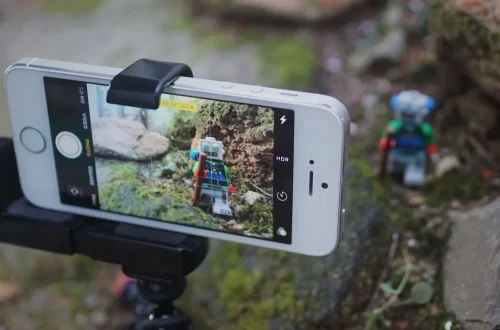
Shortcut: Tap and hold the screen on the subject for a couple of seconds until ‘AE/AF Lock’ appears.
- Step 1: Frame your subject within the composition.
- Step 2: Press and hold your finger on the specific area of interest.
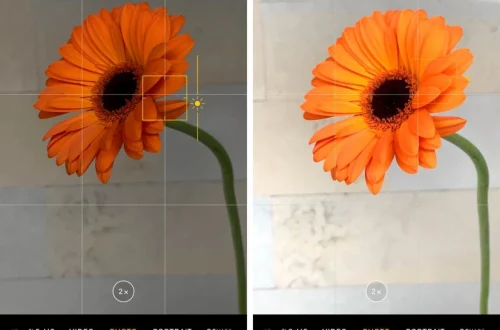
- Step 3: Wait for the visual confirmation (usually a yellow or white box) indicating the lock is active.
- Step 4: Adjust exposure by sliding the brightness bar (sun icon) if necessary while the lock is engaged.
Locking focus allows for multiple photos without resetting focus and exposure. This is particularly useful when a subject is walking toward you; you can lock the focus at a specific distance and simply wait for them to enter that plane, rather than waiting for the camera to re-calculate for every single frame.
Smartphone Zone Focusing: Simulating Depth of Field
Zone focusing on a smartphone involves anticipating where a subject will enter the focal plane. Since smartphones have fixed apertures, you must use the ‘Pro Mode’ to manage exposure and rely on the lens’s natural depth of field, often aiming for distances like 10+ feet to ensure sharpness.
Because smartphones have a fixed aperture, you cannot physically open the lens to f/1.4 or f/2.8 to create bokeh. Instead, you must use distance and focal length to manipulate the perceived depth of field. This technique is a valuable technique, particularly in fast-paced environments where you cannot afford the time for an autofocus cycle.
The Hyperfocal Approximation for Mobile
To use zone focusing effectively, you must understand how distance affects the area of sharpness. While you cannot change the aperture, you can simulate the effects of a deep field of focus by choosing your distance wisely. For a wide shot, aiming for a distance of 10+ feet often provides a sufficient buffer of sharpness for subjects moving within a small range.
| Distance Range | Focus Strategy | Expected Sharpness |
|---|---|---|
| 6 feet | Close-range zone | Narrower; requires precise subject placement |
| 10+ feet | Wide street zone | Deep; ideal for walking subjects |
| 15 feet | Deep background zone | Very deep; minimizes focus errors |
Increasing the distance between the lens and the subject helps create a more forgiving “zone” of sharpness. This is essential when you cannot rely on the camera to find the subject’s eyes automatically.
Using focal length (30-35mm) to predict focus zones
When using a wide lens range of 30–35mm, the depth of field is naturally deeper. If you are working in Pro Mode, you can approximate a deep field of focus similar to an f/8.0 aperture setting on a traditional camera by ensuring your subject is not too close to the lens. This allows you to capture movement without the constant fear of the subject falling into a blur.
Lens-Specific Strategies: Ultra-Wide vs. Telephoto
The lens you select changes the physics of your focus lock. A common misconception is that all lenses on a smartphone behave the same way regarding depth of field, but the magnification level significantly alters the results.
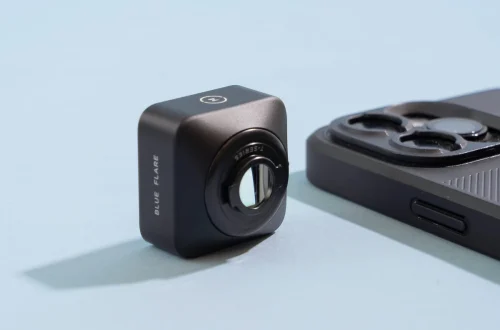
Using a telephoto lens creates the appearance of shallower depth of field. For instance, when using the 2x magnification standard for iPhone, the background will appear more compressed and blurred compared to the 1x magnification standard. This can be useful for isolating a subject, but it makes zone focusing much harder because the “zone” of sharpness becomes much thinner.
Conversely, the ultra-wide lens offers a much more forgiving environment for street photography. Because the depth of field is deeper, you can use zone focusing more aggressively, knowing that a subject moving within a few feet of your target distance will likely remain sharp.
Low-Light Troubleshooting and Stealth Tactics
Night street photography presents unique challenges. According to Street Hunters, if you use autofocus, the camera often fails to cooperate because it cannot “see” enough contrast to perform a precise Auto Focus.
In dark environments, the autofocus sensor struggles to find edges, leading to “hunting.” To combat this, switch to manual focus or focus on a bright light source, such as a street lamp, before the subject enters the frame. Additionally, be mindful of your screen brightness; a glowing screen acts like a flashlight on your face, making stealthy photography nearly impossible.
FAQ
Why does my smartphone keep refocusing on the background?
This happens because the smartphone’s autofocus is scanning a wide area and selects the most prominent object. Use AE/AF Lock by tapping and holding the subject to prevent this.
Can I use zone focusing with a smartphone?
Yes, by using Pro Mode to control exposure and anticipating subject distance. While you can’t change aperture, you can use distance and focal length to manage the depth of field.
Is it better to use the native camera app or a third-party app?
Third-party apps like Halide or ProCam are often better for street photography because they allow you to bypass computational AI that causes focus hunting and lag.