SnapRoamer.com – Leading lines in smartphone photography serve as powerful compositional tools that guide the viewer’s eye through an image, enhancing depth and emphasizing the main subject. Effectively integrating leading lines requires understanding their types, how to identify them in everyday scenes, and applying precise camera settings alongside thoughtful editing. This tutorial provides a detailed, step-by-step guide for smartphone photographers seeking to master leading lines and elevate their photographic storytelling with practical techniques, camera adjustments, and post-processing tips.
1. Understanding Leading Lines and Their Role in Smartphone Photography
Leading lines are visual elements such as roads, fences, railways, rivers, or architectural features that naturally direct the viewer’s gaze toward a focal point within a photo. In smartphone photography, where sensor size and lens options are limited compared to DSLR cameras, using leading lines becomes crucial for adding depth and structure to images. These lines create pathways in compositions, enhancing spatial perception and visual interest, and are foundational to visual storytelling.
Leading lines can take multiple forms: diagonal, converging, curved, horizontal, or vertical. Each type influences the mood and flow differently. For example, converging lines create a sense of depth and focus, while curved lines can add a dynamic, organic feel. Recognizing these distinctions enables photographers to choose the most effective line type to complement their subject and scene.
2. Identifying Leading Lines in Natural and Urban Environments
Smartphone photographers should cultivate the habit of spotting potential leading lines in both natural and man-made settings. Common natural leading lines include rivers, tree branches, shorelines, and shadows, while man-made lines often come from roads, fences, railway tracks, sidewalks, and architectural elements like columns or staircases.
To identify leading lines effectively:
For example, a river bending toward a mountain peak or a fence leading into a sunset can serve as strong visual guides that enrich your photo’s narrative.
3. Composing with Leading Lines: Step-by-Step Techniques
Leveraging leading lines requires deliberate composition strategies, including grid overlays and rule of thirds alignment, to maximize their impact.
Activating the Grid Overlay
Most smartphone cameras offer a grid option that divides the frame into thirds both vertically and horizontally. Activating this helps align leading lines and key elements with rule of thirds intersections, producing balanced, harmonious compositions.
Positioning Leading Lines Using Rule of Thirds
Exploring Types of Leading Lines
Adjusting Angles and Perspectives
Experiment with different shooting angles to emphasize leading lines:
Changing perspectives can transform ordinary scenes into compelling compositions by controlling how leading lines interact with other elements.
4. Optimizing Smartphone Camera Settings for Leading Lines
While smartphone cameras have limited manual controls compared to DSLRs, understanding and manipulating aperture, shutter speed, and focus can enhance leading lines’ effectiveness.
Aperture and depth of field
Though most smartphones have fixed apertures, some advanced models allow aperture adjustment or simulate it through computational photography:
Shutter Speed for Dynamic Lines
Shutter speed affects how motion is captured:
Focus and Exposure
5. Creative Applications and Rule-Breaking with Leading Lines
Beyond strict compositional rules, creative use of leading lines can produce striking effects:
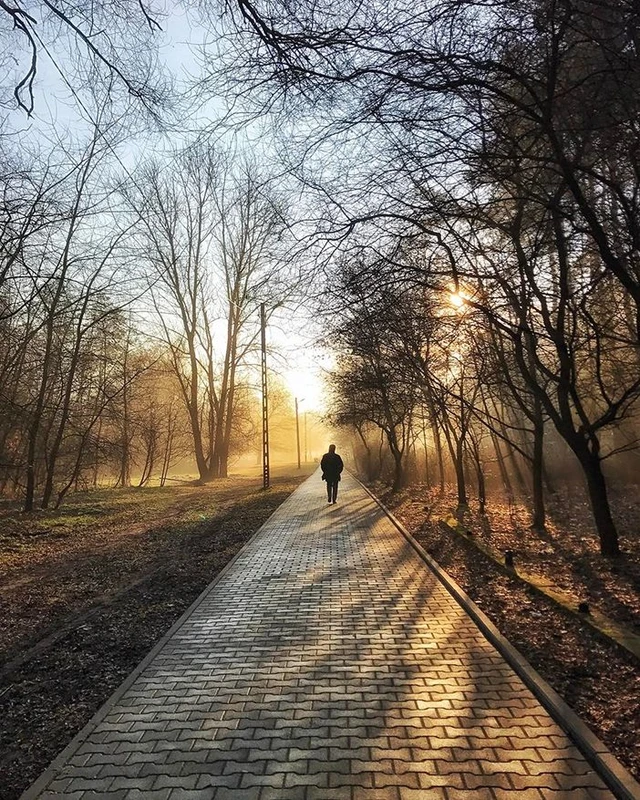
For example, a straight road centered in the frame with symmetrical trees on both sides can produce a dramatic, balanced image that commands attention.
6. Post-Processing Techniques to Enhance Leading Lines
Editing smartphone photos can further emphasize leading lines through adjustments in color, contrast, and sharpness.
Recommended Apps
Editing Steps
These edits help reinforce the visual pathways created by leading lines without overwhelming the natural composition.
7. Troubleshooting Common Challenges with Leading Lines in Smartphone Photography

Despite their benefits, leading lines can present challenges:
Addressing these issues ensures leading lines enhance rather than detract from your images.
FAQ
What are leading lines in photography?
Leading lines are compositional elements that guide the viewer’s gaze through an image toward the main subject, adding depth and visual interest.
How do I activate the grid on my smartphone camera?
Grid activation varies by device but is commonly found in the camera app’s settings under “Grid” or “Composition Grid.” Enabling it overlays a rule of thirds grid to assist composition.
Can I use leading lines in low-light smartphone photography?
Yes, but use a tripod or steady surface for longer exposures and manually adjust focus and exposure to retain sharpness and detail along the lines.
Which photo editing apps best enhance leading lines?
VSCO, Snapseed, and Lightroom Mobile offer tools to adjust contrast, saturation, sharpness, and perspective, effectively highlighting leading lines.
Are there situations where breaking the rule of thirds with leading lines is beneficial?
Yes, centering leading lines can create strong symmetry and dramatic impact, especially in architectural or minimalist compositions.
Leading lines remain essential in mastering smartphone photography composition. By training your eye to identify natural and man-made lines, composing with grids and rule of thirds, optimizing camera settings, and applying thoughtful editing, you can produce compelling images that guide viewers seamlessly through your visual story. Experimentation with angles, perspectives, and creative rule-breaking further expands your photographic repertoire, turning simple scenes into captivating artworks.
For additional insights on composition and smartphone photography techniques, consider visiting Mobiography’s guide to leading lines and the iPhone Photography School’s tutorial on leading lines.