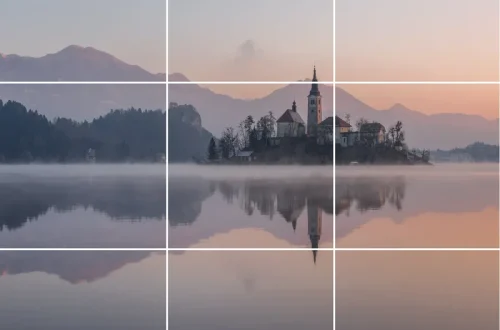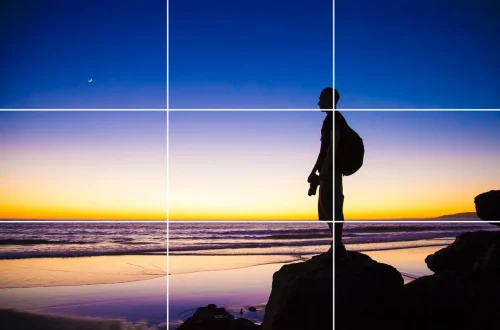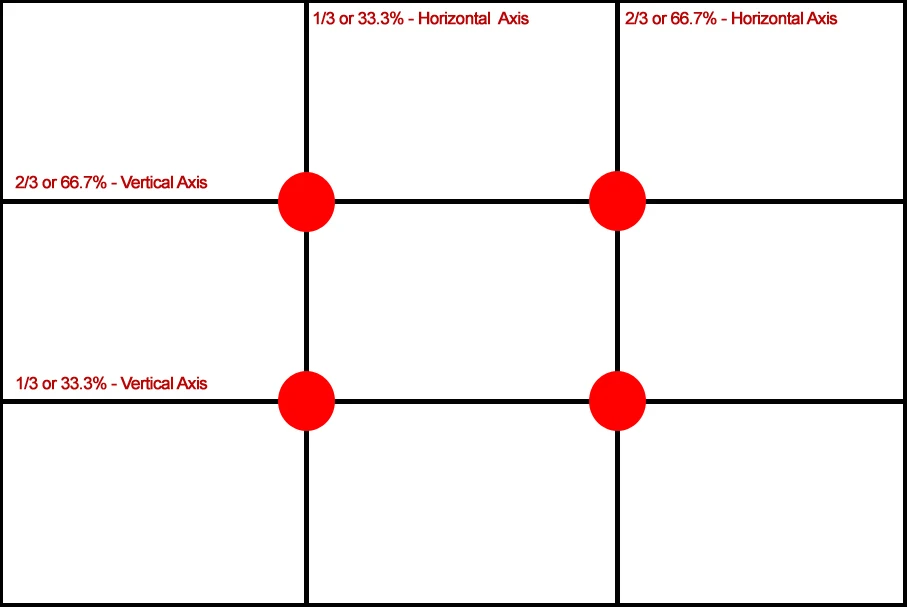
SnapRoamer.com – The rule of thirds is a compositional guideline that involves dividing your frame into a 3×3 grid of nine equal parts using two horizontal and two vertical lines. By placing your subject or key elements along these lines or at their four intersection points, you create more balanced, engaging, and natural-looking photographs. The rule of thirds is independent of the aspect ratio of an image, meaning the principle remains valid whether you are shooting a wide landscape or a vertical portrait.
Mastering the Grid: Mobile vs. DSLR Setup
To use the rule of thirds on a mobile device, go to your camera settings and toggle ‘Grid’ to ON for both iOS and Android. For DSLRs, enable the grid overlay in the viewfinder or LCD settings. Once active, use ‘tap-to-focus’ on mobile to align your subject with one of the four intersection points.
Enabling Grids on iPhone and Android
Modern smartphones provide built-in assistance to ensure your composition adheres to the 3×3 grid structure. On iOS devices, navigate to Settings > Camera and toggle the Grid switch to the green position. Android users typically find this option within the Camera app settings under a “Composition lines” or “Grid lines” menu. Using these lines allows for immediate visual feedback. It is a common mistake to assume the center of the screen is the primary area of interest; instead, aim for the 4 intersection points to increase visual tension.
DSLR Viewfinder Configuration
Professional cameras offer more granular control over how these lines appear during capture. Depending on your manufacturer, you may need to access the Custom Setting Menu to enable the grid overlay on the LCD or within the optical viewfinder. If the grid is not visible, check the Display settings to ensure “Grid Overlay” is active. While the grid is a helpful guide, some photographers find that relying too heavily on it can lead to repetitive, uninspired imagery if the subject is always placed in the exact same spot.
The 3-Step Composition Workflow
To achieve balance and harmony in your photos, follow this sequential process:
- Identify the scene: Look at the entire environment to determine what the primary and secondary elements are.
- Choose your subject: Select the specific point of interest that will command the viewer’s attention.
- Align with the grid: Move your camera or reposition yourself so the subject sits on a line or at one of the 4 intersection points.
A common failure mode occurs when a photographer identifies a subject but fails to account for the direction of movement. For example, if a person is walking toward the right side of the frame, placing them on the right-most vertical line will leave them looking “out” of the frame. Instead, place them on the left-most vertical line to provide space for their movement. This creates a sense of directionality that guides the viewer’s eye through the 9 equal parts of the frame.
Applying Techniques to Different Genres
Photographers can apply the 3×3 grid across various styles to guide the viewer’s gaze.
Landscape: Strategic Horizon Placement
In landscape photography, the horizon is a critical element. Beginners often place the horizon right in the middle of the frame, which tends to cut the picture in half and look boring since nothing has emphasis. To avoid this, use the horizontal gridlines. If the sky is the most dramatic part of your scene, place the horizon on the lower third line. Conversely, if the foreground detail is the star, place the horizon on the upper third line.
Portraiture: The Eye-Line Rule
When capturing people, the eyes serve as the emotional anchor of the image. Carli Davidson suggests that you should choose where you want your point of focus to exist before shooting, noting that she focuses on the eyes. To apply the rule of thirds here, align the subject’s eyes with the upper horizontal gridline. This placement feels more natural and establishes a stronger connection between the subject and the viewer. Avoid placing the eyes in the dead center of the frame, as this can create a static, “mugshot” appearance.
Street & Action: Using Negative Space
Street photography often requires capturing movement within a chaotic environment. Use negative space to give your subject “breathing room.” By placing your subject on one of the vertical lines, you create an open area on the opposite side of the frame. This technique prevents the composition from feeling cramped and allows the viewer to process the subject’s context. Integrating leading lines—such as a sidewalk or a building edge—that point toward a subject on a grid intersection can further enhance the flow of the image.
Troubleshooting: 5 Common Composition Mistakes
Avoid these specific pitfalls to maintain visual impact:
- Centering the subject: Placing the main subject in the middle often results in a lack of dynamic energy.
- Centering the horizon: This splits the image into two equal halves, often neutralizing the impact of both sky and land.
- Blindly following the rule: Applying the grid to a subject that naturally demands center-weighted attention can feel forced.
- Conflicting elements: Sometimes, placing one element on a third line causes another important element to fall into an awkward, non-conforming position.
- Awkward limb cropping: When using the grid to align a body, ensure you aren’t cutting off joints (like ankles or wrists) at the grid lines, which can look unnatural.
Fixing Composition in Post-Production
If you missed the perfect alignment during the shoot, you can often rectify the composition during the editing phase. To fix composition in post, use the Crop tool in Lightroom or Photoshop. In Lightroom, press ‘R’ to open the crop function and cycle through overlays with ‘O’ to find the rule of thirds grid. This allows you to reposition subjects onto intersection points without needing to re-shoot.
In Adobe Photoshop, the process is similarly straightforward. You can select the ‘Crop’ tool and then click the Overlay dropdown in the top options bar to choose the Rule of Thirds grid. This is particularly useful for correcting a slightly tilted horizon or shifting a subject to create better balance.
Shortcut: In Lightroom, press R to activate the Crop tool and O to cycle through different grid overlays.
| Feature | Rule of Thirds | Golden Ratio |
|---|---|---|
| Mathematical Basis | 3×3 Grid (Simple) | Fibonacci Spiral (Complex) |
| Visual Effect | Balanced and engaging | Organic and highly natural |
| Ease of Use | High (Beginner friendly) | Moderate (Requires practice) |
| Precision | Standardized divisions | Mathematical perfection (1:1.6) |
The comparison above highlights how the rule of thirds provides a simple 3×3 grid, while the Golden Ratio utilizes a more complex 1:1.6 proportion.
From Rule of Thirds to the Golden Ratio
As you advance in your photography, you may encounter the Golden Ratio, sometimes referred to as the Golden Mean. This concept is based on the mathematical constant 1.61803398875. While the rule of thirds uses a simple 1:1 ratio for its grid divisions, the Golden Ratio follows a more complex proportion of approximately 1:1.6.
Some photographers consider the Golden Ratio to be a more complex and natural counterpart to the Rule of Thirds because it mimics patterns found in nature. However, the rule of thirds remains the most practical starting point for most photographers due to its ease of implementation in both mobile apps and professional software. Transitioning from the grid to the spiral is a natural progression for those looking to add a deeper sense of mathematical harmony to their work.
FAQ
Is the rule of thirds a strict rule?
No, as Shawn Ingersoll notes, it is a guideline or best practice rather than a strict rule that must be followed in every single photo. It serves as a valuable tool to help you avoid boring, centered compositions.
Why shouldn’t I put my subject in the center?
Centering subjects can often feel unbalanced or boring. Using the rule of thirds creates more engagement as viewers spend more time examining off-center compositions, which helps pull the eye through the entire frame.
How do I use the rule of thirds for portraits?
For portraits, aim to align the subject’s eyes with the upper horizontal gridline to create a more natural connection with the viewer. This ensures the most important part of the face is positioned at a high-interest intersection point.