SnapRoamer.com – Smartphone photography focus modes are essential tools that enhance image sharpness and creative control by adapting the camera’s focus behavior to different shooting scenarios. These modes primarily include Single-Point focus, ideal for stationary subjects; Continuous focus, designed for tracking moving subjects; and Auto focus, which intelligently switches between the two based on subject movement. Additionally, Portrait mode leverages software and lens capabilities to create a shallow depth of field effect, blurring backgrounds while keeping subjects sharp. Modern smartphones incorporate advanced autofocus algorithms such as contrast detection and phase detection, supported by hardware components like voice coil motors (VCM) to precisely adjust lens position. Features like tap-to-focus and focus lock further empower users to control focal points in complex scenes, enhancing composition and clarity.
Understanding these focus modes and their underlying technologies is critical for photographers seeking to maximize smartphone camera performance. Each mode offers distinct advantages depending on the subject and shooting conditions, while manual focus options provide granular control for creative experimentation. This article delves into the technical principles behind smartphone focus modes, explores practical usage scenarios, and examines emerging trends shaping autofocus technology in mobile photography.
Detailed Explanation of Smartphone Focus Modes
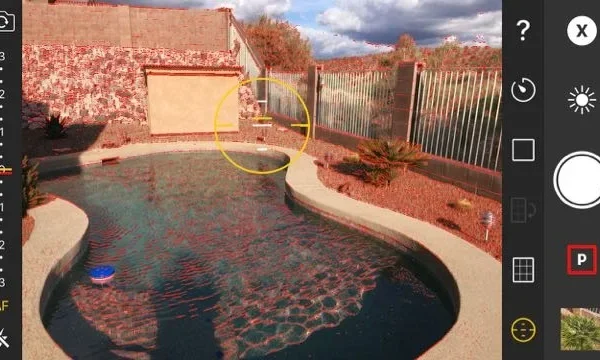
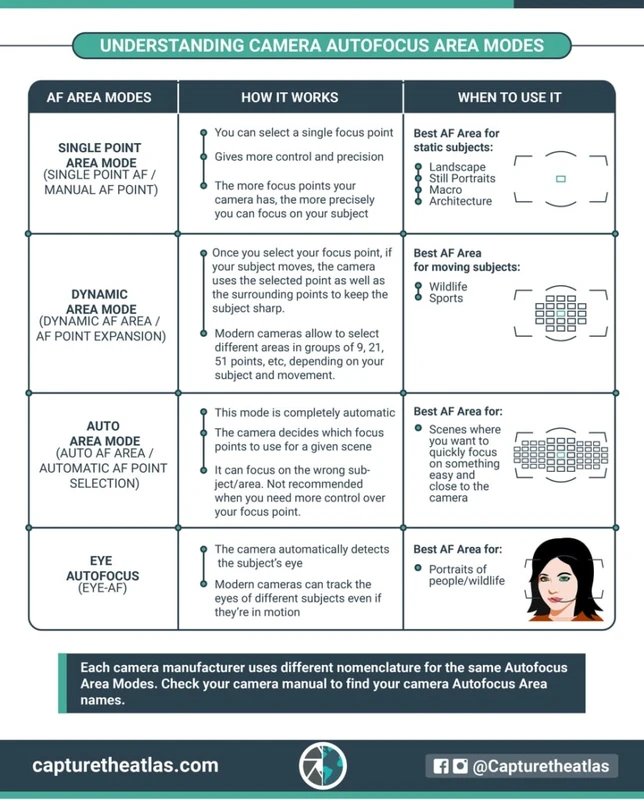
Single-Point focus is a fundamental autofocus mode where the camera locks focus on a user-selected point within the frame. This mode suits stationary subjects such as landscapes, still objects, or posed portraits, where precise control over the focal plane is desired. Activation typically involves tapping a specific area on the screen, prompting the autofocus system to prioritize that point. Single-Point focus minimizes focus hunting by restricting the autofocus area, resulting in sharper images when the subject remains static.
Continuous focus mode, often labeled as AF-C or Continuous AF, continuously adjusts the lens to maintain focus on moving subjects. This mode excels in dynamic scenarios such as sports, wildlife, or children in motion. Smartphones implement continuous focus by combining real-time focus tracking algorithms with rapid lens adjustments, enabling the camera to predict subject movement and preemptively refocus. Continuous focus often leverages phase detection autofocus (PDAF) sensors for faster and more accurate tracking, compared to contrast-detection systems.
Auto focus mode integrates the capabilities of Single-Point and Continuous focus by automatically detecting subject movement and switching between static and dynamic focus algorithms. This hybrid approach optimizes image sharpness across diverse conditions without requiring manual mode changes. Smartphones equipped with AI-driven autofocus algorithms analyze scene elements such as motion vectors, face detection, and depth information to determine the optimal focus strategy in real-time.
Portrait Mode and Background Blur Effects
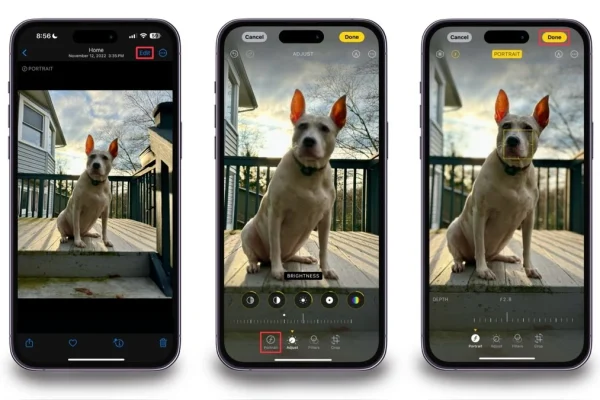
portrait mode is a specialized camera setting designed to replicate the shallow depth-of-field effect traditionally achieved with DSLR cameras and wide-aperture lenses. It isolates the subject by keeping it sharply focused while rendering the background with a smooth blur, commonly referred to as bokeh. This effect emphasizes the subject and enhances image aesthetics, especially for portraits, close-ups, and artistic shots.
Smartphone manufacturers employ a combination of hardware and software techniques to create this effect. Brands like Apple use dual or triple camera arrays along with depth sensors to generate accurate depth maps. Samsung’s Live Focus and Google Pixel’s Selective Focus modes allow users to adjust the blur intensity post-capture, offering creative flexibility. These modes apply computational photography algorithms that segment the subject from the background, then selectively blur the latter without compromising edge sharpness.
The blur effect in portrait mode depends on accurate focus detection on the subject’s face or eyes, enabled by autofocus technologies such as face detection and eye tracking. This ensures that the focal plane remains sharp even when the subject moves slightly. The ability to fine-tune blur after shooting adds another layer of user control, allowing photographers to balance subject emphasis with background context.
Manual Focus Techniques on Smartphones
While autofocus modes are convenient, manual focus provides photographers with precise control over focus distance and creative outcomes. Tap-to-focus is the most basic manual control, where the user selects a focus point by tapping on the screen. This action commands the autofocus system to prioritize that area but does not prevent refocusing if the camera detects new subjects.
Focus lock extends this by allowing users to lock the focus at a chosen distance, preventing the camera from adjusting focus despite changes in the scene or subject movement. This is useful in scenarios requiring consistent focus, such as macro photography or shooting through obstacles.
Advanced manual focus techniques include the use of focus peaking, a feature available in select camera apps and flagship smartphones. Focus peaking highlights in-focus edges in real-time using colored outlines, assisting users in achieving sharp focus without relying on autofocus. Some smartphones provide manual focus sliders or ring controls within the camera app, enabling precise adjustments by distance measurement.
Third-party apps enhance manual focus capabilities by offering granular control over focus parameters, exposure, and zoom. These apps often support RAW capture, allowing post-processing flexibility. Device-specific implementations vary; for instance, Huawei’s Pro mode and Sony Xperia’s manual focus features integrate focus peaking with tactile controls for professional-grade shooting.
Autofocus Technologies Underpinning Smartphone Focus Modes
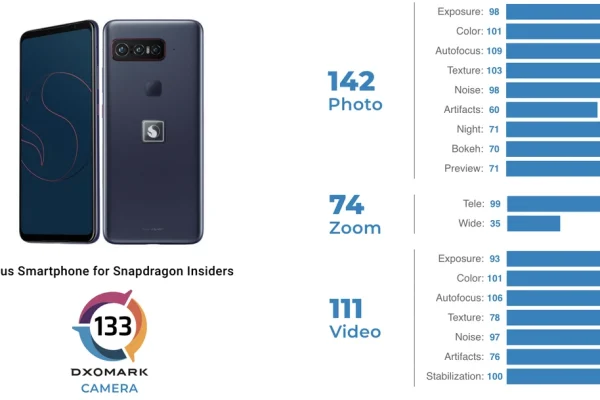
Smartphone autofocus systems primarily rely on two technologies: contrast detection and phase detection autofocus. Contrast detection measures image contrast at various focus distances and selects the position with maximum sharpness. It is accurate but slower, as it requires searching through focus positions to find the peak contrast.
Phase detection autofocus (PDAF) uses dedicated sensors to split incoming light into two beams and compare their phase difference. This provides instantaneous focus distance data, enabling faster and more accurate focus, especially for moving subjects. Many modern smartphones combine PDAF with contrast detection in hybrid autofocus systems to leverage the strengths of both.
Lens movement is actuated by voice coil motors (VCM), which offer precise and silent adjustments. VCM technology enables rapid response to autofocus commands, critical for continuous focus and zero shutter lag (ZSL) performance. ZSL allows the camera to capture an image immediately after the shutter button is pressed without waiting for focus confirmation, enhancing the likelihood of crisp photos in fast-paced environments.
Continuous focusing presents unique challenges, requiring algorithms that predict subject motion and compensate for lens inertia. AI-powered autofocus systems analyze multiple frames, depth data, and subject trajectories to maintain focus accuracy, supporting features such as face tracking and eye autofocus.
Practical Tips for Using Smartphone Focus Modes Effectively
Selecting the appropriate focus mode depends on subject characteristics and shooting context. For static subjects like landscapes or posed portraits, Single-Point focus ensures maximum sharpness by locking onto a precise area. Continuous focus is preferable for active scenes, such as sports events or moving pets, where tracking maintains subject clarity.
Combining focus modes with exposure adjustments enhances image quality. For example, pairing Continuous focus with higher shutter speeds freezes motion, while adjusting ISO and aperture settings controls noise and depth of field. Tap-to-focus combined with focus lock helps maintain focal consistency in complex scenes with multiple potential subjects.
Avoiding common autofocus pitfalls involves understanding limitations of the autofocus system. Low-contrast or low-light environments can cause focus hunting or misfocusing. In such cases, manual focus or enabling focus assist features like focus peaking can improve results. Users should also be aware of autofocus delays in smartphones with slower hardware and consider using burst mode to increase the chance of capturing sharp images.
Future Trends in Smartphone Autofocus Technology
Emerging autofocus technologies integrate artificial intelligence and machine learning to enhance focus speed, accuracy, and adaptability. AI-driven autofocus algorithms analyze scene semantics, predict subject movement, and optimize focus strategies dynamically. This reduces user intervention while improving image sharpness.
Future smartphones are expected to incorporate more sophisticated depth sensing, including LiDAR and time-of-flight sensors, to improve focus precision and portrait effects. Improvements in computational photography will enable real-time focus stacking and enhanced low-light autofocus performance.
Advancements in hardware, such as faster and quieter voice coil motors and improved sensor designs, will support continuous autofocus in increasingly challenging conditions. Enhanced eye-tracking autofocus and subject recognition features will further personalize focus control, catering to diverse photography styles.
For detailed insights on autofocus modes and their technical underpinnings, refer to Great Big Photography World’s guide to autofocus modes and Master Your Photography’s blog on focus modes.
Frequently Asked Questions About Smartphone Focus Modes
What is the difference between Single-Point focus and Continuous focus on smartphones?
Single-Point focus locks the lens on a specific area selected by the user, ideal for stationary subjects, while Continuous focus continuously adjusts to keep moving subjects sharp by tracking their movement.
How does Portrait mode create the background blur effect on smartphones?
Portrait mode combines hardware depth sensors and software segmentation algorithms to isolate the subject and apply a blur effect to the background, mimicking shallow depth of field traditionally achieved with large-aperture lenses.
Can I manually control focus on my smartphone camera?
Yes, many smartphones support manual focus features such as tap-to-focus, focus lock, and advanced options like focus peaking and manual distance adjustment through built-in or third-party camera apps.
What autofocus technology do smartphones typically use?
Smartphones commonly use contrast detection autofocus for accuracy and phase detection autofocus for speed, often combined in hybrid autofocus systems to optimize performance.
How can I improve autofocus performance in low-light conditions?
Using manual focus or focus assist features helps overcome autofocus challenges in low light. Additionally, increasing ambient light or using smartphones with advanced sensors like LiDAR can enhance autofocus reliability.
—
The evolution of smartphone focus modes continues to empower photographers with greater precision and creative potential. As autofocus technologies integrate AI and improved hardware, users can expect sharper images and more intuitive control in diverse shooting environments. Mastery of focus modes not only improves technical outcomes but also opens new avenues for artistic expression in mobile photography.