SnapRoamer.com – The best smartphone macro photography setups range from simple $30 clip-on kits like the Xenvo Pro for casual use, to professional-grade mobile rigs using SmallRig kits and Oben focusing rails for 1:1 magnification. Success depends on combining high-end sensors (like the Xiaomi 15 Ultra) with stable lighting and precision focus control.
“Macro photography reveals a level of detail that often goes unnoticed, but building a capable setup can quickly become costly once specialized lenses, lighting, and precision support gear are involved,” according to PetaPixel.
The Physics of Phone Macro: Why Telephoto Beats Ultrawide
Smartphone macro quality is often dictated by lens choice. While most phones use the ultra-wide lens for close-ups, high-end models like the Xiaomi 15 Ultra and Vivo X200 Pro utilize periscope telephoto lenses. This telephoto approach provides superior results by offering better magnification and image quality compared to the standard ultra-wide macro mode.
The sensor-switching quality jump
Many users assume that using a dedicated “macro mode” is the optimal way to capture tiny subjects. However, industry analysts note a significant quality gap when devices switch to ultra-wide lenses for close-up tasks. While the ultra-wide lens allows for a shorter minimum focus distance, it often suffers from lower resolution and significant edge distortion compared to the primary sensor. In contrast, high-end Android models like the Xiaomi 15 Ultra utilize advanced periscope telephoto lenses to achieve macro results. This approach leverages the superior optics of the telephoto system, providing a much cleaner image than a standard ultra-wide lens.
Magnification vs. Resolution trade-offs
A common misconception is that the closest focus distance always equals the best macro shot. In many cases, you’ll get better results using the main lens and cropping in, rather than using a lower-resolution lens that happens to focus more closely.
Mobile Focus Stacking: A Workflow for Extreme Detail
To overcome the limited depth of field inherent in macro photography, use focus stacking. This technique involves capturing multiple images at different focus points and merging them to create a single sharp photo.
Macro photography inherently suffers from a very thin plane of focus. To achieve sharpness from the front of a subject to the back, practitioners utilize Focus Stacking. This technique requires several specific steps:
- Set the smartphone to Pro Mode to ensure consistent exposure across all shots.
- Utilize Focus Bracketing if the device supports this automatic feature to capture a sequence of images at incremental focus distances.
- Use Manual Focus Control by sliding the focus distance slider to move through the subject’s depth.
- Capture the images using a stable tripod to prevent any unintended movement.
- Merge the resulting files in post-processing software to create a single, high-depth-of-field image.
Automatic vs. Manual Stacking
Efficiency varies depending on the chosen method. Focus Bracketing is an automatic feature that can save time and ensure consistency. Conversely, manual stacking requires the user to manually adjust the focus distance for every frame. While manual control offers more precision, it is significantly slower.
The Golden Rule: Avoiding Angle Shifts
Precision is the most critical factor during the capture phase. A major failure mode occurs when the user accidentally changes the angle of the camera between shots. According to wildmacro.de, changing the angle is the most critical error because it makes the alignment and merging of the photos nearly impossible. Even a slight tilt will cause the software to fail when attempting to stitch the images into a single sharp file.
Tiered Setup Recommendations: From Casual to Pro
Equipment selection depends on whether the user requires 1:1 magnification or simple close-up capabilities.
| Setup Type | Key Product | Estimated Cost | Best For |
|---|---|---|---|
| Budget Clip-on | Xenvo Pro Lens Kit | $39.00 | Casual hobbyists |
| Budget Clip-on | APEXEL Professional Macro | $135 | Serious enthusiasts |
| Mid-Range | ProGrip LensUltra Macro | $90 | Content creators |
| Professional | SmallRig All-in-One Video Kit | $135 | Mobile filmmakers |
| Professional | Oben Macro Focusing Rail | $90 | 1:1 magnification specialists |
The selection process involves balancing portability against the level of magnification required. For those seeking 1:1 magnification, specialized rails and high-end kits are necessary.
Budget Clip-on Kits
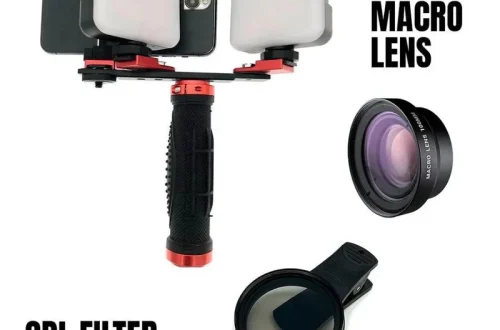
For casual users, the Xenvo Pro Lens Kit, priced at $39.00, offers a simple way to add macro capabilities. For more serious enthusiasts, the APEXEL Professional Macro Photography Lens provides higher quality optics for a higher investment.
Professional Mobile Rigging
Professional setups often move away from simple clip-ons toward dedicated rigs. The SmallRig All-in-One Video Kit is a versatile option for mobile videography and macro work. For extreme precision, using an Oben Macro Focusing Rail allows the user to move the entire camera setup forward or backward in precise increments to facilitate perfect focus stacking.
Lighting Physics: Managing Shadows and Diffusion
Off-camera flash with a diffuser is the most versatile macro lighting setup because it can freeze subject movement, support apertures between f/8 and f/13 and produce softer shadows than direct built-in flash.
To manage technical challenges, macro photographers should consider these methods:
- Use an off-camera flash to control the direction of light.
- Apply Diffusion to place a translucent material between the light source and subject to soften highlights.
- Utilize Continuous LED lighting for stationary subjects, as it is easier to preview and works well for focus stacking and macro video.
Why Diffusers are Mandatory
Direct light at high magnification creates harsh, distracting shadows and “hot spots” on reflective surfaces. Using a translucent material to spread light evenly is essential to prevent high contrast from ruining fine details.
LED vs. Flash for Focus Stacking
When performing focus stacking, continuous LED lighting is often preferred over a flash. Because LED lighting is continuous, it is much easier to preview the exact lighting conditions before capturing the sequence. This helps avoid the failure mode of unexpected shadows appearing halfway through a focus stack.
Troubleshooting Guide: Avoiding Common Macro Failures
“Movement and vibration is your enemy!” warns wildmacro.de.
Warning: Changing the angle during a focus stack is a critical error that will prevent successful image merging.
The Diffraction Trap
Diffraction often blurs macro images taken with very small apertures. To ensure better clarity, use a mid-range aperture such as f/8 to f/13.
Stability and Vibration Management
To ensure sharpness, use a tripod to keep the setup stable at high magnifications. A tripod becomes essential if you want to capture macro images where subjects are sharp from front to back through focus stacking.
Compatibility Matrix: Cases and Clip-on Stability
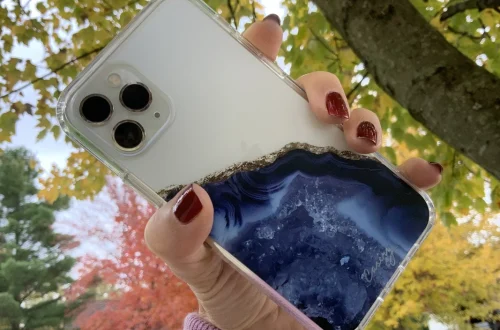
Thick protective cases can prevent clip-on lenses from seating correctly against the phone’s glass, leading to blurry edges or complete focus failure.
The Case Thickness Problem
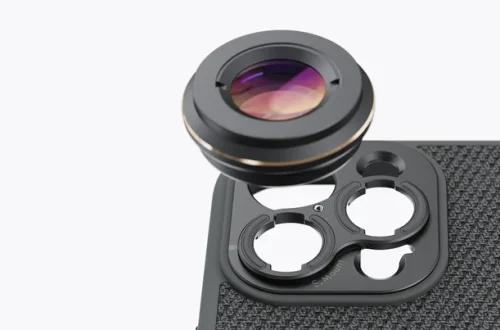
When using clip-on lenses with devices like the iPhone 17 Pro or Google Pixel 10 Pro, the thickness of the case is a deciding factor. If the case is too thick, the macro lens will not align with the primary sensor, resulting in vignetting or off-center images.
Lens Alignment and Centering
Ensure the clip-on lens is perfectly centered over the main camera module. If the lens is offset, the resulting image will suffer from severe distortion.
FAQ
Can I use my phone’s built-in macro mode for professional shots?
While convenient, built-in modes often rely on ultra-wide lenses. For better results, use the main lens and crop, or invest in a dedicated 1:1 macro lens kit.
How do I prevent blurry macro photos?
Use a tripod to eliminate vibration, maintain a shutter speed of at least 1/200s if handheld, and avoid very small apertures that cause diffraction.
What is the best aperture for macro lighting?
An aperture range between f/8 and f/13 is generally recommended to balance depth of field with light requirements and avoid diffraction blur.