SnapRoamer.com – Composition is the backbone of any great photo. By arranging elements to create balance and focus through techniques like the Rule of Thirds, leading lines, and the Rule of Odds, you can transform mobile snapshots into intentional images.
Ansel Adams once said, “A good photograph is knowing where to stand.”
Mastering the Lens: Compositional Strategies for Multi-Camera Smartphones
Effective smartphone composition requires adjusting your technique based on the lens being used. Use the ultra-wide lens for expansive landscapes while being mindful of edge distortion, the standard wide lens (approx. 28mm on iPhone) for natural perspectives, and the telephoto lens to create subject compression and cleaner geometric shapes.
The Wide-Angle Distortion Trap
Modern devices like the iPhone and Google Pixel utilize multiple lenses that dictate how you frame a shot. While an 18mm lens provides a massive field of view, it often introduces edge distortion that can warp the geometry of your composition. Practitioners must avoid placing critical subjects at the extreme edges of an ultra-wide frame to prevent stretching. A common failure mode occurs when a straight architectural line appears curved due to lens physics. To manage this, use the standard wide lens, which approximates a 28mm perspective, to maintain a natural look without the aggressive warping found in wider focal lengths.
Telephoto Compression for Portraits
When moving from a wide angle to a 55mm focal length or higher, the visual relationship between the subject and the background changes. This phenomenon, known as compression, makes the background appear closer to the subject than it actually is. This is highly effective for portraits because it simplifies the background into cleaner geometric shapes. Using a telephoto lens helps isolate a subject from a cluttered environment, providing a more professional aesthetic compared to the flatter look of a wide-angle lens.
| Technique | Primary Benefit | Best Use Case |
|---|---|---|
| Zooming | Magnifies distant subjects | Quickly framing a detail |
| Moving Feet | Maintains perspective and sharpness | Landscape and portrait photography |
| Rule of Thirds | Creates balance and interest | General subject placement |
| Phi Grid | Offers more organic placement | Advanced artistic compositions |
To maintain image quality, move your feet to change your angle instead of using digital zoom, which can cut detail and lower quality on phones.
Fighting the AI: Intentionality vs. Computational Photography
smartphone photography involves managing features like HDR (High Dynamic Range) and Portrait Mode. While HDR balances light and dark areas, it may over-process a scene. Portrait Mode attempts to mimic a shallow depth of field, but it can fail to accurately separate the subject from complex backgrounds, leading to unnatural edges.
Warning: Relying solely on automatic modes can lead to “center-weighting bias,” where the AI forces your subject into the exact middle of the frame, potentially ruining a more artistic, off-center composition.
To maintain control, users should utilize the Tap to Focus feature. Instead of letting the software decide what is important, tap the specific area on your screen to set the focus point. On many Android devices, you can further refine the exposure by holding your finger on the screen until a yellow circle appears, then swiping left or right to adjust the light manually.
Overcoming Center-Weighting Bias
Many smartphone algorithms are programmed to find the most “interesting” part of a scene—usually the center—and focus there. This can result in a static, boring image. By manually selecting a focus point away from the center, you force the composition to follow your specific artistic vision rather than the software’s default logic.
Manual Focus vs. Auto-Framing
While auto-framing is helpful for moving subjects, it can lead to an incorrect focus on background elements rather than the intended subject. Mastering manual focus ensures that your composition remains sharp where it matters most, preventing the common failure of having the background in focus while the subject remains blurry.
Core Frameworks: From Rule of Thirds to the Rule of Odds
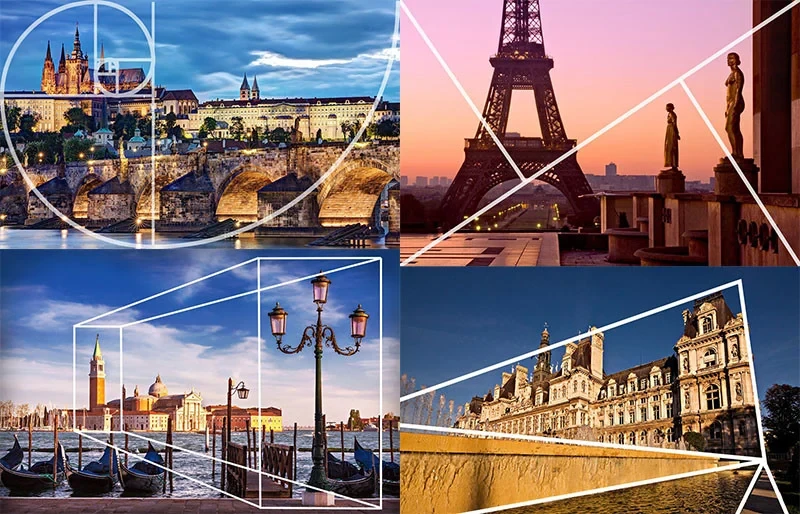
The rule of thirds involves dividing your screen into nine equal sections using a grid and placing subjects at the intersections. Complement this with the Rule of Odds—grouping subjects in sets of three, five, or seven—to create a more natural, visually engaging composition that avoids the static feel of even numbers.
The Geometry of Odds
Visual interest is often higher when subjects are arranged in odd numbers. Whether you are photographing three, five, or seven flowers or arranging a set of three, five, seven, or nine forks in a pattern, an odd-numbered collection avoids the mathematical symmetry that can make an image feel too “perfect” or artificial. This technique breaks up the frame and encourages the eye to move through the image rather than resting on a single, central point.
Using Gridlines in Settings
To implement these frameworks effectively, you must enable the visual guides provided by your hardware. To do this on an iPhone, navigate to iOS Settings → Camera → Grid. For many Android devices, the gridlines can be toggled within the Camera app settings menu. These lines provide the necessary structure to execute the Rule of Thirds with precision.
The Rule of Thirds is a guideline rather than a strict requirement. Ignoring it does not mean a composition is bad or uninteresting.
The Square Format: A Liberation from Gravity
Utilizing a 1:1 aspect ratio can fundamentally change how you perceive a scene. When shooting with a square format, the sense of a “top” and “bottom” becomes less pronounced. As photographer Sally Ann Field notes, “When shooting with a square format, I see the world differently.”
The 1:1 ratio is effective for:
- Highly symmetrical architectural shots.
- Minimalist subjects with significant negative space.
- Close-up textures where the edges are less critical than the central pattern.
The square format is inherently balanced. This symmetry can liberate a photographer from the sense of gravity that often accompanies an unbalanced rectangular frame.
Common Compositional Pitfalls and How to Fix Them
Recognizing common errors is essential for improving mobile photography. Even minor mistakes can disrupt the visual flow of a captured moment.
Critical Warning: Avoid “cutting off limbs at joints.” When framing people, ensure the crop does not end abruptly at the wrists, ankles, or knees, as this creates a jarring visual break.
Common errors include:
- Merging edges: When a subject appears to be “growing” out of a background object, like a pole coming out of a head.
- Tilted horizon: A slanted water surface or horizon line that disrupts the balance.
- Subject dead-centre: Placing the subject exactly in the middle, creating a static and uninteresting image.
- Incorrect focus: When the camera focuses on the background instead of the subject.
The Horizon Fix
A tilted horizon is one of the most common mistakes. If you realize your horizon is slanted after the shot, you can fix it in post-processing. Most modern apps can straighten a photo in approximately 10 seconds using a simple rotation tool. However, the best way to avoid this is to use the gridlines feature during the shoot to ensure the horizon is perfectly level.
Avoiding the ‘Dead Center’ Trap
Placing your subject exactly in the middle can result in a flat, unengaging photo. Instead, use the intersections of your gridlines to place your subject for a more dynamic feel. If your subject is dead-center, use a cropping tool in your photos app to reframe the image and restore balance.
Optimizing the Final Frame: Post-Processing and Lighting
Great photos often require careful light management and editing. Skipping the final step of editing will rarely result in a photo you are truly proud of.
| Editing App | Best For | Key Feature |
|---|---|---|
| Lightroom | Advanced Color Grading | Selective adjustments |
| Snapseed | Quick, precise fixes | Selective tool/Healing |
| VSCO | Film-style aesthetics | Preset filters |
Use tools like Lightroom, Snapseed, or VSCO to refine your composition and color during post-processing.
The Golden Hour Window
Lighting is a fundamental component of composition. The golden hour—occurring during the one hour after sunrise and one hour before sunset—provides soft, warm, and directional light. This light reduces harsh shadows and creates a natural glow that enhances the depth and texture of your subject, making it much easier to create a compelling composition compared to the flat light of midday.
Essential Editing Apps
Once the shot is captured, use tools like Lightroom or Snapseed to refine your work. Cropping is one of the most powerful tools at your disposal; a slight crop can salvage a photo that deserves a second lease on life by fixing a tilted horizon or removing distracting edges. For those seeking a specific “look,” VSCO provides various filters to enhance the mood of your composition without over-processing the image.
FAQ
How do I turn on gridlines on my smartphone?
On iPhone, go to iOS Settings → Camera → Grid. On Android, this is typically found within the Camera app settings menu.
Why should I avoid digital zoom?
Digital zoom crops the image and can significantly reduce detail and image quality. It is better to move your feet to change your perspective.
What is the best time of day for photography?
The Golden Hour, which occurs during the one hour after sunrise and one hour before sunset, provides soft, warm, and directional light ideal for composition.