SnapRoamer.com – smartphone photography in 2026 has reached unprecedented levels of sophistication, with manual focus camera apps offering users DSLR-like control over critical settings such as ISO, shutter speed, white balance, and focus. These apps empower photographers to transcend the limitations of native camera software on iOS and Android, delivering professional-grade results through advanced features like RAW capture, focus peaking, and AI-driven focus tracking. As smartphone hardware continues to evolve, the accompanying software ecosystem has matured to provide seamless manual operation, appealing to enthusiasts and professionals alike.
Among the broad spectrum of manual focus camera apps, ProShot and Open Camera stand out on Android for their comprehensive manual controls and customizable interfaces. Halide Mark II and ProCamera dominate the iOS landscape, integrating gesture-based focus adjustments and support for Apple’s ProRAW format. The diversity of options now available caters to varying user preferences, from free open-source solutions to premium apps with extensive feature sets, positioning manual focus apps as indispensable tools for creative control in mobile photography.
Manual Focus Camera Apps Leading Android Photography in 2026
ProShot continues to lead Android users seeking DSLR-style control, offering full manual adjustment of focus, ISO, shutter speed, and white balance. Its interface mimics professional cameras, allowing precise settings manipulation, including focus peaking and 4x magnification, which are critical for achieving sharp focus in complex scenes. ProShot’s support for RAW/DNG formats ensures high-quality image data suitable for post-processing workflows, though it remains a paid app, reflecting its advanced capabilities.
Open Camera remains a benchmark for free, open-source manual focus apps on Android, widely lauded for its extensive manual options and customization. It supports manual focus gestures, exposure bracketing, and long exposure shots, making it suitable for a variety of photographic scenarios from landscape to astrophotography. Open Camera’s open-source nature encourages community contributions, enhancing compatibility with a broad range of devices, including those with limited Camera2 API support.
Camera FV-5 builds on this by offering advanced shooting modes such as long exposure and intervalometer functionality, catering to users interested in technical photography. Its manual focus capabilities are supplemented by histogram overlays and focus loupe tools, aiding precise composition and exposure control. Footej Camera and HedgeCam 2 provide more accessible user interfaces with customizable settings, appealing to casual users who desire manual focus without steep learning curves.
MotionCam and Bacon Camera offer niche features like RAW video capture, harnessing Android’s Camera2 API to record high-fidelity video with manual focus and exposure controls. These apps extend manual focus utility into mobile videography, supporting log profiles and audio adjustments, which are essential for professional video workflows. Their compatibility with older devices also ensures broader accessibility in diverse Android ecosystems.
Top Manual Focus Camera Apps for iOS: Harnessing Apple’s Hardware and Software Advantages
Halide Mark II commands attention on iOS as an Apple Design Award winner, praised for its intuitive gesture-based manual focus controls and Smart RAW format that balances file size with image quality. Its UI adapts fluidly to both iPhone and iPad, offering focus peaking, histogram overlays, and advanced exposure controls. Full Apple ProRAW support enables photographers to capture 12-bit RAW images, unlocking extensive post-processing potential, especially on flagship devices like the iPhone 17.
ProCamera complements Halide with an extensive suite of manual controls, including focus loupe, manual ISO, shutter speed, and white balance adjustments. Its support for ProRAW and HDR modes enhances dynamic range capture, while its video recording capabilities include manual focus and exposure with log profiles. ProCamera’s user-friendly interface strikes a balance between depth and accessibility, making it a favorite for serious mobile photographers.
Camera M stands out by integrating AI-powered focus tracking, which intelligently maintains sharp focus on moving subjects while allowing manual overrides. This app also incorporates focus peaking and manual exposure controls, tailored for users seeking a hybrid manual-AI approach. Photon and Firstlight add creative layers through film simulation filters alongside traditional manual adjustments, appealing to those desiring vintage aesthetics combined with technical precision.
Focos offers a unique proposition by emphasizing advanced depth of field manipulation and bokeh editing post-capture, leveraging computational photography to simulate DSLR-like background blur. While it does not replace manual focusing during capture, its editing capabilities complement manual focus apps by enhancing portrait and macro photography outcomes.
Essential Features Defining the Best Manual Focus Camera Apps in 2026
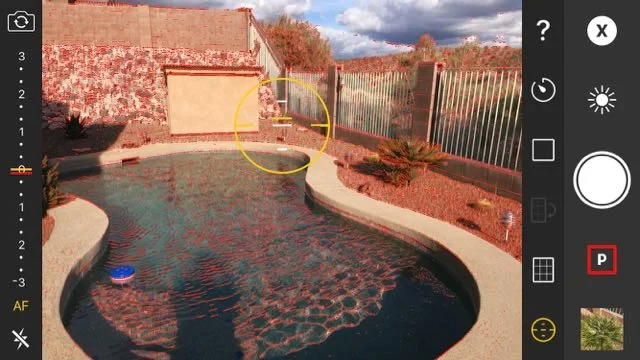
Core to any leading manual focus app is the ability to finely tune ISO, shutter speed, and white balance. These settings allow photographers to control exposure, motion blur, and color temperature, crucial for creative intent. Focus peaking overlays highlight in-focus areas in real-time, significantly aiding manual focus accuracy, especially in low-light or macro scenarios. Magnification tools, typically 4x or higher, provide detail inspection, enabling pinpoint focus adjustments.
RAW and ProRAW support remain non-negotiable for professionals, as these formats preserve maximum sensor data and dynamic range, facilitating extensive post-processing. Many apps also support long exposure photography, unlocking creative possibilities like light trails and smooth water effects, which are otherwise unachievable with default camera apps.
AI-powered focus tracking is increasingly integrated to reduce user error and improve focus on moving subjects, blending manual precision with intelligent automation. Video capabilities have also advanced, with manual control over focus, exposure, and audio levels, often including log profiles for cinematic-grade color grading in post-production. These features elevate smartphones as viable tools not only for still photography but also for professional video production.
Pragmatic Considerations for Choosing Manual Focus Camera Apps
Device compatibility remains a critical factor, particularly for Android users where Camera2 API support varies widely among manufacturers and models. Apps like Open Camera excel in adapting to a wide device range, while others require newer hardware for full feature access. iOS apps benefit from Apple’s consistent hardware and software ecosystem, ensuring broad compatibility across recent iPhone generations, including the iPhone 17.
User interface design balances complexity and usability; some users prefer streamlined controls with presets and AI assistance, while enthusiasts seek granular manual input and customizable layouts. This spectrum influences the choice between free and paid apps, as premium offerings like ProShot or Halide often justify their cost with richer feature sets and superior UI/UX.
Different photographic use cases dictate app selection. Landscape and astrophotographers prioritize long exposure and RAW capture, whereas event and sports photographers benefit from AI focus tracking and fast manual adjustments. Video creators require apps supporting manual video controls with professional profiles, highlighting the need for diversified app portfolios depending on user intent.
Emerging Trends Shaping Manual Focus Camera Apps Beyond 2026
Artificial intelligence will increasingly augment manual focus and exposure controls, offering real-time optimization without compromising user autonomy. This hybrid approach promises enhanced accuracy in challenging conditions, such as low light or fast motion, while maintaining creative freedom.
Video manual controls will continue to evolve, integrating features like HDR video capture, advanced stabilization, and professional audio mixing within mobile apps. Cross-platform developments and cloud syncing are expected to streamline workflows, allowing photographers and videographers to transition effortlessly between devices and editing environments.
The convergence of computational photography with manual controls will enable new creative paradigms, where users can capture raw data with full manual precision and apply sophisticated algorithms post-capture to refine focus, exposure, and depth of field dynamically.
| App Name | Platform | Key Manual Controls | RAW Support | Unique Features |
|---|---|---|---|---|
| ProShot | Android | Manual focus, ISO, shutter speed, white balance | RAW/DNG | DSLR-like UI, focus peaking, 4x magnification |
| Open Camera | Android | Manual focus, exposure, ISO, long exposure | RAW/DNG | Open-source, free, extensive customization |
| Camera FV-5 | Android | Manual focus, ISO, shutter speed, histogram | RAW/DNG | Long exposure, intervalometer |
| Halide Mark II | iOS | Manual focus, ISO, shutter speed, white balance | Apple ProRAW | Gesture controls, Smart RAW, focus peaking |
| ProCamera | iOS | Manual focus, ISO, shutter speed, white balance | Apple ProRAW | HDR mode, video log profiles |
| Camera M | iOS | Manual focus, AI focus tracking, exposure control | RAW | AI-powered tracking, focus peaking |
FAQ
What is the best manual focus camera app for Android in 2026?
ProShot and Open Camera are widely regarded as the best manual focus camera apps on Android in 2026. ProShot offers a DSLR-like interface with extensive paid features, while Open Camera provides a free, open-source alternative with comprehensive manual controls and customization options.
Which iOS app provides the most advanced manual focus controls?
Halide Mark II is considered the leading iOS app for manual focus control in 2026, featuring gesture-based focus adjustments, Apple ProRAW support, and advanced exposure settings. ProCamera and Camera M also offer robust manual controls with unique features like AI focus tracking and video log profiles.
Do these manual focus apps support RAW image capture?
Yes, most top manual focus camera apps support RAW or ProRAW capture, enabling photographers to retain maximum image quality and dynamic range for professional editing. This includes ProShot, Open Camera, Halide Mark II, and ProCamera among others.
Can manual focus apps improve mobile video recording?
Many manual focus apps now integrate manual video controls, including focus, exposure, and audio adjustments, often with support for log profiles. This allows for professional-grade mobile videography, as seen in apps like ProCamera and MotionCam.
Are free manual focus apps as effective as paid ones?
Free apps like Open Camera offer extensive manual controls and customization, making them highly effective for many users. However, paid apps like ProShot and Halide Mark II often provide more polished interfaces, advanced features, and better hardware integration, justifying their cost for professional users.
As smartphone photography continues to evolve, manual focus camera apps remain critical for photographers aiming to harness full creative and technical control. Future developments will likely blend AI enhancements with manual precision, expanding the boundaries of what is achievable on mobile devices.
For an in-depth review of Android manual camera apps, see The App Whisperer’s comprehensive guide. Insights on manual control features for landscape photography on Android are detailed at iPhotography’s blog.