SnapRoamer.com – Setting accurate white balance for indoor lighting is essential for achieving true-to-life colors and eliminating unwanted color casts in photography. This tutorial provides a detailed, step-by-step guide on how to set white balance correctly indoors by utilizing camera presets, custom calibration with neutral objects, and manual Kelvin adjustments. It also addresses the challenges posed by mixed lighting environments and explains post-processing options to perfect color accuracy. Photographers with intermediate knowledge will find practical instructions and expert insights to master indoor white balance control.
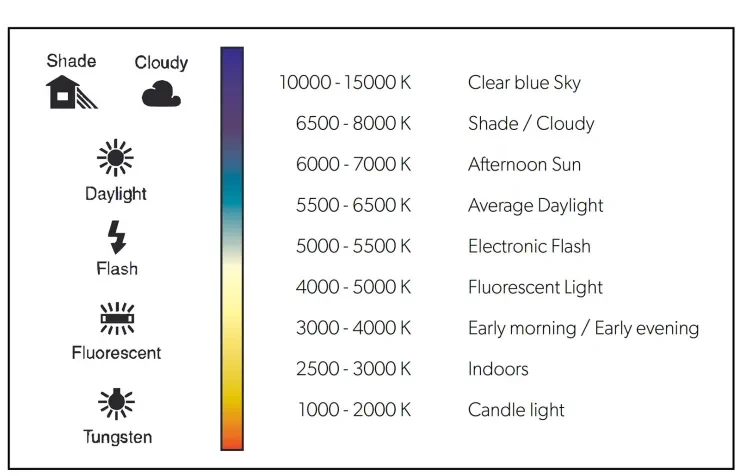
Indoor lighting sources such as incandescent bulbs, tungsten lamps, and LED fixtures emit light at various color temperatures, measured in Kelvin (K). Typical incandescent or tungsten lighting ranges from approximately 2500K to 3200K, producing warm, yellow-orange tones that cameras often misinterpret without proper white balance settings. Using incorrect white balance settings can result in images with unnatural color shifts, often seen as yellow or orange tints. Understanding and correctly applying white balance can preserve natural skin tones and the true colors of objects in indoor photography.
Understanding Color Temperature and the Kelvin Scale
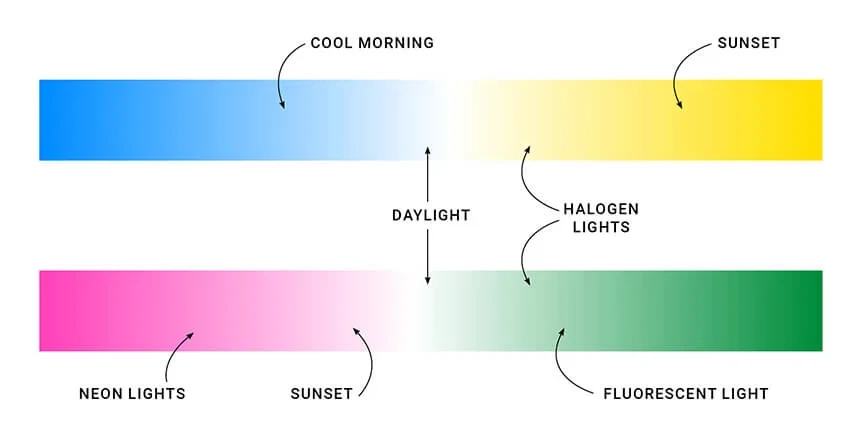
color temperature quantifies the hue of a light source, measured in Kelvin (K). Lower Kelvin values (around 2500K-3200K) correspond to warm light, typical of incandescent and tungsten bulbs, which emit reddish-yellow tones. Higher Kelvin values (around 5000K-6500K) align with daylight or cooler light sources that cast bluish hues. Fluorescent and LED lights may vary widely, with bicolor LED lights offering adjustable warmth or coolness.
The Kelvin scale serves as the foundation for white balance adjustments on modern cameras, allowing photographers to match the camera’s color interpretation to the actual lighting conditions. Properly setting white balance based on Kelvin temperature ensures that whites appear neutral and colors remain consistent with the scene’s real appearance.
Using Camera Presets for Indoor Lighting
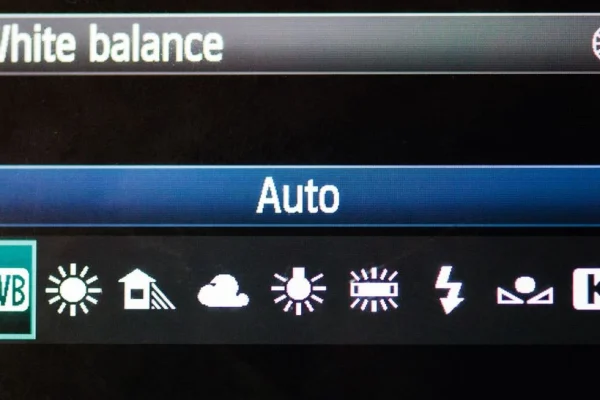
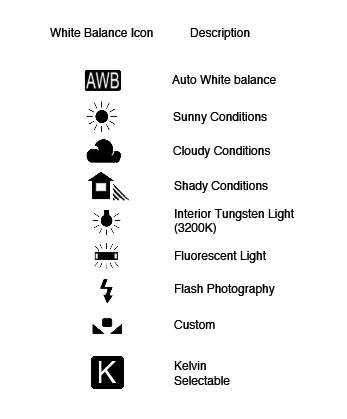
Most cameras include preset white balance modes designed for common lighting conditions. The incandescent or tungsten preset is specifically calibrated for warm indoor lighting, typically setting white balance around 2800K to 3200K.
When to use presets:
Limitations of presets:
Using presets is a practical starting point, but for precise color accuracy, especially in professional or critical work, custom white balance or manual Kelvin adjustments are necessary.
Custom White Balance: Step-by-Step Guide
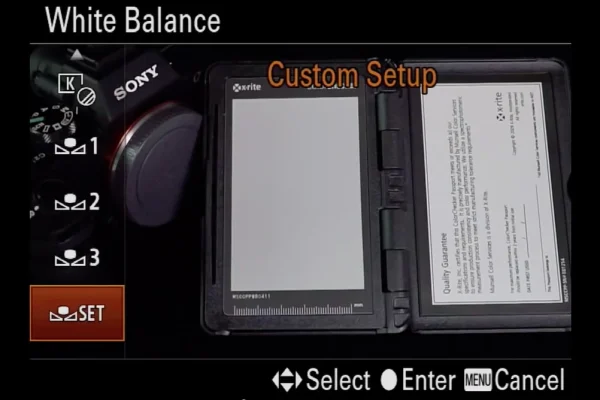
Custom white balance allows photographers to calibrate their camera to the exact lighting conditions by using a neutral reference object, such as a white or mid-gray card, photographed under the indoor light source. This method eliminates guesswork and produces accurate color rendition.
Prerequisites:
Steps:
Custom white balance greatly improves color fidelity, especially in challenging lighting conditions, by directly referencing the actual light illuminating the scene.
Manual Kelvin Adjustment for Precise Control
Many cameras allow direct input of Kelvin values for white balance, giving photographers fine-grained control over color temperature beyond presets.
How to adjust Kelvin manually:
- Tungsten/incandescent lighting: 2500K to 3200K.
- Fluorescent lighting: 4000K to 5000K (varies by bulb).
- Daylight: 5000K to 6500K.
Examples:
Manual Kelvin adjustment offers flexibility for photographers who want precise control or need to adapt to non-standard lighting.
Handling Mixed and Complex Indoor Lighting
Indoor environments often combine multiple light sources with varying color temperatures, such as daylight from windows mixed with tungsten bulbs or LED lighting. This mixture poses challenges for white balance because no single setting perfectly matches all light sources.
Challenges:
Strategies:
These approaches mitigate color conflicts and enhance the final image’s natural appearance.
Practical Tips and Troubleshooting
Testing and fine-tuning white balance is essential for indoor photography success. Here are actionable tips and common issues to watch for:
By systematically testing and observing these factors, photographers can achieve consistent indoor color accuracy.
Frequently Asked Questions
How do I set custom white balance on my camera?
To set custom white balance, photograph a neutral white or gray card under your indoor lighting, then select that image in your camera’s custom white balance menu to calibrate the color temperature accordingly.
What Kelvin value should I use for incandescent lighting?
Incandescent or tungsten lighting typically ranges from 2500K to 3200K. Setting your camera’s white balance to around 2800K often neutralizes the warm, yellow-orange cast of these bulbs.
Can I fix white balance issues in post-processing?
Yes, shooting in RAW format preserves color data, allowing you to adjust white balance precisely in post-processing software without degrading image quality.
Why does mixed indoor lighting complicate white balance?
Mixed lighting combines different color temperatures, causing conflicting color casts that a single white balance setting cannot accurately correct, often requiring selective adjustments or controlled lighting setups.
Is it better to use presets or custom white balance indoors?
Presets are quick and useful for stable lighting conditions but lack precision. Custom white balance is preferred for accurate color rendition, especially under unusual or mixed indoor lighting.
—
Setting white balance correctly indoors empowers photographers to capture true colors and avoid unwanted color casts caused by artificial lighting. By combining camera presets, custom calibration with neutral references, and manual Kelvin adjustments, photographers can tailor white balance settings to their environment. When dealing with mixed lighting, shooting in RAW and employing thoughtful lighting control strategies enhances flexibility and results. Continuous testing and observation ensure consistent color accuracy, elevating indoor photography quality.
For further technical guidance on Kelvin white balance adjustments, visit this detailed manual white balance tutorial and explore expert techniques at Capture Landscapes’ white balance mastery guide.