SnapRoamer.com – High Dynamic Range (HDR) exposure techniques on smartphones capture multiple images at different exposures and merge them using advanced algorithms to produce photos with enhanced detail in both shadows and highlights, closely mimicking human eye perception. This process relies heavily on the smartphone’s Image Signal Processor (ISP) and computational photography algorithms to extend dynamic range beyond the native sensor capabilities, resulting in images with balanced brightness and color fidelity even in challenging lighting conditions.
HDR photography on smartphones begins with exposure bracketing, where the camera captures several frames—typically three or more—at varying exposure levels. These frames include underexposed, correctly exposed, and overexposed shots. The ISP then uses image fusion algorithms to combine the best-exposed portions of each frame, effectively preserving details from the darkest shadows to the brightest highlights. This technique addresses the limited dynamic range of camera sensors and compensates for scenes with high contrast, such as backlit subjects or sunsets. Modern smartphones process HDR images with bit depths up to 18-bit internally before compressing them into 8-bit or 10-bit output formats compatible with display and sharing platforms.
Technical Foundations of HDR Exposure Techniques
Exposure bracketing is the cornerstone of smartphone HDR. Unlike traditional cameras that rely on a single shot, smartphones capture multiple frames at different exposure values—commonly referred to as EV steps. This method allows for capturing details in both underexposed shadow regions and overexposed highlights. The challenge lies in aligning these frames precisely, especially in dynamic scenes, to avoid ghosting or blur.
The image signal processor (ISP) plays a pivotal role by executing real-time image fusion and tone mapping algorithms. ISPs in flagship smartphones from manufacturers like Apple and leading Android OEMs incorporate dedicated hardware accelerators for HDR processing. These processors handle tasks such as aligning frames, weighting exposure regions, and performing local contrast enhancement. Additionally, computational photography techniques—such as machine learning-based noise reduction and edge-preserving filters—enhance the merged HDR image without introducing artifacts.
Tone mapping converts the high dynamic range data into a standard dynamic range (SDR) format suitable for most displays. This process compresses luminance values while preserving perceptual brightness and color accuracy. Advanced tone mapping algorithms maintain natural gradients and avoid unnatural halos or saturation shifts commonly seen in early HDR implementations.
HDR Implementation in Smartphone Cameras
Smartphone HDR implementations differ between Android and iPhone platforms primarily in their integration with camera APIs and user controls. Android’s Camera2 API provides granular control over exposure bracketing, allowing both automatic and manual HDR capture modes. Many Android devices employ multi-frame fusion using up to five exposures combined with machine learning to optimize image quality. Some Android models also support HDR video recording with 10-bit color depth, enabling richer color gradations and enhanced contrast in moving images.
Apple’s iPhone HDR functionality, including Smart HDR and the newer Smart HDR 5, automates exposure bracketing and fusion seamlessly in the native Camera app. iPhones leverage the A-series chip’s dedicated ISP and Neural Engine to analyze scenes in real time, selecting optimal frames and applying computational enhancements. iOS also offers manual HDR toggles for users who wish to control the feature directly, complementing automatic modes optimized for typical shooting conditions.
The distinction between HDR still image capture and HDR video recording is notable. While HDR photography combines multiple static exposures, HDR video involves real-time processing of frames at high bit depths and frame rates. Modern smartphones support HDR10 or Dolby Vision HDR formats for video recording, which require high-performance ISPs and codecs to maintain quality without significant latency.
Practical Use and Limitations of HDR Mode
HDR mode excels in scenes with significant contrast differences, such as landscapes featuring bright skies and shaded foregrounds, backlit portraits, and indoor scenes with windows. It enhances details in shadows and highlights, producing balanced images closer to human visual perception. For example, photographing a sunset or a subject against a bright light source benefits greatly from HDR by preventing blown-out skies while preserving foreground details.
However, HDR has limitations. Processing multiple frames takes time, which can lead to motion blur or ghosting in fast-moving subjects or handheld shots without effective stabilization. Some HDR images may exhibit an unnatural appearance if the algorithm over-enhances contrast or saturates colors excessively. Additionally, HDR processing can increase power consumption and storage requirements due to the handling of multiple high-resolution frames.
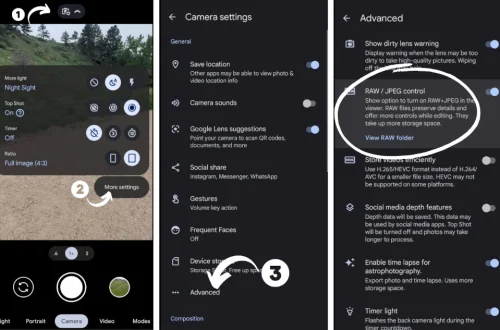
To optimize HDR photography on smartphones, users should enable HDR mode in stable shooting conditions and avoid rapid subject movement. On iPhones, manual HDR control allows photographers to disable automatic HDR or choose when to apply it, beneficial in low-contrast scenes where HDR may be unnecessary. Android users can leverage third-party camera apps with advanced HDR controls or use built-in manual modes to adjust exposure bracketing parameters.
HDR Display Technology and Viewing Experience
HDR images achieve their full potential when viewed on HDR-compatible displays capable of reproducing a wider color gamut and higher brightness levels—often exceeding 1,000 nits. Ultra HDR displays, including OLED and advanced LCD panels, support standards such as HDR10, HDR10+, and Dolby Vision, ensuring accurate color reproduction and contrast ratios.
Platforms like Google Photos now support Ultra HDR formats, allowing users to store and share HDR images and videos with full dynamic range on compatible devices. Display manufacturers continue to improve HDR capabilities, integrating higher peak brightness, 10-bit color depth support, and local dimming technologies to enhance HDR content presentation.
Future Trends and Research in Smartphone HDR
Advancements in ISP hardware focus on increasing processing power while reducing latency and energy consumption. Emerging chipsets incorporate more sophisticated neural processing units (NPUs) dedicated to real-time HDR enhancement and computational photography. Research from institutions such as Cornell University and industry leaders emphasizes dynamic exposure adaptation and AI-driven scene analysis to improve HDR accuracy and reduce artifacts.
Computational photography algorithms are evolving toward leveraging multi-sensor arrays and depth mapping to create context-aware HDR images, enhancing detail reconstruction in complex lighting scenarios. HDR video recording is expected to become more prevalent, with improvements in compression techniques and support for higher frame rates and resolutions.
Nevertheless, balancing computational complexity with mobile device constraints remains a challenge. Optimizing HDR workflows for low-power consumption and minimizing processing delays will be critical for widespread adoption, especially in mid-range and budget smartphones.
| HDR Feature | Android Smartphones | iPhone |
|---|---|---|
| Exposure Bracketing | 3-5 frames; manual & automatic modes via Camera2 API | Usually 3 frames; Smart HDR automates exposure selection |
| Image Processing | ISP with AI fusion; machine learning denoising | A-series chip ISP + Neural Engine for fusion & enhancement |
| HDR Video Support | HDR10, 10-bit video recording; varies by model | Dolby Vision HDR, 10-bit video recording since recent models |
| User Control | Manual override via third-party apps and Camera2 API | Automatic HDR with manual toggle option in Camera app |
| Display Compatibility | Supports HDR10 displays and Ultra HDR formats on flagship models | Supports HDR10, Dolby Vision on OLED and Liquid Retina XDR |
FAQ
How does HDR improve smartphone photo quality?
HDR improves photo quality by capturing multiple images at different exposures and merging them using computational algorithms. This process preserves details in both shadows and highlights, producing a balanced image that closely resembles what the human eye perceives in high-contrast scenes.
Can HDR cause problems with fast-moving subjects?
Yes, HDR can introduce motion blur or ghosting artifacts when subjects move quickly during the multiple exposures needed for HDR processing. It is advisable to disable HDR in such scenarios or use faster shutter speeds and image stabilization.
Is manual HDR control better than automatic HDR on smartphones?
Manual HDR control allows experienced users to decide when to apply HDR based on scene conditions, potentially preventing over-processing in low-contrast scenes. However, automatic HDR modes on modern smartphones are highly optimized and sufficient for most users.
Do all smartphone displays support HDR images?
Not all smartphone displays fully support HDR. HDR images are best viewed on compatible screens with high brightness and wide color gamut, such as OLED panels supporting HDR10 or Dolby Vision standards. On non-HDR displays, HDR images are tone-mapped to standard dynamic range, which may reduce their visual impact.
What is the difference between HDR photo and HDR video on smartphones?
HDR photos are created by merging multiple exposures from static scenes, while HDR video involves real-time processing of video frames with extended color depth and contrast. HDR video requires more advanced processing and supports formats like HDR10 and Dolby Vision.
High Dynamic Range (HDR) technology on smartphones continues to evolve, driven by improvements in sensor hardware, ISP capabilities, and computational photography algorithms. Users benefit from richer images and videos that capture real-world lighting complexities more faithfully. Understanding how HDR works and when to use it empowers photographers to maximize the potential of their smartphone cameras for diverse shooting environments.
For detailed technical specifications and guidelines on HDR image handling and supported formats, refer to official resources such as the Google Photos HDR support documentation and expert analyses like DxOMark’s HDR imaging breakdown.