SnapRoamer.com – Smartphone cameras have evolved to include sophisticated autofocus systems and manual mode capabilities, offering users distinct options for controlling image focus and exposure. Autofocus systems typically rely on multiple focus points and modes such as single point, dynamic area, and 3D tracking to swiftly and accurately focus on subjects. In contrast, manual mode grants photographers comprehensive control over focus as well as critical camera settings like ISO, shutter speed, and white balance, enabling precise adjustments tailored to specific shooting conditions. Understanding the operational differences between autofocus and manual mode, as well as their practical applications, is essential for maximizing smartphone photography’s creative and technical potential.
Autofocus technology remains the default choice for most users due to its speed and convenience, excelling at tracking moving subjects and adjusting focus in real time. However, autofocus systems sometimes struggle under challenging conditions such as low light, macro photography, or scenes with low contrast, where manual focus can provide sharper, more reliable results. The integration of third-party camera applications and developer tools like the Android CameraX API has further expanded manual mode’s accessibility, allowing more granular control and customization beyond native camera apps’ built-in features.
How Autofocus Works on Smartphones
smartphone autofocus systems employ a combination of hardware and software to determine the optimal focus point quickly. Typically, the camera software uses multiple autofocus points distributed across the frame. Modes such as single point autofocus allow users to select a specific focus area, while dynamic area autofocus tracks a subject within a predefined region. More advanced implementations include 3D tracking autofocus that continuously follows a subject’s movement in three-dimensional space, ensuring consistent sharpness even with erratic motion.
Most modern Android and iPhone cameras utilize phase detection autofocus (PDAF) sensors alongside contrast detection to achieve rapid focus acquisition. PDAF measures the phase difference of incoming light rays to estimate focus distance, whereas contrast detection adjusts focus based on image sharpness metrics. Combining these methods, known as hybrid autofocus, provides faster and more accurate performance, especially in well-lit environments.
Autofocus benefits general photography by enabling quick shots without manual intervention, crucial for capturing spontaneous moments or fast-moving subjects such as athletes or wildlife. However, autofocus systems exhibit limitations in low-light scenarios, where sensor noise and insufficient contrast hamper focus accuracy. Additionally, when shooting macro subjects or objects behind glass, autofocus can “hunt” or fail to lock onto the intended focal plane, resulting in blurred images.
Manual Mode Features and Controls on Smartphones
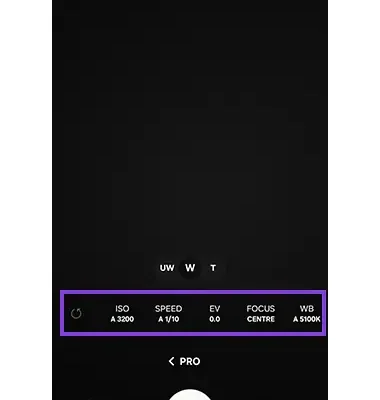
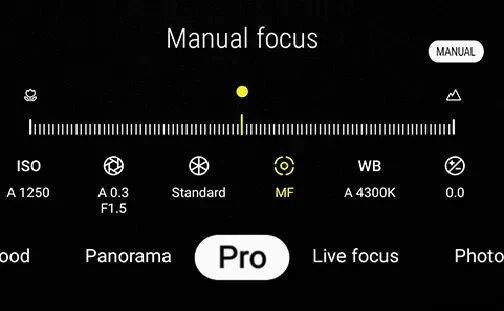
Manual mode, often labeled as Pro Mode in native camera apps, unlocks control over several critical parameters: focus distance, ISO sensitivity, shutter speed, and white balance. Adjusting focus manually involves manipulating a slider or dial to shift the focal plane, offering precise control over which element in the frame appears sharp. ISO settings regulate the camera sensor’s sensitivity to light; higher ISO values allow shooting in darker environments but introduce noise. Shutter speed controls the duration the camera sensor is exposed to light, affecting motion blur and exposure. White balance adjustments correct color temperature to maintain natural-looking hues under varying lighting conditions.
Manual mode enables photographers to create artistic effects and technical precision unattainable with autofocus alone. For instance, slower shutter speeds can be used to capture light trails or smooth water surfaces, while custom ISO and white balance settings help maintain image fidelity in mixed lighting. Manual focus is invaluable in macro photography, astrophotography, and scenes with complex depth fields where autofocus systems may be unreliable.
Advanced smartphone cameras support RAW image capture in manual mode, preserving uncompressed sensor data for extensive post-processing flexibility. Using manual controls in conjunction with RAW format allows professional-level image editing workflows directly from a smartphone.
Tools for Accessing Manual Focus and Controls on Smartphones
While many native camera apps offer limited manual controls or autofocus lock (AE/AF lock), third-party camera applications significantly enhance manual mode functionality. Popular apps like Camera+, Open Camera, and ProCam X provide intuitive interfaces to adjust focus, exposure, and white balance independently. Open Camera, an open-source Android app, supports manual focus sliders, ISO adjustment, and shutter speed control, appealing to users seeking complete command over their shots.
Developers benefit from tools like Android’s CameraX API, which facilitates manual focus overrides and exposure adjustments programmatically. CameraX abstracts complex camera hardware variations, allowing third-party apps to offer consistent manual mode features across diverse Android devices. This API supports manual focus distance setting and focus metering, enabling developers to implement advanced autofocus and manual focus combinations.
On iOS devices, Apple’s native camera app incorporates a tap-to-focus feature and exposure compensation sliders, but manual focus control remains limited to third-party apps like ProCam X and Camera+ that leverage Apple’s AVFoundation framework for enhanced manual focus and exposure adjustments.
Practical Advice for Choosing Between Autofocus and Manual Mode
Autofocus remains the optimal choice for quick, everyday photography due to its speed and ease of use. Situations involving moving subjects, such as sports, wildlife, or children at play, benefit from autofocus’s ability to track and maintain focus dynamically. Similarly, casual snapshots and spontaneous moments generally do not require manual adjustments, making autofocus the preferred mode.
Conversely, manual focus excels in scenarios demanding precise focus control or exposure settings. Macro photography, where the focal plane is extremely narrow, often defies autofocus accuracy, making manual focus adjustment essential. Low-light environments also benefit from manual focus combined with ISO and shutter speed control to reduce noise and motion blur. Creative photography techniques, such as long exposure and selective focus effects, require manual mode for intentional artistic outcomes.
Combining autofocus with manual fine-tuning is a practical strategy for many photographers. Some smartphone camera apps allow autofocus to initially lock focus, followed by manual adjustments to refine sharpness. This hybrid approach leverages autofocus’s speed while retaining the creative control of manual focus, enabling sharper images and more nuanced compositions.
Understanding Autofocus Modes and Their Applications
Smartphone autofocus modes vary in complexity and suitability depending on photographic needs:
Each mode offers trade-offs between speed, accuracy, and computational load. Developers optimize these autofocus algorithms using AI and machine learning models to enhance subject recognition and tracking, pushing smartphone photography closer to DSLR performance levels.
Technical Insights: Camera Settings and Their Impact on Image Quality
Manual control over ISO, shutter speed, and white balance directly affects image quality and creative expression. ISO adjustment balances sensor sensitivity against noise levels; modern smartphone sensors combined with computational photography algorithms mitigate noise at higher ISOs but manual control allows users to prevent automatic overexposure or grain.
Shutter speed influences motion capture; faster shutter speeds freeze action but require more light, while slower speeds introduce motion blur for creative effects or compensate for low-light without increasing ISO. White balance tuning ensures colors are rendered faithfully under different light temperatures, whether tungsten, daylight, or fluorescent, preventing unnatural color casts.
These settings, combined with manual focus, empower photographers to adapt to complex lighting scenarios and artistic demands. Mastery of these controls distinguishes proficient smartphone photographers from casual users.
Enhancing Manual Focus with Third-Party Applications
Third-party apps bridge gaps left by native camera software, offering granular manual controls and advanced features like focus peaking, histogram displays, and programmable autofocus modes. For example, Camera+ provides focus and exposure lock, manual focus sliders, and RAW capture, enhancing image sharpness and post-processing potential.
Open Camera’s support for Camera2 API on Android devices unlocks full manual control on compatible hardware, including manual focus distance and exposure compensation. ProCam X extends these capabilities with real-time focus assist and customizable interface layouts.
These applications often provide visual feedback such as magnified focus previews and focus peaking overlays, aiding precise manual focusing. This functionality is crucial in macro photography and low-light conditions where autofocus systems may falter.
| Focus Mode | Best Use Case | Advantages | Limitations |
|---|---|---|---|
| Autofocus – Single Point | Portraits, stationary subjects | Quick, precise focus on selected area | Less effective with moving subjects |
| Autofocus – Dynamic Area | Sports, moving subjects | Tracks subject within area | May lose focus if subjects move erratically |
| Autofocus – 3D Tracking | Fast-moving subjects in-depth | Maintains focus on subject in 3D space | Requires high processing power, may drain battery |
| Manual Focus | Macro, low light, creative shots | Precise control over focus plane | Slower, requires user skill |
Balancing Autofocus and Manual Mode for Optimal Results
A balanced approach between autofocus and manual focus can greatly enhance smartphone photography outcomes. For dynamic scenes, enabling autofocus ensures quick focus acquisition, while manual focus can be used to fine-tune sharpness when autofocus struggles. For example, in macro or low-light photography, users might initiate autofocus to approximate focus distance, then adjust manually using a slider or focus peaking indicators.
Many modern smartphones support AE/AF lock, allowing users to lock focus and exposure settings and recompose the shot without losing sharpness. This feature is a practical midway point between fully automatic and fully manual control.
The continued development of AI-powered autofocus algorithms promises improved subject recognition and tracking, reducing dependence on manual focus. Nonetheless, manual mode remains indispensable for professional photographers and enthusiasts seeking creative freedom and technical precision.
Future Trends in Smartphone Camera Focus Technology

Emerging technologies indicate deeper integration of AI and computational photography techniques in autofocus and manual focus systems. Machine learning models enable more accurate subject detection, predictive tracking, and scene recognition, improving autofocus reliability even in complex environments.
Hardware advancements such as periscope lenses, time-of-flight sensors, and larger image sensors contribute to enhanced depth mapping and focus accuracy. These innovations facilitate refined manual focus controls and new autofocus modes, expanding creative possibilities.
Moreover, the expansion of developer APIs like CameraX fosters innovation in third-party camera applications, encouraging more sophisticated manual control features tailored for diverse user needs.
Photographers and developers alike are positioned to benefit from these advancements, pushing smartphone photography closer to professional standards without sacrificing convenience.
FAQ

What is the main difference between autofocus and manual mode in smartphone cameras?
Autofocus automatically adjusts the camera’s focus based on multiple focus points and tracking algorithms, making it ideal for quick and dynamic shooting. Manual mode allows users to control focus distance and camera settings like ISO, shutter speed, and white balance, offering precise control, especially in challenging or creative scenarios.
When should I use manual focus instead of autofocus on my smartphone?
Manual focus is preferable for macro photography, low-light conditions, scenes with low contrast, or when creative effects like selective focus are desired. It is also useful when autofocus struggles to lock onto the intended subject or when precise focus control is necessary.
Can I use manual focus on iPhone and Android devices?
Yes, both platforms support manual focus through native camera apps with limited controls or via third-party apps like Camera+, Open Camera, and ProCam X that provide advanced manual focus sliders and exposure settings. Android developers can also leverage CameraX API for custom manual focus implementations.
How does combining autofocus and manual focus improve smartphone photography?
Combining both allows autofocus to quickly acquire an initial focus lock, while manual focus fine-tunes sharpness for greater precision. This hybrid approach is effective in complex shooting conditions, ensuring sharper images without sacrificing speed.
What camera settings can I adjust in manual mode on smartphones?
Manual mode typically allows adjustment of focus distance, ISO sensitivity, shutter speed, and white balance. Some apps also enable RAW image capture, offering uncompressed image data for professional-grade post-processing.
For comprehensive insights and detailed tutorials on manual focus techniques, consult expert photography resources such as SnapRoamer’s manual focus guide and Photography Life’s autofocus modes analysis.