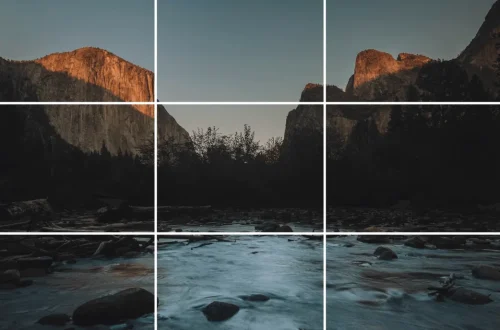
SnapRoamer.com – Photography composition is the intentional arrangement of visual elements within a frame to guide the viewer’s eye and convey meaning. Rather than just following rigid rules, effective composition uses techniques like the rule of thirds, leading lines, and the golden ratio to create balance, depth, and emotional impact. The Golden Ratio, a mathematical constant of approximately 1.618, serves as the sophisticated foundation for many fundamental photography rules.
When Composition Fails: Common Mistakes and Corrective Actions
Composition fails when elements distract rather than direct the eye. Common failures include tilted horizons, leading lines that point away from the subject, and ‘cramped’ subjects that lack breathing space. To fix these, ensure vertical/horizontal lines are level, redirect lines toward your focal point, and leave space in front of moving subjects.
A tilted horizon is one of the most common mistakes made by beginner photographers. Even a slight deviation can disrupt the perceived stability of a landscape. Practitioners often find that checking the level in the viewfinder or using the electronic level function in the camera menu helps prevent this. If a shot is already captured, a slight rotation in post-processing can correct it, though this may necessitate a crop that alters the original framing.
The ‘Dead End’ Leading Line
Leading lines, such as roads, fences, or rivers, are intended to guide the eye toward a specific focal point. However, a common failure mode occurs when these lines lead the viewer’s eye away from the subject. To correct this, ensure the path or fence directs attention toward your primary subject. As noted by various photography resources, diagonal lines can also be utilized to create movement in a photograph even when subjects remain still.
Horizon and Vertical Alignment Errors
Beyond the horizon, vertical lines—such as those found in architecture—must also remain straight. Crooked vertical lines can make buildings appear as if they are leaning. To avoid this, pay attention to the surrounding elements during capture. While a 16-35mm wide-angle lens can exaggerate perspective, it also makes alignment errors much more obvious. If the lines are not level, use the crop tool during editing to re-align the geometry.
- Ensure horizontal lines are level to avoid a sinking or climbing feeling.
- Redirect leading lines so they point to, rather than away from, the subject.
- Provide breathing space by leaving room in front of a moving subject to avoid a cramped composition.
- Reduce the number of competing diagonal lines to prevent visual chaos.
The Composition x Lighting Matrix
Figure to ground composition relies on contrast to isolate a subject. By narrowing in on the contrast between the subject and the background, a photographer can ensure the subject remains the undisputed focal point of the frame.
| Composition Technique | Lighting Requirement | Visual Result | Primary Use Case |
|---|---|---|---|
| Figure to Ground | High Contrast | Subject isolation | Portraits / Minimalist |
| Silhouette | Strong Backlighting | Subject outline | Sunset / Dramatic |
| Layering | Directional Light | Depth perception | Landscapes |
The relationship between light and placement dictates the “weight” of an image. For instance, using high contrast for Figure-to-Ground composition allows a subject to pop against a darker or simpler background. Conversely, backlighting can be used for subject isolation by creating a rim of light that separates the subject from the background, preventing them from blending into a single mass.
Using High Contrast for Figure-to-Ground
To achieve a strong Figure-to-Ground effect, focus on the contrast levels. If the background is too similar in tone to the subject, the composition will feel “flat.” Aim for a significant difference in luminance to ensure the subject stands out. This technique is highly effective when the subject is placed off-center to provide visual breathing space.
Backlighting for Subject Isolation
Backlighting serves as a compositional tool to define edges. When light comes from behind the subject, it creates a separation that adds a three-dimensional quality to a two-dimensional medium. This prevents the subject from becoming lost in a busy background, a common failure in complex environments.
Core Techniques: From Rule of Thirds to the Golden Ratio
The Rule of Thirds divides an image into a 3×3 grid of 9 equal sections to place subjects on intersections. The Golden Ratio (1:1.618) is a more complex mathematical proportion used to refine these placements for natural harmony and advanced balance in professional photography.
| Technique | Mathematical Basis | Primary Visual Effect | Complexity |
|---|---|---|---|
| Rule of Thirds | 3×3 Grid (9 sections) | Balanced, easy-to-read | Low |
| Golden Ratio | 1:1.618 (Phi) | Natural, organic harmony | High |
The Rule of Thirds acts as a practical way to determine the placement of key elements. However, it is essentially a simplification of the more complex Golden Ratio. While the Rule of Thirds provides a basic framework, the Golden Ratio can be used to refine and fine-tune the proportions for a more sophisticated aesthetic.
The 3×3 Grid Method
The Rule of Thirds is one of the most accessible methods for improving a shot. By dividing the frame into 9 equal sections, the photographer can place the subject on one of the four intersecting lines or at the intersections themselves. This avoids the “mugshot” effect of centering everything and provides the subject with breathing space within the environment.
Mathematical Harmony: The Golden Mean
For those seeking more organic balance, the Golden Ratio—also known as the Golden Mean—offers a more precise approach. This ratio, often represented by the value 1.6180339887, creates a sense of natural flow. Unlike the rigid lines of the 3×3 grid, the Golden Ratio guides the eye in a spiral or a more fluid path, making it ideal for complex natural scenes.
Creating Dimensionality: Layers and Negative Space
To simulate a three-dimensional world on a flat surface, photographers can include objects in the foreground, middle ground, and background. This layering technique provides the necessary visual cues to build depth within a single frame.
A landscape that only contains a background will often appear flat and uninteresting. To fix this, find an object—such as a rock, a flower, or a branch—to serve as a foreground element. This provides a sense of scale and pulls the viewer into the scene. To maintain sharpness across these layers, using an aperture in the f/11-f/16 range is often necessary to ensure both the foreground and background remain in focus.
Negative space is another critical tool for managing visual weight. In minimalist compositions, negative space can occupy as much as 70-80% of the frame. This intentional empty space directs the viewer’s attention toward the subject and prevents the image from feeling cluttered. It provides a sense of scale and importance to the subject, no matter how small it may be.
- Foreground: Provides an entry point for the eye.
- Midground: Usually contains the primary subject.
- Background: Sets the context and provides depth.
- Negative Space: Uses empty areas to emphasize the subject.
Mobile-First Composition: Mastering the Smartphone Viewfinder
To apply compositional rules on a mobile device, users should enable the built-in grid view. This tool helps implement the Rule of Thirds directly during the capture process.
To activate this, users typically navigate to the camera settings. On most iOS or Android devices, this involves going to Settings > Camera > Grid. Once enabled, the 3×3 grid appears on the viewfinder, allowing for precise subject placement. Furthermore, the touch-to-focus feature is essential; tapping the screen on a specific area not only sets the focus but also allows the user to adjust exposure, which is vital for maintaining proper contrast for Figure-to-Ground composition.
Shortcut: Tap the screen on your subject to set focus and exposure, then slide your finger up or down to adjust brightness.
The Post-Processing Workflow: Saving Composition in Edit
Post-processing software provides tools to correct framing errors after the shutter is pressed. Common adjustments include using the Crop tool in Adobe Photoshop or the Develop module in Adobe Lightroom to re-center subjects or apply the Rule of Thirds.
In Adobe Photoshop, the Crop tool can be found in the left sidebar. This tool is essential for adjusting the geometry of an image. Similarly, in Adobe Lightroom, photographers can use the following workflow to improve composition:
- Navigate to the Develop module.
- Select the Crop Tool.
- Enable “Overlay cropping guides” under the Tools menu to see the Rule of Thirds grid.
- Rotate the image to correct tilted horizons.
By using these tools, a photographer can transform a mediocre shot into a compelling one. Cropping can remove distracting elements at the edges of the frame or change the aspect ratio to better suit the subject’s placement. It is a vital step in the professional workflow, ensuring that the final output adheres to the intended compositional vision.
FAQ
Is the Rule of Thirds the same as the Golden Ratio?
No, the Rule of Thirds is a simplified version of the Golden Ratio. While the Rule of Thirds uses a 3×3 grid to divide an image into 9 equal sections, the Golden Ratio uses the 1:1.618 proportion for more organic, natural balance and advanced harmony.
How can I create depth in a landscape photo?
Create depth by incorporating three distinct layers: a foreground element to provide an entry point, a midground subject to hold interest, and a background setting to provide context. Using a narrower aperture like f/11 can help keep these layers sharp.
What is the best way to isolate a subject from a busy background?
Use ‘Figure to Ground’ composition by maximizing the contrast between your subject and the background. You can also use a wide aperture to create a shallow depth of field, which blurs the background and draws the eye to the subject.