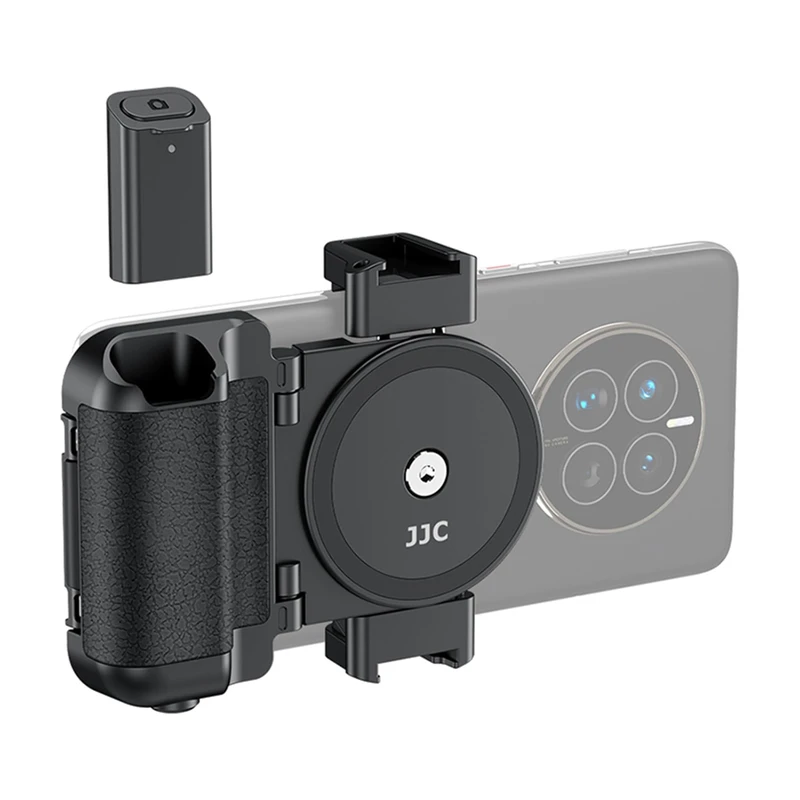
SnapRoamer.com – Smartphone camera grips act as specialized handheld accessories that stabilize mobile devices to reduce shakiness. By providing a secure hold, these tools help users capture better footage even during movement.
A poll of mobile vloggers revealed that 87% felt their video quality improved noticeably after adopting a smartphone grip.
The ‘Gimbal Conflict’: Choosing a grip that won’t break your stabilizer
To avoid motor strain, select a slim, lightweight grip when using a gimbal. Avoid bulky, heavy-duty cages or thick ergonomic handles that shift the phone’s center of gravity, as these can exceed the stabilizer’s payload capacity and cause axis errors.
The ZHIYUN Store notes that the lighter the phone gimbal stabilizer, the better. This is because maintaining a raised arm position during extended shooting sessions can become physically taxing for the operator. When a grip adds significant mass, it forces the gimbal motors to work harder to maintain balance.
Weight-to-Stability Ratio
DJI technology utilizes motors and sensors to reduce camera shake. However, these motorized systems rely on precise balance. If an accessory shifts the center of gravity too far from the mounting point, the motors may struggle to compensate for rapid movements. This can result in axis errors where the gimbal fails to level the horizon correctly.
Motor Strain and Payload Limits
Stabilization technology typically falls into two categories. DJI notes that gimbals use motors and sensors to reduce camera shake, while some stabilizers use weights to reduce shake and may not even require batteries. Furthermore, ZHIYUN Store documentation indicates that three-axis stabilizers are more stable than two-axis models because three-axis versions can correct unnecessary shakes on the yaw axis, whereas two-axis models only correct tilt or roll.
Technical Breakdown: When and why grips fail
Mechanical stress and mounting physics are primary drivers of accessory failure. Specific issues reported by users include breakage of plastic components or instability in mounting systems.
- Mechanical breakage: According to provideocoalition.com, the plastic claws on the ProGrip can break during the process of inserting the smartphone into the cradle.
- Security issues: The handstraps on the ProGrip have been documented by provideocoalition.com to come out easily during active use, increasing the risk of a drop.
- Magnetic instability: Digitalcameraworld.com reports that smartphones can dislodge from magnetic attachments, such as those found on the RØDE Phone Cage, during movement.
- Optical misalignment: APEXEL INDIA notes that blurry shots frequently occur when mobile lenses are not perfectly aligned with the device’s internal sensor.
A common misconception is that a magnetic grip is always faster to use. While the SnapGrip attaches instantly via magnetic connection, the physical force required during fast movement can cause the phone to slip, a failure mode that mechanical jaw-style grips avoid through physical clamping.
Core Functionality: Stability, Ergonomics, and Power
Grips address mobile limitations through enhanced ergonomics, increased stability, and integrated power. For instance, the 5000mAh Ulanzi MA45 provides significant battery capacity to extend shooting sessions.
MOJOGEAR states that “a smartphone camera grip is a handy tool when creating content with your smartphone.” These devices help bridge the gap between slim phone chassis and professional handling requirements.
The Ergonomic Advantage
ShiftCam reports that the ProGrip makes iPhones feel more like a traditional camera. This tactile shift is critical for long-form shooting. MOJOGEAR emphasizes that grips help users maintain a firm hold, which directly reduces the statistical chance of dropping the device during high-intensity movement.
Integrated Power Solutions
For creators working in the field, battery life is a primary constraint. Some grips function as mobile power stations. For example, the ShiftCam ProGrip includes a 3,000 mAh built-in power bank, whereas the Ulanzi MA45 offers a larger 5000 mAh capacity. Digitalcameraworld.com also notes that the ProGrip provides 15W wireless charging, allowing for a seamless power workflow.
| Feature | ProGrip (ShiftCam) | SnapGrip Pro | Ulanzi MA45 |
|---|---|---|---|
| Power Capacity | 3,000 mAh | Not Specified | 5,000 mAh |
| Charging Type | 15W Wireless | N/A | Wired/Integrated |
| Attachment Style | Spring-mounted jaws | Magnetic | N/A |
| Ergonomic Feel | Traditional Camera | Compact/Travel | Utility-focused |
The technical specifications in the table above highlight differences in power capacity and attachment methods between the ProGrip, SnapGrip Pro, and Ulanzi MA45.
Selecting the right power capacity depends on your specific workflow. While a 3,000 mAh bank is sufficient for short bursts, users requiring all-day reliability should prioritize higher capacity models like the 5,000 mAh Ulanzi unit.
The Bluetooth Shutter Workflow
ShiftCam suggests that if you shoot more than once a month—whether for Reels, street photography, or short videos—a phone grip provides a level of stability and control that is otherwise difficult to achieve. The workflow typically involves a half-press of the integrated shutter to focus, followed by a full-press to capture the image.
Grips vs. Gimbals vs. Tripods: Which do you actually need?
The choice between stabilization tools depends on whether your subject is stationary or in motion. A tripod is ideal for long exposures or static shots, but it lacks the versatility required for modern content creation.
Store.zhiyun-tech.com notes that gimbals are superior to tripods for moving shots. This is because gimbals utilize active motorized systems to counteract movement, whereas tripods are purely passive. Furthermore, DJI Indonesia explains that gimbals use motors and sensors to reduce shake, while traditional stabilizers rely on weights to achieve balance.
| Tool | Best Use Case | Stability Type | Learning Curve |
|---|---|---|---|
| Handheld Grip | Street/Casual | Manual/Ergonomic | None (Intuitive) |
| Gimbal | Vlogging/Cinematic | Motorized/Active | High |
| Tripod | Landscapes/Static | Fixed/Passive | Low |
Handheld grips offer an intuitive, low-learning-curve option for beginners. In contrast, gimbals provide higher motorized stability but require mastering complex balancing and operating modes.
Pro-Level Setup: Mastering your mobile gear
Professional mobile videography requires specific technical configurations to maintain image integrity across different shooting environments.
Vlogging Workflow with DJI Mimo
To maximize the utility of motorized stabilizers, follow the DJI recommended workflow:
- Pair your smartphone with the gimbal via Bluetooth.
- Attach the phone securely to the gimbal mount.
- Launch the DJI Mimo app to access specialized features.
- Select PF (Panorama/Follow) mode when shooting landscapes or selfies to ensure smooth tracking.
Precision Lens Mounting
When using external optics, precision is mandatory to avoid image degradation. APEXEL INDIA recommends the following steps for attaching a mobile lens:
- Wipe the phone lens and camera area clean of all oils.
- Mount the lens using a clip-on or magnetic mount.
- Ensure precise alignment between the lens center and the phone’s sensor.
- Double-check the frame for any peripheral distortions.
Underwater Rigging
For aquatic environments, standard grips are insufficient. MOJOGEAR suggests using specialized diving cases that incorporate vacuum pumps and dedicated buttons to maintain seal integrity and operational control while submerged.
FAQ
Will a phone grip work with third-party camera apps?
While most Bluetooth shutters work with native apps, check compatibility with Filmic Pro or Blackmagic Cam, as some grips may only trigger the default system shutter. This can affect your ability to control specific exposure settings directly from the grip.
Can I use a grip with a rugged case like Otterbox?
MagSafe grips may struggle with thick non-MagSafe cases. For rugged protection, consider a cage-style grip rather than a magnetic attachment to ensure the device remains physically clamped to the accessory regardless of case thickness.
How much extra weight does a grip add to my phone?
A standard grip like the ProGrip adds approximately 200g. It is essential to consider how this additional mass affects your center of gravity, especially when mounting the combined unit onto a tripod or a motorized gimbal.