SnapRoamer.com – To stabilize smartphone tripod photography in wind, prioritize lowering the tripod height, extending legs before the center column, and using low-center-of-gravity ballast. Avoid hanging heavy bags from the center column to prevent the pendulum effect, and use a remote shutter or timer to eliminate touch-induced vibrations.
Wind is one of the hardest things to deal with as a landscape photographer, according to Spencer Cox.
Optimizing Smartphone Aerodynamics and Software Settings
To minimize wind drag on a smartphone, remove bulky rugged cases and clip-on accessories like ring lights or microphones that create a ‘sail effect.’ Additionally, toggle off Optical Image Stabilization (OIS) in your camera app settings to prevent the sensor from ‘fighting’ wind-induced micro-vibrations, which can cause blur.
Managing the ‘Sail Effect’ of Accessories
Wind force transfers to your tripod based on the device’s physical profile. Accessories that increase surface area create a “sail effect,” catching gusts and pulling the tripod off-balance. To maintain stability, follow these aerodynamic adjustments:
- Remove bulky, high-profile rugged cases that increase the wind drag profile of the device.
- Detach clip-on lenses, ring lights, or external microphones that act as wind catchers.
- Remove lens hoods if they are catching air, as they can create unnecessary torque on the mount.
Toggling OIS and Software Stabilization
Leaving software stabilization active can degrade sharpness. If the sensor attempts to “fight” high-frequency oscillations caused by the wind, it can result in smeared or soft images. For maximum precision, navigate to your camera app’s professional or manual settings to disable electronic or optical stabilization when the device is mounted.
The Low-Center-of-Gravity Ballast Strategy
To counteract wind, you must increase the mass of the base without introducing new points of oscillation.
Applying the 1.5x Mass Rule
For high-wind coastal shoots or exposed ridges, practitioners recommend the 1.5x Mass Rule. This principle dictates that your counterweight mass should be at least 1.5 times the combined mass of your smartphone and the tripod head. This ensures the downward force of gravity significantly outweighs the lateral force of the wind gusts.
Avoiding the Pendulum Effect
Maintain a low center of gravity by avoiding the center hook. Use these mobile-specific ballast hacks to keep weight close to the ground:
- Attach weight low on the tripod legs using a leg spreader pouch or tension straps.
- Use everyday items like water bottles or heavy stones, securing them to the lower leg sections.
- Utilize a heavy power bank, strapped to the bottom of a leg, to add mass without creating a swinging load.
Mechanical Setup: Leg Extension and Column Management
Prioritize height through leg extension. Extending the center column lifts the center of gravity, making the setup top-heavy and increasing vulnerability to wind-induced vibrations and camera shake.
The center column is the weakest part of your tripod, according to Iceland Photo Tours. When extended, it acts as a long lever that amplifies the movement of every wind gust.
Shortcut: To achieve the most stable setup, extend all tripod legs to their full length before attempting to raise the center column. Only use the column for fine-tuned height adjustments.
Material Science: Carbon Fiber vs. Aluminum in Windy Conditions
The material composition of your tripod determines how quickly it recovers from a gust. Carbon fiber offers distinct mechanical advantages for vibration management.
| Material | Vibration Settling Time | Thermal/Wind Property |
|---|---|---|
| Aluminum | 5.3 seconds | Highly efficient thermal conductor |
| Carbon Fiber | 1.0 second | ~81% reduction in vibration settling time |
As shown in the data, carbon fiber demonstrates an approximately 81% reduction in vibration settling time compared to aluminum for a 1.5kg payload. While aluminum is a highly efficient thermal conductor—which can be a drawback in freezing winter conditions where it acts as a thermal bridge—carbon fiber’s primary advantage in wind is its ability to dampen oscillations almost instantly. An aluminum tripod may take 5.3 seconds to stop vibrating after a physical disturbance, whereas a carbon fiber model settles in just 1.0 second.
Securing the Weakest Link: The Smartphone Mount
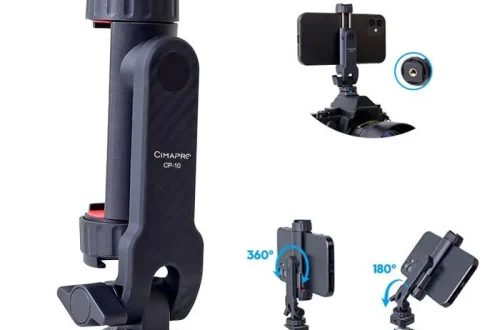
Even a heavy, carbon fiber tripod will fail if the connection to the phone is unstable. The smartphone mount is often the most overlooked point of failure in a windy environment.
Wind-proofing the connection requires ensuring your clamp or mount is physically secure. Ensure your mount provides a high-friction grip and that the tightening mechanism is robust enough to maintain a rigid connection between the phone and the tripod head.
Ground Anchoring and Environmental Tactics
To prevent the wind from sliding the entire unit, anchor the base. Use these environmental tactics:
- Press tripod feet firmly into the surface or push legs deep into the sand to create a mechanical lock.
- Position your body as close as possible to your camera to act as a physical windbreak.
- Use a jacket or gear as a shield to block the wind from hitting the smartphone directly.
- Stand far enough away from the tripod to avoid adding instability to the platform every time you take a step or shift your weight.
Implementing these mechanical and software adjustments helps maintain stability during high-wind events.
FAQ
Will hanging a bag from my tripod help in the wind?
Hanging a bag from the center column can create a “pendulum effect” that increases instability. Instead, attach weight as low as possible on the legs to maintain a low center of gravity.
Should I use a remote shutter in windy weather?
Yes. Pressing the shutter button manually introduces touch-shake. Using a Bluetooth remote or a self-timer—even with a 10-meter range—ensures the tripod has time to settle after any physical contact.
Does the type of tripod material affect wind performance?
Yes. Carbon fiber is superior for wind because it dampens vibrations significantly faster—roughly 81% faster than aluminum—helping your smartphone maintain a stable position during gusts.