SnapRoamer.com – Documenting cultural experiences requires a balance of technical precision and deep respect for local traditions. To capture authentic moments, prioritize natural light, use portrait mode for subject separation, and always respect local photography restrictions to ensure your documentation is both visually striking and ethically sound.
A camera is just an aid in the process of making an image; the best tools are your eyes and your mind.
The Ethics of the Human Subject: Documenting with Respect
Photography at religious or cultural sites requires particular sensitivity. Churches, mosques, temples, synagogues, monasteries, and memorial sites often have photography restrictions designed to preserve reverence and respect. Furthermore, traditional knowledge is a cultural resource that may not be public property; it belongs specifically to an individual or a group and is not always meant for public consumption.
Religious and cultural sites deserve particular sensitivity. Churches, mosques, temples, synagogues, monasteries, and memorial sites often have photography restrictions designed to preserve reverence and respect. Ignoring these signs is a primary failure mode that can lead to immediate removal from a site or deep offense to the practitioners. Practitioners note that traditional knowledge is a cultural resource that may not be public property; it belongs specifically to an individual or a group and is not always meant for public consumption.
Navigating Photography Restrictions in Sacred Spaces
When entering a temple or mosque, the first step is to look for signage or ask a local guide about photography rules. Some sites allow photos of the architecture but strictly prohibit images of active prayer or specific deities. A common mistake is assuming that because a space is open to the public, every corner is open to the lens. Always prioritize the sanctity of the ritual over the shot.
The Ethics of Candid vs. Posed Cultural Moments
Photographers often face a choice between candid shots and posed portraits. While a candid image might capture raw emotion, capturing a person in a moment of vulnerability without consent can violate their dignity. Aim to build a rapport first. If you are documenting a community, ensure your presence does not disrupt the natural flow of their daily life. Respecting the 2-way relationship between the photographer and the subject is more important than a single frame.
Stealth Documentation: Capturing Moments Without Disruption
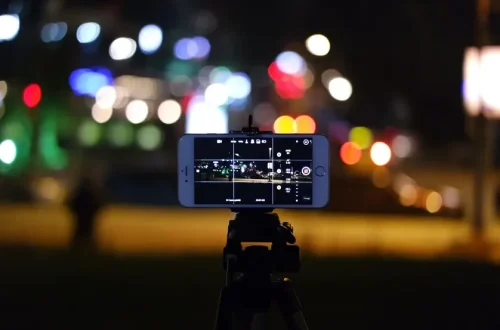
A bright screen or a loud shutter sound can break the atmosphere of a ceremony. To maintain a low profile, adjust your device settings. Minimize screen brightness to avoid drawing attention and ensure your device is in silent mode to prevent accidental shutter sounds.
Using Physical Buttons for Silent Capture
If you find that hitting the touch screen is causing a shake, most phones will also allow you to use the volume down button to take the snap instead. This is a highly effective method for discreet shooting. By using the volume buttons or even headphone buttons as a shutter release, you can capture images while keeping your hands steady and your eyes focused on the subject rather than the screen.
- Minimize Brightness: Lower your screen brightness to the minimum usable level to avoid glowing in dark environments.
- Volume Shutter: Use the physical volume buttons to trigger the shutter to prevent “tap shake.”
- Silent Mode: Ensure all system sounds and shutter clicks are disabled in your device settings.
Managing Digital Footprints and Metadata
Smartphones allow you to capture, edit, and share photos all in one place. When managing these files, avoid over-editing cultural scenes in a way that strips them of their true context or color accuracy.
Mastering Texture and Detail in Cultural Artifacts
To capture intricate cultural crafts, textiles, or architecture, use your smartphone’s macro-focus capabilities and exposure compensation. Avoid digital zoom beyond 2x to prevent graininess, and use portrait mode to softly blur backgrounds, keeping the detailed subject sharp and centered.
Portrait mode works especially well for photographing market details and cultural experiences because it softly blurs the background while keeping the subject sharp. This creates a sense of depth that makes the artifact “pop” from the frame.
Optimizing Macro Focus for Textiles and Carvings
Smartphone cameras often struggle when you get too close to a subject, but modern devices allow for fine-tuned focus. A major pitfall is over-reliance on digital zoom. Where smartphones lag is in the area of zoom—anything more than 2x zoom will cause your image to become grainy. Instead of zooming in digitally, physically move your phone closer to the object or use the specific lens switching options (such as 0.5x, 1x, or 3x) located near the shutter button to find the right perspective.
Managing Exposure for High-Contrast Textures
Cultural artifacts are often viewed under harsh or uneven lighting. To prevent losing detail in the shadows or blowing out the highlights on a metallic surface, use manual exposure control. You can do this by using the long-press and swipe technique: long-press on the subject to lock focus, then swipe the screen up or down to make the image brighter or darker.
Low-Light Rituals and Evening Festivals
Mobile phones usually do not handle low light conditions very well. Because smartphone sensors are much smaller than those in professional cameras, they struggle to gather enough light without introducing significant “noise” or graininess.
Avoiding the Unflattering Smartphone Flash
The flash on your phone camera is not flattering for photos, whether you’re shooting in the daytime, late at night, landscapes, flowers, or portraits. Instead, look for alternative light sources within the environment, such as lanterns, candles, or even the ambient glow of a festival. If the light is too dim, your priority should be stability rather than brightness.
Stability Techniques for Nighttime Ceremonies
To combat blur, find a steady base. Rest the phone on a stone, a wall, or a small tripod. If the subject is moving—such as a dancer in a festival—use Burst Mode. Taking many photos at once allows you to capture fast-moving subjects and gives you a higher chance of selecting one frame where the motion is perfectly frozen.
Smartphone vs. DSLR: The Cultural Storyteller’s Choice
The choice between a smartphone and a professional camera depends on your specific documentation goals. While a smartphone offers unmatched speed and integration, professional gear offers superior image quality in challenging environments.
| Criterion | Smartphone | DSLR/Mirrorless |
|---|---|---|
| Integration/Speed | Allows capturing, editing, and sharing in about 10 minutes. | Requires separate steps for transferring and editing. |
| Low-light Performance | Struggles with high-ISO noise in dark settings. | Larger sensors produce much better high-ISO photos. |
| Portability | Extremely high; fits in a pocket. | Requires bags and more physical effort to carry. |
| Zoom Quality | Digital zoom beyond 2x causes graininess. | Optical zoom maintains high detail. |
In a crowded, fast-moving market, the smartphone’s ability to capture, edit, and share in roughly 10 minutes makes it an incredibly efficient tool for real-time storytelling. However, if you are documenting a dark, solemn evening ritual where image fidelity is paramount, the larger sensors found in mirrorless or advanced compact cameras will provide a level of detail that a smartphone cannot match.
FAQ
Should I use my smartphone flash for cultural portraits?
No, the flash on your phone camera is not flattering for photos, whether you’re shooting in the daytime, late at night, landscapes, flowers, or portraits. It is better to utilize natural light or find a steady base for longer exposures in low light to preserve the authentic atmosphere of the scene.
How much zoom is safe on a smartphone camera?
To avoid grainy images, try to stay within the 2x zoom threshold. Beyond 2x, digital zoom significantly degrades image quality, making the photo appear pixelated and lose fine detail.
How can I take photos discreetly in a religious site?
Use the volume buttons as a physical shutter release and minimize screen brightness to avoid drawing attention to your device. This helps you remain a respectful observer rather than a disruptive presence.