SnapRoamer.com – Accurate white balance correction remains a critical factor in achieving true-to-life color representation in photography and videography. Despite advancements in automatic white balance algorithms on smartphone cameras such as iPhone and Samsung models, inconsistent lighting conditions and artificial light sources often cause color casts that distort the final image. To address these challenges, photographers increasingly rely on specialized apps that offer precise white balance measurement, manual adjustment, and color temperature control to ensure color fidelity across diverse shooting environments.
Among these, the White Balance Kelvin Meter app stands out as a leading tool for real-time color temperature measurement using both front and rear smartphone cameras. This app provides high-precision Kelvin readings, supports multilingual interfaces, and includes calibration options that enhance accuracy tailored to specific cameras and lighting setups. A unique feature is its flash gel recommendations, offering guidance on CTO (Color Temperature Orange), CTB (Color Temperature Blue), Green, and Magenta gels to balance ambient lighting effectively. Complementary photo editing apps like Snapseed and VSCO CAM also provide robust white balance correction tools and selective adjustment features, allowing users to fine-tune color casts post-capture for professional results.
Top White Balance Correction Apps: Features and Functionalities
The White Balance Kelvin Meter app utilizes the Kelvin scale to measure color temperature in real-time, a crucial parameter influencing white balance accuracy. Its calibration feature enables users to tailor the app’s readings to specific devices, correcting any systematic deviations caused by sensor differences. This precision is vital for photographers working under mixed lighting or unusual conditions where automatic white balance fails. The app’s ability to recommend appropriate flash filter gels supports lighting professionals in balancing artificial flashes with ambient light, mitigating unwanted color casts in portrait and product photography.
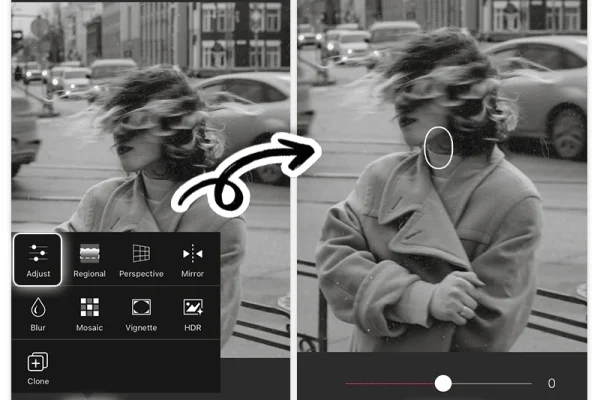
Snapseed, a widely-used photo editing app owned by Google, incorporates selective white balance adjustment tools that allow users to modify specific areas within an image. This granular control is essential for correcting localized color casts caused by uneven lighting. Snapseed’s integration of advanced color grading tools further complements white balance correction by enabling users to adjust hue, saturation, and luminance with precision.
VSCO Cam offers manual white balance control within its camera app, enabling users to set Kelvin temperature values directly before capturing images. This capability is particularly advantageous for photographers seeking greater creative control over their smartphone photography. The app also provides a variety of presets designed to emulate classic film stocks, which include predefined white balance settings optimized for different lighting conditions.
Hydra and Camera+ apps similarly provide manual white balance locking and temperature adjustment features. Hydra specializes in high dynamic range (HDR) imaging and employs white balance controls to maintain color consistency across multiple exposures. Camera+ emphasizes manual control, including white balance presets and custom Kelvin temperature input, appealing to enthusiasts who prefer fine-tuning camera parameters traditionally available only in DSLRs or mirrorless cameras.
Understanding White Balance and Color Temperature in Photography
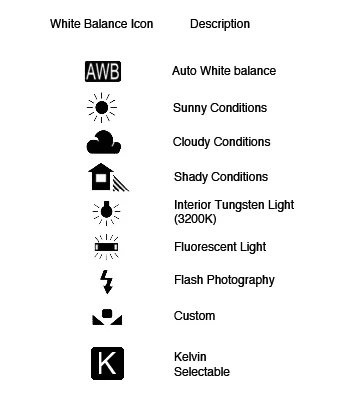
The Kelvin scale quantifies color temperature, representing the hue of light sources from warm (lower Kelvin values) to cool (higher Kelvin values). Typical photographing conditions span from tungsten lighting (~3200K), which produces a warm orange-yellow cast, to daylight (~5600K), characterized by neutral white light. Fluorescent lights and cloudy daylight vary in color temperature, often requiring manual adjustment to achieve neutral whites and accurate color reproduction.
artificial lighting can introduce color casts—tints of green, magenta, or orange—that automatic white balance systems might misinterpret. Photographers use flash gel filters such as CTO, CTB, green, and magenta gels to modify flash output color, aligning it with ambient lighting. For instance, a CTO gel warms a flash output to match tungsten lighting, preventing unnatural blue tones. The White Balance Kelvin Meter app’s flash gel recommendations assist users in selecting optimal filters for their specific lighting environment, streamlining this traditionally technical process.
Practical Applications and User Experiences with White Balance Apps
Professional photographers and lighting technicians benefit from real-time Kelvin measurement to make immediate white balance adjustments during shoots. The White Balance Kelvin Meter app allows users to save and document these measurements, facilitating consistent color correction across multiple sessions or locations. This consistency is crucial for portrait studios, product photography, and videography where color accuracy directly impacts output quality.
User testimonials highlight the app’s ease of use and accuracy, noting its utility in challenging lighting scenarios such as mixed indoor lighting and outdoor shade. Multilingual support and customizable calibration enhance accessibility for international users and diverse camera models, broadening its professional appeal.
Snapseed users frequently praise the selective white balance adjustments for repairing localized color issues without affecting the entire image, a feature particularly useful in complex scenes with varying light sources. VSCO Cam users appreciate manual Kelvin control for creative expression, enabling deliberate use of warm or cool tones for mood setting.
Comparative Evaluation of White Balance Tools for Different User Profiles
Smartphone apps like White Balance Kelvin Meter and VSCO Cam cater primarily to mobile photographers and lighting professionals requiring portability and convenience. Their features emphasize real-time measurement, manual control, and integration with existing smartphone cameras for immediate application. Snapseed’s strength lies in post-processing, offering precise selective editing without the need for advanced hardware.
Desktop software such as Capture One Pro provides comprehensive white balance and color grading controls suited for high-volume professional workflows. Capture One Pro supports tethered shooting with advanced color calibration profiles and batch white balance adjustments, ideal for studio photographers who demand pixel-perfect color fidelity.
The choice between mobile apps and desktop software depends on user needs: mobile apps prioritize accessibility and on-the-go corrections, while desktop solutions deliver granular control and integration with professional-grade cameras. Casual users may find Snapseed sufficient for routine color corrections, whereas professionals often combine in-camera manual white balance settings with post-processing tools for optimal results.
Best Practices in Manual White Balance Adjustment and Color Correction

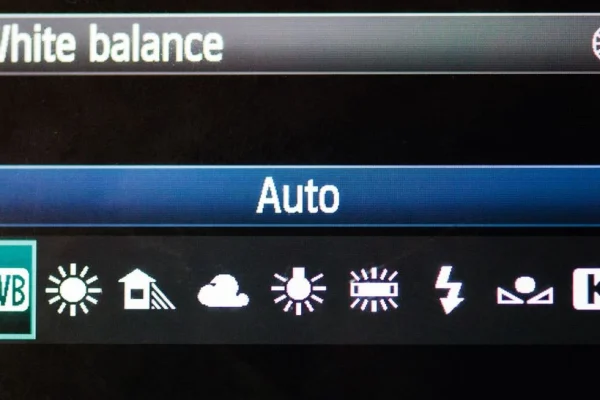
Manual white balance adjustment on smartphones involves setting the Kelvin temperature to match the prevailing lighting conditions. Most apps and camera settings provide presets for common lighting types such as tungsten, daylight, and fluorescent. For precise correction, photographers measure ambient color temperature using a Kelvin meter app and input the exact value into their camera or editing software.
Combining in-camera white balance settings with post-processing tools enhances final image quality. Manual adjustment during shooting prevents color cast artifacts, reducing the need for extensive edits. Post-processing apps like Snapseed offer selective corrections to address residual issues or creative color grading.
Photographers working under mixed lighting should consider flash gel filters recommended by Kelvin meter apps to harmonize artificial and natural light sources. This approach minimizes complex color casts and streamlines the correction process.
| App/Software | Platform | Key Features | White Balance Control | Additional Tools |
|---|---|---|---|---|
| White Balance Kelvin Meter | iOS, Android | Real-time Kelvin measurement, calibration, flash gel recommendations | Precise manual Kelvin input, front/rear camera support | Multilingual support, color temperature presets |
| Snapseed | iOS, Android | Selective white balance adjustment, advanced photo editing | Selective area white balance correction | Color grading, filters, healing tool |
| VSCO Cam | iOS, Android | Manual white balance control, presets emulating film stocks | Manual Kelvin adjustment pre-capture | Photo filters, camera app integration |
| Hydra | iOS | HDR imaging, manual white balance locking | Manual temperature adjustment | Exposure blending, detail enhancement |
| Camera+ | iOS | Manual white balance presets, temperature control | Manual white balance locking | RAW shooting, advanced camera controls |
| Capture One Pro | Windows, macOS | Professional color grading, tethered shooting, batch processing | Advanced white balance profiles, manual Kelvin input | Color calibration, lens correction, layer-based editing |
FAQ

What is the best app for real-time white balance measurement?
The White Balance Kelvin Meter app is widely regarded as the best for real-time Kelvin temperature measurement, offering high precision, device calibration, and flash gel recommendations to ensure accurate white balance across various lighting conditions.
How does manual white balance adjustment improve photo quality?
Manual white balance adjustment allows photographers to set the exact color temperature of the lighting environment, eliminating unwanted color casts caused by artificial or mixed lighting. This results in more natural and consistent colors in photographs.
Can smartphone cameras achieve professional white balance accuracy without external apps?
While modern smartphones have advanced automatic white balance systems, they can struggle in complex lighting environments. External apps like White Balance Kelvin Meter and manual adjustment tools in apps such as VSCO Cam provide greater control and accuracy for professional results.
What role do flash gel filters play in white balance correction?
Flash gel filters modify the color output of flash units to match ambient lighting temperatures, preventing color mismatches and unnatural tints. Apps that recommend specific flash gels help photographers achieve balanced lighting in mixed environments.
Are desktop photo editing tools necessary if I use white balance apps on my smartphone?
Desktop tools like Capture One Pro offer more comprehensive white balance and color grading controls, beneficial for professional workflows and high-resolution images. However, smartphone apps suffice for many users needing quick and effective white balance correction on the go.
Accurate white balance correction continues to evolve with the integration of AI-powered color correction and real-time Kelvin measurement technologies embedded in smartphone apps. The White Balance Kelvin Meter app exemplifies this trend, combining user-friendly interfaces with advanced calibration and flash gel guidance to meet the demands of photographers and lighting professionals worldwide. As smartphone cameras become increasingly sophisticated, leveraging dedicated white balance tools alongside manual adjustment techniques will remain essential for achieving the highest color fidelity in digital imaging.
For further insights and app downloads, visit the White Balance Kelvin Meter app page and explore detailed reviews at Improve Photography’s article on top photo editing apps.