SnapRoamer.com – smartphone photography apps have revolutionized the way photographers capture and enhance symmetry in their images, blending manual controls with AI-driven editing tools. Symmetry, a fundamental principle in photographic composition, enhances visual balance and aesthetic appeal by aligning elements in reflectional or radial patterns. Modern smartphones, equipped with advanced cameras and paired with specialized apps, now enable users to explore this compositional technique with precision and creativity. Leading apps like Adobe Project Indigo enable manual RAW capture, while AI-powered tools such as Facetune and YouCam Makeup offer facial symmetry corrections. Additionally, creative editing apps including Pixlr’s mirror image tool facilitate artistic symmetrical effects, expanding the boundaries of mobile photography.
This article explores the best smartphone applications for capturing and enhancing symmetry, emphasizing their features, practical uses, and limitations. It offers insights into manual shooting techniques, AI retouching capabilities, and creative tools that collectively empower users to create compelling symmetrical photographs. By integrating professional recommendations and user reviews, the discussion presents a comprehensive guide for photographers seeking to optimize their symmetry photography using smartphones.
Manual Control and Capture: Enhancing Symmetry at the Source
manual camera controls remain essential for photographers aiming to capture symmetry accurately at the source rather than relying solely on post-processing. Adobe Project Indigo exemplifies the advancements in smartphone camera apps by offering robust manual control over focus, exposure, ISO, and shutter speed, alongside support for RAW image capture. RAW format preserves maximum image data, enabling detailed adjustments without quality loss—critical for maintaining clean lines and balanced tones in symmetrical compositions. According to photography expert Greg Benz, Project Indigo’s interface and control precision make it one of the best camera apps available for smartphones, particularly for users who prioritize compositional accuracy and high-fidelity capture.Greg Benz Photography Review
Tripods and remote shutter controls complement manual shooting by stabilizing the camera and reducing vibrations that can disrupt symmetry, especially when shooting architectural or reflection-based subjects. Employing a tripod ensures consistent framing and sharpness, while timers or Bluetooth remotes prevent shake during capture. Photographers are advised to shoot during golden hour lighting, as the soft, directional light enhances depth and highlights symmetrical features without harsh shadows that can break visual harmony.
Compositionally, leveraging symmetry involves deliberate use of leading lines, quadrants, and negative space. Apps like Composition Cam provide overlays that assist in aligning subjects symmetrically within the frame, using grids and symmetry guides inspired by traditional photographic principles. These tools facilitate real-time adjustments, allowing photographers to refine their compositions before pressing the shutter, significantly improving the chances of capturing perfectly balanced images.
AI-Powered Facial Symmetry Correction Apps
Facial symmetry is a widely recognized marker of aesthetic appeal, but natural human faces often exhibit slight asymmetries. AI-powered apps address this by enabling subtle corrections that enhance perceived balance while preserving authenticity. Facetune’s Reshape tool allows users to adjust facial features, such as jawlines and eyes, with precision and intuitive controls. The app uses AI algorithms to suggest adjustments that maintain natural proportions, avoiding over-editing that can result in artificial appearances.
YouCam Makeup’s AI Retake feature offers a quick and user-friendly method for symmetry correction, integrating seamlessly with makeup enhancement tools. This app provides real-time previews of changes, supporting subtle facial refinements that enhance symmetry without compromising facial identity. User feedback highlights its effectiveness for casual users seeking immediate improvements for social media portraits.
For more professional results, RetouchMe employs expert manual editing services combined with AI automation to deliver high-quality facial symmetry corrections. Unlike fully automated apps, RetouchMe’s human editors can interpret and respect natural asymmetries, ensuring results that appear natural rather than digitally altered. This hybrid approach addresses limitations inherent in AI-only tools, such as over-smoothing or unrealistic reshaping.
It is important to acknowledge that facial asymmetry is normal and contributes to individual uniqueness. Experts caution against excessive reliance on AI corrections, which can diminish authenticity and create unrealistic beauty standards. Balanced use of these apps, combined with good lighting and camera angles, yields the most flattering and natural outcomes.
Creative Symmetry and Reflection Photography Tools
Beyond technical capture and subtle facial corrections, creative symmetry apps enable artistic exploration of reflectional and radial symmetry. Pixlr’s mirror image tool is a standout, offering kaleidoscopic effects that replicate symmetrical reflections or multiply image segments to create intricate patterns. Such effects are popular for abstract photography and social media content, providing visually striking compositions that emphasize balance and repetition.
Composition Cam also supports framing symmetrical shots through customizable overlays, including quadrant divisions and diagonal lines, which assist photographers in adhering to symmetry principles during capture. These overlays are valuable for architectural photography, landscapes, and portraiture, where precise alignment enhances the image’s impact.
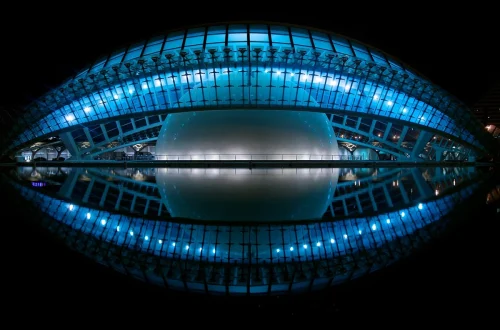
Reflection and radial symmetry photography benefit from deliberate use of natural or artificial reflective surfaces such as water, glass, or mirrors. Smartphone apps designed for these genres often include tools for perspective correction and highlight enhancement to accentuate symmetry. For example, apps with built-in HDR and exposure bracketing complement symmetry photography by balancing lighting across reflective surfaces, preserving details in both shadows and highlights.
Practical Tips for Using Symmetry Photography Apps
Combining shooting and editing apps is the most effective strategy for achieving high-quality symmetrical photographs. Starting with apps like Adobe Project Indigo for precise manual capture ensures that the base image contains minimal distortion and optimal composition. Following capture, using AI-assisted editing apps such as Facetune or YouCam Makeup allows for refined facial symmetry adjustments, while creative tools like Pixlr expand artistic possibilities.
Many of these apps integrate social media sharing features, enabling photographers to publish their work directly to platforms like Instagram and TikTok. This streamlines the workflow but also necessitates attention to export settings to maintain image quality and aspect ratios suited for symmetrical compositions.
Users should be aware of limitations inherent in symmetry editing, particularly regarding facial features. Overuse of AI retouching can result in unnatural appearances, and some apps may introduce artifacts or distortions when applying mirror effects. Best practices include maintaining moderate edits, cross-referencing before-and-after images, and combining manual adjustments with AI tools for balanced outcomes.
Choosing the Right Apps for Your Symmetry Photography Needs

Selecting the optimal smartphone app depends on the user’s goals—whether capturing precise symmetrical compositions, correcting facial asymmetry, or creating artistic symmetrical effects. Adobe Project Indigo is ideal for photographers prioritizing manual control and image fidelity, especially those shooting in RAW format for post-processing flexibility. For facial symmetry correction, Facetune and YouCam Makeup offer accessible AI-powered tools suitable for casual and semi-professional users, while RetouchMe provides a professional touch through expert manual editing.
Creative symmetry enthusiasts benefit from apps like Pixlr and Composition Cam, which specialize in mirror image effects and compositional overlays. The integration of these tools into photography workflows enhances the ability to produce visually compelling and balanced images.
Future developments in smartphone photography apps are expected to deepen AI capabilities, offering more nuanced and context-aware symmetry corrections, while expanding manual control options. Photographers are encouraged to experiment with both manual and AI tools, leveraging each for their strengths to achieve authentic, aesthetically pleasing symmetrical photographs.
| App | Primary Function | Key Features | Ideal User | Platform |
|---|---|---|---|---|
| Adobe Project Indigo | Manual Capture | RAW support, manual controls, exposure/bracketing | Enthusiast & Professional Photographers | iOS |
| Facetune | AI Facial Symmetry Correction | Reshape tool, AI smoothing, intuitive UI | Casual & Social Media Users | iOS, Android |
| YouCam Makeup | AI Facial Symmetry & Makeup | AI Retake, makeup filters, real-time correction | Casual Users, Beauty Enthusiasts | iOS, Android |
| RetouchMe | Manual Expert Editing | Professional symmetry correction, manual retouch | Professional & Serious Hobbyists | iOS, Android |
| Composition Cam | Symmetry Composition Guides | Grids, quadrant overlays, real-time framing aid | All Levels, Composition Focused | iOS |
| Pixlr Mirror Image Tool | Artistic Symmetry Effects | Kaleidoscopic effects, mirror tools, filters | Creative & Social Media Users | iOS, Android |
FAQ

What is the best smartphone app for capturing symmetrical photos with manual control?
Adobe Project Indigo is widely regarded as the best app offering extensive manual controls and RAW capture, enabling precise composition and exposure adjustments essential for symmetry photography.
Which apps provide AI-based facial symmetry correction?
Facetune and YouCam Makeup are leading apps that utilize AI to correct and enhance facial symmetry, offering easy-to-use tools suitable for casual users and social media enthusiasts.
Can I create artistic mirror and kaleidoscopic effects using smartphone apps?
Yes, Pixlr’s mirror image tool and similar apps provide artistic symmetry effects, including kaleidoscopic patterns and reflections, allowing for creative and visually striking images.
How important is using a tripod for symmetry photography on smartphones?
Using a tripod is crucial for maintaining consistent framing and sharpness, especially when composing symmetrical shots that require precise alignment and minimal camera shake.
Are AI facial symmetry corrections always natural-looking?
While AI can enhance symmetry effectively, excessive or uncalibrated edits may produce unnatural results. Combining AI tools with manual adjustments and mindful editing practices helps maintain authenticity.
The integration of manual shooting techniques, AI retouching, and creative symmetry tools represents the future of smartphone symmetry photography. As app developers continue to innovate, photographers can expect increasingly sophisticated features that balance technological precision with artistic expression. Exploring these apps and techniques offers a pathway to mastering symmetry photography, enriching both technical skills and creative vision.
For further information on photography apps and manual controls, visit Renee Roaming’s photography app reviews.