SnapRoamer.com – Smartphone cameras have advanced rapidly, yet achieving consistently sharp focus remains a challenge due to inherent autofocus limitations and environmental factors. Users often encounter issues where the camera fails to lock focus on the intended subject, resulting in blurry or poorly exposed photos. Addressing these challenges involves mastering manual focus techniques, utilizing hardware accessories for stabilization, and optimizing camera settings, including exposure controls. Implementing these strategies can significantly enhance image sharpness and overall photographic quality on devices like the iPhone, Samsung Galaxy, and TCL smartphones.
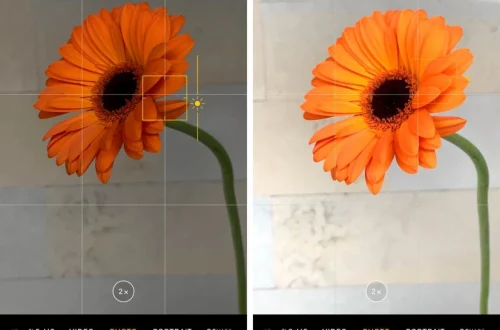
Tapping the screen on the desired subject is the initial step to manually control focus on a smartphone camera. This action instructs the camera to prioritize that area for autofocus. To maintain focus on the chosen subject throughout the shot, a long press on the screen activates AE/AF lock (auto-exposure/auto-focus lock), preventing the camera from adjusting focus or exposure due to movement or lighting changes. Confirmation of precise focus can be achieved by zooming in on the subject before capturing the image. Disabling tracking autofocus, which can automatically shift focus to unintended areas, is advisable in complex scenes where background and foreground elements vary significantly in distance.
Manual Focus Control Techniques
manual focus on smartphones hinges on intuitive touch controls embedded within the native camera apps and specialized third-party applications. On iPhones and many Android models, a tap on the screen sets the focus point, while holding the tap engages AE/AF lock, a feature critical for stabilizing both focus and exposure settings in dynamic shooting conditions. This functionality ensures that neither focus nor exposure shifts unexpectedly as the subject or camera moves.
Some camera apps like Camera+ and Top Camera extend manual control capabilities by allowing separate adjustments of focus and exposure. These apps provide sliders or focus rings that mimic DSLR-like manual focus, granting users granular control over focus distance and brightness. For example, Camera+ offers a dedicated manual focus slider, enabling photographers to fine-tune sharpness in macro or low-light scenarios where autofocus tends to struggle.
Another manual focus technique involves disabling tracking autofocus, which is designed to keep moving subjects in focus but can cause the camera to refocus erratically in scenes with multiple subjects or complex backgrounds. Disabling this feature helps maintain consistent focus on a chosen point, particularly useful in portrait or still life photography.
Stabilization Methods to Enhance Focus
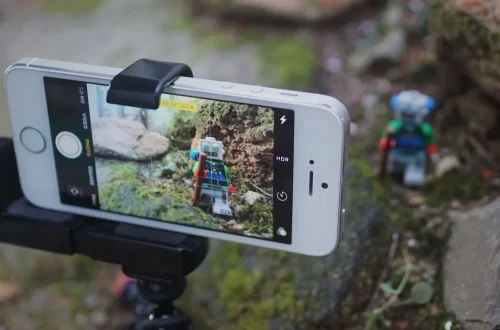
Even with precise focus settings, camera shake remains a principal cause of blurred images. Using a tripod or a dedicated phone holder significantly reduces shake, especially during close-up shots or low-light conditions where shutter speeds slow down. Tripods provide a stable platform, eliminating hand tremors that can shift focus and degrade sharpness.
Utilizing the camera’s timer mode further mitigates shake by allowing the photographer to initiate the shutter and then remove their hands from the device before the photo is taken. This technique is particularly effective for long-exposure shots or when using additional hardware like external lenses.
Camera shake impacts focus clarity by causing micro-movements during the exposure, leading to motion blur even when the lens is correctly focused. For smartphone users, leveraging stabilization accessories is essential to maximize the benefits of manual focus techniques, especially in scenarios demanding pixel-level sharpness.
Exposure and Focus Separation
A common obstacle when relying on default smartphone cameras is the coupling of autofocus and auto-exposure functions. When focus shifts, exposure settings often adjust simultaneously, which may result in inconsistent brightness and image sharpness. Separating these controls allows photographers to lock exposure independently from focus, maintaining consistent lighting while fine-tuning sharpness.
Camera apps such as Camera+ and Top Camera enable exposure and focus separation, offering dedicated controls for each. This separation is crucial in high-contrast environments or scenes with challenging lighting, where automatic exposure adjustments can cause overexposure or underexposure around the focal point.
Adjusting exposure manually enhances image clarity by ensuring that highlights are preserved and shadows retain detail, supporting the overall perception of sharpness in a photograph. This level of control also facilitates creative effects, such as deliberately underexposing to increase contrast or overexposing for a bright, airy look without sacrificing focus accuracy.
Maintaining Your Phone Camera for Optimal Focus
Optimal focus performance depends not only on technique but also on proper maintenance of the smartphone camera hardware and software. A frequently overlooked aspect is lens cleanliness; smudges, fingerprints, and dust on the camera lens can cause blurred or hazy images. Cleaning the lens with a microfiber cloth regularly ensures the optical surface remains clear, directly impacting focus sharpness.
Phone accessories, such as cases or attachable lenses, must be positioned carefully to avoid obstructing the camera lens or introducing optical distortions. Misaligned accessories can interfere with autofocus mechanisms or degrade image quality.
Keeping the smartphone’s camera software updated is vital, as manufacturers frequently release firmware improvements that enhance autofocus algorithms and address bugs. Updates for the iPhone camera, Samsung Galaxy series, and other models often include refinements to focus speed and accuracy.
If persistent focus issues arise, resetting the camera settings to default can resolve conflicts caused by user customizations or corrupted data. This action restores factory configurations, eliminating software glitches that might impair autofocus function.
Additional Photography Tips to Improve Focus
Employing burst mode is a practical approach to increasing the likelihood of capturing sharp images, especially in dynamic scenes or with moving subjects. Burst mode rapidly captures a series of frames, allowing users to select the sharpest shot post-capture. This technique is effective for sports, wildlife, or children’s photography.
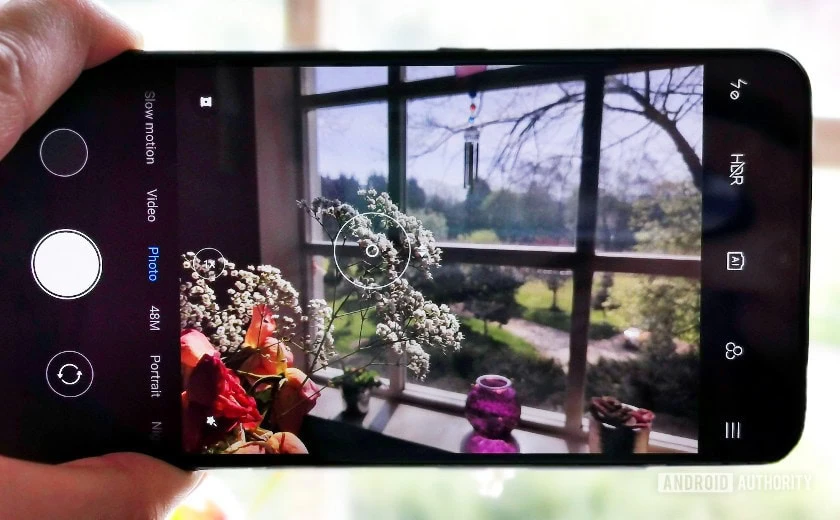
Composition tools like gridlines and the rule of thirds assist in aligning subjects and maintaining focus on key elements. Positioning the subject along grid intersections guides autofocus systems and enhances visual appeal.
natural light plays a pivotal role in autofocus performance. Cameras perform optimally under ample, diffuse lighting conditions, which improve sensor responsiveness and contrast detection necessary for accurate focusing. Shooting outdoors during the golden hours or near windows indoors can markedly improve focus precision.
Exploring different perspectives and angles can also help achieve better focus by altering the distance relationships within the scene, reducing the challenge for autofocus systems when dealing with complex depth fields.
Troubleshooting Common Focus Problems
Software glitches are a primary cause of autofocus malfunctions. Restarting the camera app or the entire phone often resolves transient errors. Clearing camera app caches or reinstalling third-party camera apps can address persistent issues.
Device maintenance, including virus scans and storage management, indirectly affects camera performance by ensuring the operating system runs smoothly, minimizing conflicts that could impair camera functions.
If issues persist despite troubleshooting, a factory reset may be necessary as a last resort. This step restores the device’s system files to their original state but should be preceded by backing up important data.
Practical Next Steps for Sharper Smartphone Photography
To consistently achieve sharp focus on smartphone cameras, users should integrate manual focus locking techniques into their shooting routine, supported by stabilization hardware such as tripods. Regular lens cleaning and software updates are essential maintenance practices that prevent common focus degradation factors. Exploring advanced camera apps that allow independent control of focus and exposure unlocks greater creative and technical potential.
Future smartphone camera innovations are expected to enhance manual control interfaces and introduce more sophisticated autofocus algorithms leveraging AI. Meanwhile, photographers can maximize current technology by combining hardware accessories with informed software use and foundational photography principles.
For more detailed guidance on smartphone camera focus improvement, consult expert photography resources such as Brickpixels’ comprehensive tips and instructional content from iPhone Photography School.
FAQ
How do I manually lock focus on my smartphone camera?
To manually lock focus, tap the screen on your desired subject to set focus, then perform a long press until AE/AF lock activates. This locks both focus and exposure settings, preventing automatic readjustment during the shot.
Why are my smartphone photos blurry even when focused?
Blur can result from camera shake, dirty lenses, or software issues. Using a tripod, cleaning the lens regularly, and updating camera software can mitigate these problems. Also, ensure tracking autofocus is not shifting focus away from your subject.
Can third-party camera apps improve focus control?
Yes, apps like Camera+ and Top Camera offer manual sliders for independent focus and exposure control, providing enhanced precision beyond default camera app capabilities.
How does exposure adjustment affect photo sharpness?
Proper exposure ensures image details are visible and prevents highlight clipping or shadow crushing, which can affect perceived sharpness. Separating exposure from focus adjustments allows better control over brightness without compromising focus.
What are the best accessories to improve smartphone photo focus?
Tripods, phone holders, and external lenses designed for smartphones improve stability and optical quality, directly enhancing focus accuracy and image sharpness.