SnapRoamer.com – smartphone photography has advanced markedly in recent years, yet understanding how to control exposure remains a pivotal skill for capturing high-quality images. Central to mastering exposure is the exposure triangle, a foundational concept involving aperture, shutter speed, and ISO. While traditionally associated with DSLR and mirrorless cameras, the exposure triangle’s principles apply equally to smartphones, particularly as more models offer manual or pro mode settings that unlock these controls. By grasping the interplay between these three elements, smartphone users can transcend the limitations of automatic settings, managing light effectively to enhance image brightness, sharpness, and noise characteristics.
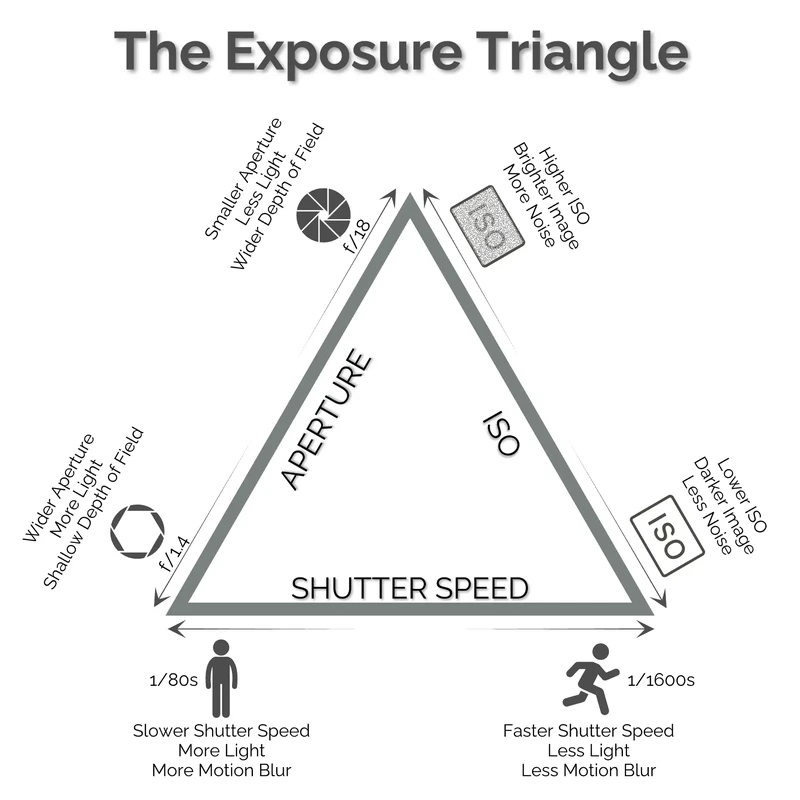
The exposure triangle represents the three core variables that dictate how much light reaches the camera sensor and how the resulting image appears. Aperture controls the lens opening size, shutter speed determines the duration the sensor is exposed to light, and ISO adjusts the sensor’s sensitivity. On smartphones, aperture is often fixed due to physical constraints, but software advancements and attachable lenses simulate aperture effects, allowing some degree of artistic control. Shutter speed and ISO are more commonly adjustable in manual modes, enabling users to balance exposure under varying lighting conditions. Understanding these settings and their interactions is crucial for photographers seeking to improve their smartphone images beyond the capabilities of automatic exposure systems.
Components of the Exposure Triangle in Smartphones
Aperture in traditional cameras refers to the adjustable opening within the lens that regulates incoming light. In smartphones, however, the aperture is usually fixed—common values range from f/1.8 to f/2.4—due to the compact design of mobile lenses. This limitation means that smartphones cannot physically alter the aperture size to control exposure or depth of field dynamically. To compensate, many flagship smartphones employ software algorithms and dual or multiple camera setups to mimic shallow depth of field and bokeh effects. Additionally, attachable lenses can modify the physical optics, offering expanded aperture options and creative flexibility. Despite these workarounds, aperture remains the least adjustable factor of the exposure triangle on smartphones.
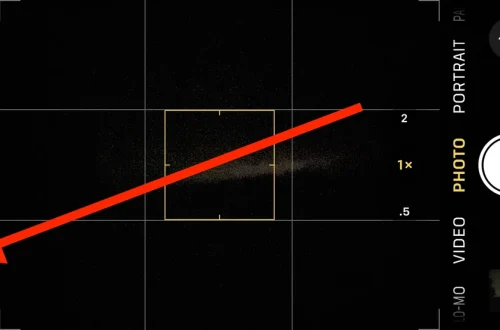
Shutter speed controls how long the camera sensor collects light. Smartphone cameras typically offer shutter speeds ranging from fractions of a second (e.g., 1/8000s) to several seconds (e.g., 30s) in manual or pro modes. Adjusting shutter speed affects motion rendering; faster speeds freeze action, while slower speeds introduce motion blur, useful for artistic effects such as light trails or smooth water. However, slow shutter speeds require stable support like tripods to avoid camera shake. Modern smartphones increasingly support longer exposure times, complementing night mode photography and low-light scenarios by capturing more light without increasing noise.
ISO adjusts the sensor’s sensitivity to light. Higher ISO values brighten images in dim conditions but introduce grain and noise, degrading quality. Smartphone sensors generally have ISO ranges from 50–3200, with some advanced models extending beyond this. Manual ISO control allows users to balance light sensitivity and noise: lowering ISO reduces noise but demands longer shutter speeds or brighter environments. Smartphone camera software often applies noise reduction algorithms to mitigate high ISO noise, yet manual ISO adjustment remains critical for photographers aiming for optimal image clarity, especially in challenging lighting.
Accessing and Using Manual Controls on Smartphones
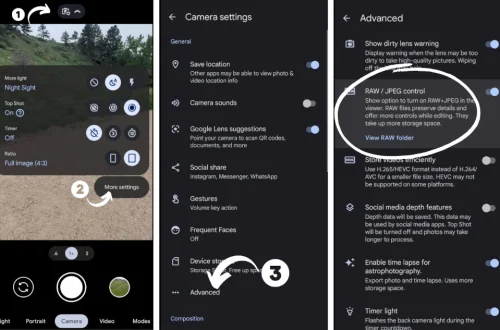
Most contemporary smartphones offer a “Pro” or “Manual” mode within their native camera apps, unlocking exposure triangle controls such as shutter speed and ISO. Accessing these settings varies by manufacturer but typically involves toggling from automatic to manual shooting modes. For users requiring more granular control or additional features, third-party camera applications like Adobe Lightroom Mobile provide expanded manual adjustments, including exposure compensation, white balance, and focus. These apps often integrate RAW shooting capabilities, preserving maximum image data for post-processing.
Despite these capabilities, smartphone cameras have inherent hardware and software limitations. Fixed apertures restrict depth of field control, and sensor sizes are smaller compared to DSLRs, limiting dynamic range and noise performance. Additionally, not all smartphones support extended shutter speeds or wide ISO ranges in manual mode. Users must recognize these constraints to set realistic expectations. However, leveraging manual controls still provides significant advantages over automatic modes, enabling creative experimentation and improved exposure management.
Practical Techniques for Balancing Exposure Settings
Adjusting one element of the exposure triangle necessitates compensatory changes in the others to maintain correct exposure. For example, increasing shutter speed to freeze fast-moving subjects reduces light intake, requiring higher ISO or wider aperture (if adjustable) to compensate. Conversely, lowering ISO to reduce noise demands slower shutter speeds or more light. Smartphone photographers should experiment with these trade-offs to find optimal settings for specific scenarios.
In bright daylight, users can employ fast shutter speeds and low ISO to capture sharp, noise-free images. In low-light or night photography, slower shutter speeds combined with moderate ISO values can reveal details otherwise lost, provided the device is stabilized. Exposure compensation tools available in many apps allow fine-tuning brightness without manually adjusting all parameters. Additionally, understanding how shutter speed affects motion blur aids creative expression, such as intentionally blurring moving subjects or capturing crisp action shots.
Technological Advances Enhancing Exposure Control in Smartphones
Smartphone manufacturers increasingly incorporate dual-camera and multi-lens systems to extend exposure control possibilities. For example, telephoto and wide-angle lenses with differing apertures enable varied light intake and depth of field effects without mechanical aperture adjustments. Computational photography algorithms combine data from multiple lenses and exposures to simulate large aperture effects and improve dynamic range.
Software innovations also facilitate aperture simulation by selectively blurring backgrounds and enhancing subject separation post-capture, compensating for physical aperture limitations. Attachments like clip-on lenses further expand hardware capabilities, allowing users to modify focal length and aperture characteristics. These developments narrow the gap between smartphones and traditional cameras in exposure control, empowering mobile photographers to achieve sophisticated effects previously unattainable on compact devices.
Future Directions and Practical Next Steps for Smartphone Photographers
As smartphone camera technology evolves, manual exposure controls will become more refined and accessible, with AI-driven algorithms offering intelligent adjustments while preserving user agency. Photographers are encouraged to practice systematically using manual modes, experimenting with shutter speed and ISO under diverse lighting conditions to internalize exposure relationships. Combining hardware enhancements with software tools will continue to enhance creative possibilities.
Users should also explore third-party camera apps that provide RAW capture and extensive manual settings, enabling greater post-processing flexibility and image quality optimization. Understanding smartphone sensor characteristics and lens configurations will inform better exposure decisions. Overall, mastering the exposure triangle remains a vital skill for smartphone users aiming to elevate their photography beyond point-and-shoot defaults.
| Exposure Setting | Smartphone Application | Typical Range | Impact on Image |
|---|---|---|---|
| Aperture | Fixed physical aperture; simulated with software and attachable lenses | Typically f/1.8 to f/2.4 | Controls depth of field; affects light intake but generally fixed |
| Shutter Speed | Adjustable in manual/pro mode; extended exposure for low light | 1/8000s to 30s (varies by model) | Controls motion blur; longer exposures brighten image |
| ISO | Adjustable sensor sensitivity; noise increases with higher ISO | 50 to 3200+ (model dependent) | Brightness control; high ISO introduces noise |
Frequently Asked Questions
What is the exposure triangle in smartphone photography?
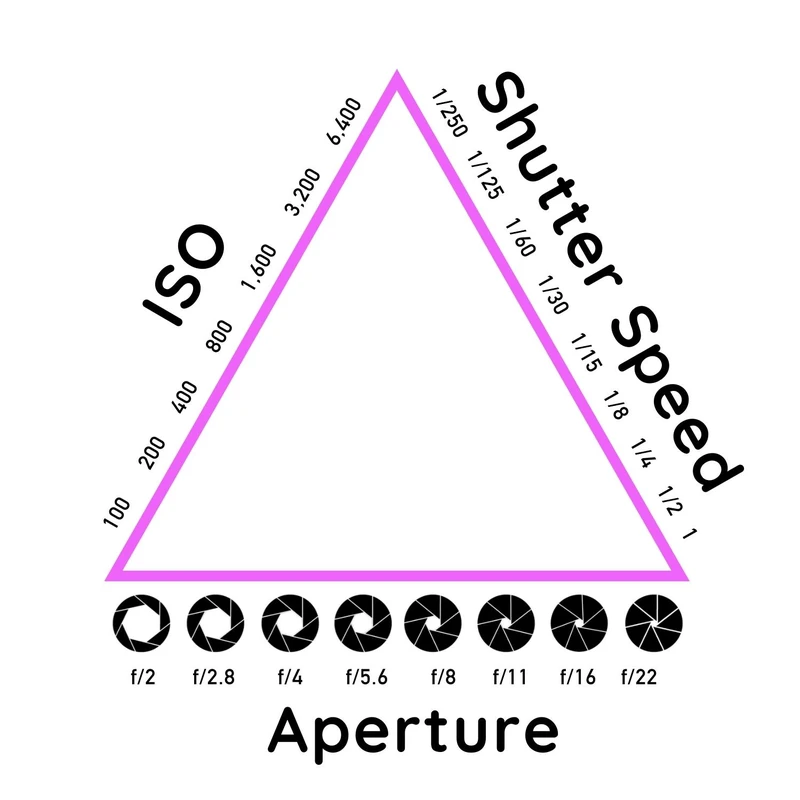
The exposure triangle consists of aperture, shutter speed, and ISO, which together regulate the amount of light reaching the smartphone camera sensor. These settings control image brightness, sharpness, and noise. While aperture is usually fixed on smartphones, shutter speed and ISO can be manually adjusted in pro modes to optimize exposure.
How can I manually adjust exposure settings on my smartphone?
Many smartphones offer a Pro or Manual mode within the native camera app, allowing users to change shutter speed and ISO. Third-party camera apps like Adobe Lightroom provide more extensive manual controls, including RAW capture. Users access these modes via the camera interface, enabling precise exposure adjustments.
Why is aperture often fixed on smartphones?
Smartphone lenses have physical size and design constraints limiting mechanical aperture adjustments. Most models feature a fixed aperture to maintain lens compactness and reliability. Software and multi-lens systems simulate aperture effects to offer some control over depth of field and light intake.
How does changing shutter speed affect my photos?
Shutter speed determines how long the sensor is exposed to light. Faster speeds freeze motion for sharp images, while slower speeds create motion blur, useful for artistic effects. Longer exposures also brighten images in low light but require camera stability to avoid shake.
What are the trade-offs when increasing ISO on a smartphone?
Raising ISO increases the sensor’s light sensitivity, brightening images in dark conditions. However, higher ISO values introduce more noise and grain, reducing image quality. Balancing ISO with shutter speed and aperture ensures optimal exposure with minimal noise.
For more detailed insights on exposure control and smartphone photography techniques, see the expert guide on the exposure triangle by Picfair and Croma’s smartphone photography exposure analysis.
Mastering exposure through manual control on smartphones bridges the gap between casual snapshots and professional-quality images, enabling users to harness light creatively and technically. As device capabilities expand, proficiency in the exposure triangle will remain indispensable for photographers striving for excellence in mobile imaging.