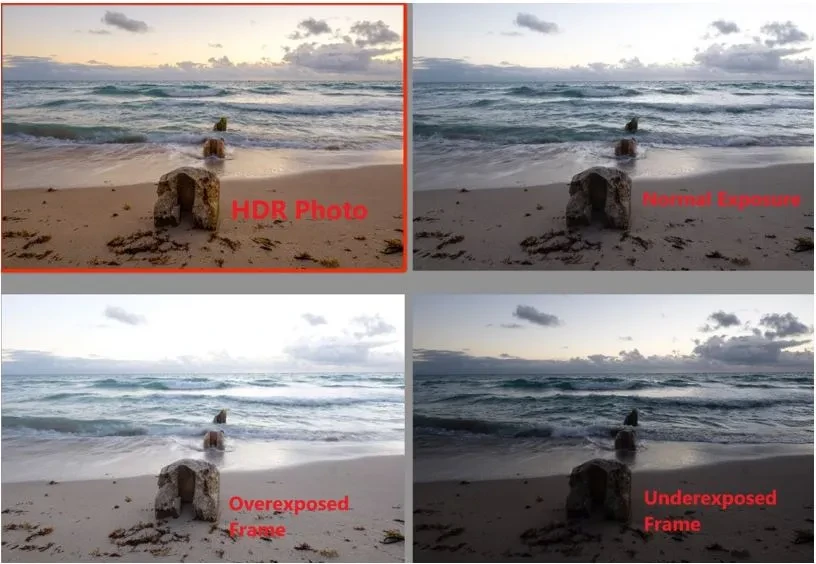
SnapRoamer.com – The technical distinction between smartphone HDR and manual exposure centers on the control over light. While smartphone HDR uses computational AI to merge frames, manual bracketing allows photographers to choose exact exposure levels, such as -2, 0, and +2 EV, to ensure full control over highlight preservation.
Smartphone HDR is often described as doing the work of a professional in an “even easier and faster way” than traditional methods, according to Iceland Photo Tours. This computational approach relies on high-speed processing to deliver a finished look in seconds, whereas manual methods require a more deliberate technical workflow.
Decision Matrix: When to use Auto-HDR vs. Manual Bracketing
Use Smartphone HDR for instant social media posts or low-contrast scenes. For high-contrast landscapes like mountains or cliffs, manual exposure bracketing is necessary to achieve a natural aesthetic and prevent a “cartoonish” look through precise highlight recovery.
| Feature | Smartphone Auto-HDR | Manual Exposure Bracketing |
|---|---|---|
| Ease of Use | High (Beginner friendly) | Lower (Requires technical knowledge) |
| Highlight Control | Automated/Limited | Precise (e.g., -2, 0, +2 EV) |
| Natural Aesthetic | Risk of “cartoonish” look | High (Natural shadow depth) |
| Moving Subjects | Better for quick snapshots | Risk of ghosting/misalignment |
The trade-off involves balancing convenience against granular control. While automated processes are accessible for beginners, achieving professional-grade results often requires the specific exposure levels provided by manual settings.
The Speed Advantage of Computational HDR
For most casual users, the primary benefit of Auto-HDR is the elimination of the post-processing phase. The device performs the merging and tone mapping internally, often utilizing an in-app slider to darken the scene before the capture is finalized. This speed makes it the superior choice for spontaneous moments where a tripod or a multi-shot sequence is impractical.
The Precision Advantage of Manual Bracketing
Manual bracketing is not merely about having more light; it is about having the exact light required for a specific composition. Practitioners can choose exact exposure levels, such as -2, 0, and +2 EV, to ensure that every detail from the darkest crevice to the brightest cloud is captured. A common failure mode occurs when the automated system miscalculates a high-contrast scene, resulting in a flat, washed-out image that lacks the “mood” of a properly exposed manual shot.
The ‘Black Box’ of Computational HDR vs. Optical Bracketing
Smartphone HDR modules use smaller sensors with limited dynamic range compared to DSLRs or mirrorless cameras. This physical limitation is why computational software must work aggressively to bridge the gap in dynamic range.
How AI interprets light vs. how sensors capture it
computational photography relies on a series of rapid-fire shots that are mathematically blended. This process can create a “black box” effect where the user has little understanding of how final colors were derived, sometimes leading to a “cheap art look” when filters are overused.
The risk of noise-induced overexposure
High ISO settings increase sensor noise, which HDR algorithms may misinterpret as brightness. This can lead to overexposure where the software attempts to “lift” shadows, inadvertently brightening the grain and creating a muddy texture.
Mastering Manual Exposure for High-Contrast Landscapes
To master manual landscape exposure, always ‘shoot for the highlights’ by reducing Exposure Value (EV) by 0.3 to 1 stop to prevent unrecoverable clipping. Use a low ISO, such as 100, and a fast shutter speed like 1/1000s in bright conditions to ensure clean, sharp images.
Because shadows can often be recovered in post-processing, but highlights that are “clipped” (pure white) are usually unrecoverable due to sensor limitations, the priority must be the brightest parts of the frame.
The ‘Expose for Highlights’ Rule
When approaching a high-contrast scene, such as a sunset over a mountain range, follow these technical priorities:
- Reduce the Exposure Value (EV) by 0.3 to 1 stop to protect the sky.
- Set the ISO to 100 to ensure the cleanest possible image data.
- Adjust the shutter speed—for example, using 1/1000s in bright daylight—to prevent overexposure.
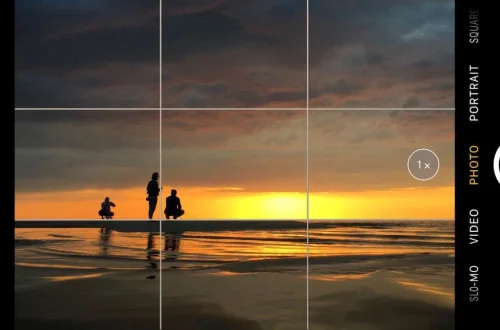
- Use AE/AF lock by tapping and holding on the screen to maintain consistent exposure across your bracketed shots.
Essential Manual Settings: ISO and Shutter Speed
Achieving professional results requires moving away from “Auto” modes. Using apps like Camera FV-5, ProShot, or Open Camera on Android allows for direct control over the exposure triangle. By locking the ISO at 100, you minimize the noise that often plagues mobile sensors, providing a much cleaner canvas for later editing.
Avoiding Common Failure Modes in Mobile Landscapes
Technical errors can render a landscape unusable during the merging process. Even with advanced hardware, physical and digital constraints remain.
Warning: Be cautious when adjusting aperture during a bracketing sequence. If you change the aperture between shots, you risk slight focus breathing and having your images not align in post-processing.
The Ghosting and Misalignment Trap
Ghosting occurs when subjects move between frames, such as wind-blown foliage. To mitigate this, use a tripod and a 2-second timer for remote release to avoid camera shake caused by touching the screen.
Managing Sensor Heat and Noise
Long exposures on Android devices can lead to sensor heat, which may introduce hot pixels. Additionally, avoid using digital zoom during landscape shoots, as it reduces resolution and destroys fine detail.
The Professional Post-Processing Workflow
High-quality HDR photography requires merging bracketed exposures using dedicated software to achieve a cohesive look.
For desktop users, the workflow in Adobe Lightroom is highly efficient. Follow this menu path: Select Photos > Right Click > Photo Merge > HDR. This process allows you to utilize the “Auto Align” feature, which ensures that any slight camera movements or focus breathing issues are corrected before the final blend.
Merging Brackets in Lightroom
When using Adobe Lightroom or Adobe Photoshop, the goal is to blend the luminosity of each shot. This method provides more control over the final aesthetic than a smartphone’s internal processing, allowing you to decide exactly how much shadow detail to reveal.
Mobile-First Editing with Snapseed
If you are working exclusively on a mobile device, Snapseed is a dedicated app for HDR photography that offers several filters. You can experiment with the Snapseed HDR Filter using settings like Nature, People, Fine, or Strong. However, for the most natural results, it is often better to use the “Tune Image” tools to manually adjust brightness and contrast rather than relying on a single heavy-handed filter.
FAQ
Why do my HDR landscape photos look ‘fake’ or cartoonish?
This often happens in auto-HDR modes where shadows are pushed too high and saturation is unnaturally boosted. Manual exposure allows you to preserve natural shadow depth and maintain a realistic tonal transition.
Can I recover blown-out highlights on a smartphone?
Generally, no. While shadows can be brought up in post-processing, highlights that are “clipped” (pure white) are usually unrecoverable due to sensor limitations. Always prioritize protecting your highlights during the initial capture.
How do I prevent blurry images when shooting manual brackets?
Use a tripod and a 2-second timer for remote release to avoid camera shake caused by touching the screen. This ensures that every frame in your bracket is as sharp as possible for a clean merge.