SnapRoamer.com – The best mobile apps for desert landscape editing depend on your goal: use Remodel AI for instant xeriscaping redesigns, Adobe Lightroom Mobile for professional-grade color grading of arid tones, and iScape for AR-based desert plant placement. Combining AI design with high-end photo manipulation allows you to visualize or perfect desert aesthetics.
Remodel AI can transform a single photo of your yard into a desert-style landscape in just 10 seconds.
Mastering the Desert Aesthetic: Color Theory and HSL Settings
To achieve a desert aesthetic in mobile editors like Lightroom, focus on enhancing warm tones. Use the HSL sliders to boost ochre, terracotta, and sage hues, while slightly decreasing the saturation of blues to manage harsh desert skies. Adjust the Temperature slider toward the warmer end to emphasize the golden hour glow.
The Warm Palette: Enhancing Ochre and Terracotta
Achieving a convincing arid look requires precise control over the Hue, Saturation, and Luminance (HSL) sliders. Rather than simply increasing global saturation, which often results in a synthetic appearance, practitioners should target specific color channels. For instance, increasing the saturation of orange and yellow channels by 15% to 25% can simulate the warmth of sun-baked earth. Using Photo Presets can save time, but manual adjustments to the Temperature and Tint sliders are often necessary to correct the specific lighting cast of a high-sun environment.
A common failure mode in desert editing is the “neon sand” effect. This occurs when the saturation of yellows is pushed too high without corresponding adjustments to luminance, making the landscape look like a cartoon rather than a natural environment. To avoid this, decrease the luminance of the yellow channel as you increase its saturation to give the sand a denser, more realistic weight.
Managing the Blue: Taming Arid Skies
Desert photography often suffers from overly aggressive blue skies that clash with the warm ground. A counterintuitive technique involves slightly decreasing the saturation of the blue channel while simultaneously shifting its hue toward cyan. This prevents the sky from appearing unnaturally deep and helps it blend more effectively with the hazy atmosphere common in heat-heavy environments. By utilizing the Sliders menu path in Lightroom, editors can isolate the sky and apply these changes without affecting the warmth of the foreground rocks or cacti.
Fixing Harsh Light: A Survival Guide for Arid Photography
Desert environments create extreme dynamic range challenges. High-noon lighting often leaves shadows too dark and highlights completely lost.
Recovering Blown-out Highlights
When shooting in high-noon desert conditions, the sky or sand surfaces often become “blown out,” meaning they contain no detail. To combat this, use the Highlights slider to pull back the exposure in the brightest areas. However, caution is required: over-correcting can lead to a flat, grayish appearance in the sky. If the highlights are completely clipped, even the best mobile software may struggle to recover the original texture.
Reducing Digital Noise in Shadow Areas
Extreme contrast often forces users to boost shadow levels to see detail in rock crevices or plant shadows. This frequently triggers a major pitfall: Noise. Cranking up the brightness during exposure adjustments often leads to a mottled, noisy look in the image, particularly in the darker regions of the sand or shadows.
To mitigate this, practitioners should use selective masking tools to brighten only the specific shadow areas needed, rather than applying a global exposure boost. This localized approach preserves the overall contrast and keeps the noise levels manageable.
Top AI Apps for Desert Landscape Redesign
For rapid desert yard redesigns, Remodel AI is a leading option, offering 10 different garden styles—including desert/xeriscaping—from a single photo in 10 seconds. For Android users, OutdoorBrite provides fast concept generation in under 1 minute, while Neighborbrite offers powerful AI-driven design inspiration.
Remodel AI: The 10-Second Transformation
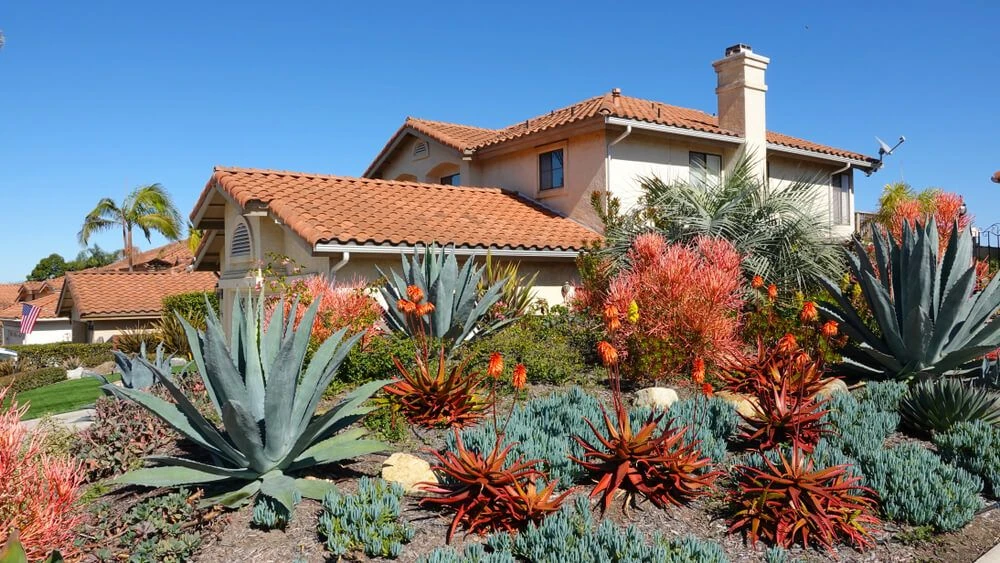
Remodel AI stands out because it transforms an existing yard from a single photo rather than requiring the user to build a 3D model from scratch. The app offers 10 different garden styles, allowing a user to instantly see how a traditional lawn might look as a desert/xeriscaping environment filled with succulents and gravel. While the app offers a free tier that includes 3 free designs, users looking for extensive experimentation may need to explore paid options. It is widely considered the best AI landscape design app for photo-to-photo yard transformation.
OutdoorBrite: The Android Specialist
For those on the Android platform, OutdoorBrite is the best overall landscape design app, built specifically to show users what their own yard could look like quickly. It is highly efficient, capable of generating design concepts in under 1 minute. Users can use the In-app AI editor to refine a concept by swapping specific materials or changing the planting density to better suit a desert climate.
Neighborbrite: AI-Driven Inspiration
Neighborbrite is the best landscape design app of 2024 for homeowners. It provides powerful AI-driven design inspiration to assist in the transition to low-water, arid-style landscaping.
| App Name | Primary Use Case | Best For | Key Desert Feature |
|---|---|---|---|
| Remodel AI | AI Yard Redesign | Instant transformations | 10 garden styles (incl. Desert) |
| OutdoorBrite | Android Landscape Design | Fast concept generation | In-app AI material swapping |
| iScape | AR Plant Placement | iPhone users | Real-time AR plant layering |
| Lightroom Mobile | Professional Photo Editing | Color grading/HSL | Advanced desert tone control |
| Photoshop Express | Quick Mobile Edits | Fast, one-touch fixes | Simplified desert filters |
Use the tools above to progress from initial AI visualization to final professional photo retouching.
Professional Photo Editing for Arid Textures
Once a landscape is designed or photographed, professional-grade manipulation is required to bring out the grit and character of desert elements like sand ripples and rock formations.
Lightroom Mobile: Deep Texture and Color Control
Adobe Lightroom Mobile is widely regarded as the best photo editing software for mobile devices because it offers most of the features found in the desktop version. For desert landscapes, the key is using the Texture and Clarity sliders to emphasize the tactile nature of succulents and stone. Unlike global sharpening, which can introduce artifacts, these tools allow for a more organic enhancement of fine details. Practitioners often report that a significant portion of high-end landscape editing is performed within the Lightroom ecosystem due to its non-destructive workflow.
Photoshop Express: The Quick-Fix Workflow
For users who do not require the deep color grading capabilities of Lightroom, Adobe Photoshop Express is the best option for quick edits on mobile. It provides easy-to-use filters and one-touch enhancements that can instantly adjust the exposure of a bright desert shot. While it lacks the granular HSL control needed for complex color grading, it is an essential tool for rapid social media posting or immediate brightness corrections.
- Lightroom: Use for complex HSL adjustments and non-destructive color grading.
- Photoshop Express: Use for rapid cropping, one-touch filters, and basic exposure fixes.
- Photoshop (Desktop): Reserved for heavy-duty retouching and complex compositing.
Augmented Reality: Visualizing Xeriscaping in Real-Time
Use AR apps like iScape to place individual plants, trees, and landscape elements in your actual yard.
iScape: Precision AR for iPhone Users
iScape (iOS only) offers a unique approach to landscape planning by letting users place individual plants, trees, and landscape elements using augmented reality. This is particularly useful for desert gardening, where the scale and spacing of cacti or agave groupings are critical to the design’s success. By pointing the phone at a specific area of the yard, users can virtually “plant” a saguaro to see how its shadow falls during different times of the day.
DreamzAR: Immersive Landscape Planning
DreamzAR is an AR landscape design app that helps users bridge the gap between a digital concept and the physical ground. It makes it easier to visualize the density of gravel, rocks, and drought-tolerant vegetation before any physical work begins.
FAQ
Which app is best for designing a desert yard from a photo?
Remodel AI is the top choice, capable of converting a single photo into 10 different styles, including desert/xeriscaping, in just 10 seconds. It is specifically designed for photo-to-photo yard transformations.
Can I use AR to see how cacti will look in my yard?
Yes, apps like iScape (iOS) allow you to use augmented reality to place individual plants and trees directly into your real-world view, helping you visualize the scale and placement of desert flora.
How do I prevent noise when editing bright desert photos?
Avoid over-cranking the brightness during exposure adjustments, as this often leads to a mottled, noisy look in the image. Instead, use selective masking to brighten only the necessary areas.