SnapRoamer.com – Smartphone photography has transformed the way people capture and share moments, leveraging increasingly sophisticated cameras embedded in everyday devices. Mastering effective composition techniques is essential for elevating smartphone photos beyond snapshots to professional-quality images. Utilizing core principles such as the rule of thirds, leading lines, and symmetry, combined with optimized camera settings and thoughtful editing, can significantly enhance photo aesthetics and storytelling. Unlike traditional cameras, smartphones pose unique challenges in terms of sensor size and lens limitations, making composition and technical adjustments vital to achieving striking results.
Smartphone cameras like those found in the iPhone 5 or Huawei Mate10 Pro offer features such as burst mode and HDR, which support creative expression when applied alongside key compositional strategies. Understanding how to balance elements within a frame, harness natural lighting—especially during golden hour—and avoid common pitfalls such as digital zoom distortion empowers users to produce compelling images across various contexts, from travel photography to silhouette shots. This article provides a thorough examination of practical composition methods, technical camera settings, and editing tips tailored specifically for smartphone photography enthusiasts seeking to refine their craft.
Fundamental Composition Techniques in Smartphone Photography
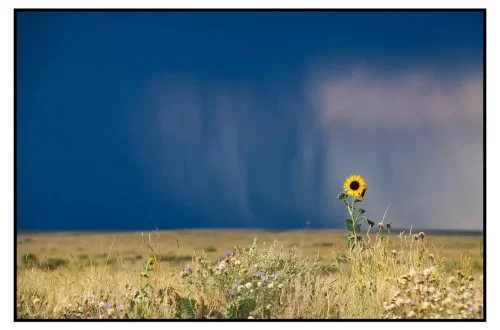
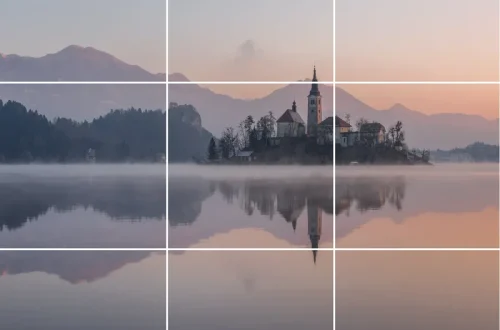
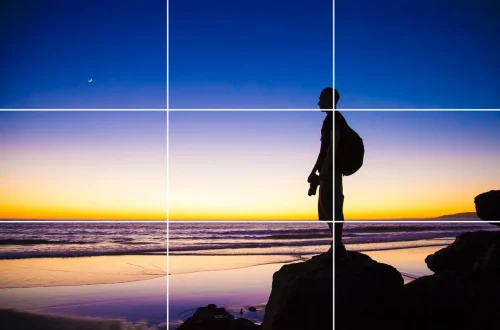
The rule of thirds remains the foundational guideline for composing smartphone images. By dividing the frame into nine equal sections using two vertical and two horizontal gridlines, photographers place important subjects or horizons along these lines or at their intersections to create visual interest and balance. Most smartphones allow enabling grid lines in the camera app, simplifying the application of this technique. For example, positioning a sunset horizon on the upper third line rather than the center fosters a more dynamic and engaging composition.
leading lines serve as directional guides that naturally draw the viewer’s eye toward the photo’s focal point. These lines may be architectural features like roads, fences, or bridges, or natural elements such as rivers and tree branches. When utilized effectively, leading lines enhance depth and emphasize the subject without cluttering the image. Smartphone users can experiment with angles and perspectives to maximize the impact of these lines, moving physically closer to avoid relying on digital zoom, which tends to degrade image clarity.
Symmetry and geometric patterns create visually pleasing images by balancing shapes and reflections, especially effective in square-format smartphone photography. Many modern camera apps include square mode, encouraging symmetry-based compositions. This technique works well in architectural photography or scenes featuring reflections on water or glass surfaces. Layering and framing elements, such as using overhanging branches or doorways, introduce depth and context by creating foreground and background relationships that enrich the narrative quality of a photo.
Advanced Composition Tips for Smartphone Photography
Moving beyond basic rules, balancing tension between the subject and the surrounding scene adds emotional resonance to photos. This involves carefully positioning the subject in relation to empty space or contrasting elements to convey mood or movement. Combining multiple composition techniques—for instance, applying the rule of thirds while incorporating leading lines and symmetry—produces stronger and more complex images that captivate viewers.
Distraction management is crucial in smartphone photography due to the limited sensor capabilities and narrower dynamic range. Photographers should be mindful of cluttered backgrounds or bright light sources that compete with the main subject. Adjusting the framing or changing the shooting angle often mitigates these issues. Burst mode, available on devices like the Huawei Mate10 Pro, is an effective tool for capturing fast-moving subjects or fleeting moments, ensuring multiple shots to select the best composition and expression.
Optimizing Smartphone Camera Settings for Better Composition
Technical settings play a pivotal role in complementing composition techniques. exposure adjustment allows control over the brightness of an image, which is especially useful in high-contrast scenes. Most smartphones feature exposure compensation sliders accessible through the camera interface, enabling photographers to brighten shadows or tone down highlights for balanced lighting.
Tap to focus functionality ensures the subject remains sharp and clear, a critical factor for maintaining viewer attention. Accurate focus not only enhances detail but also affects exposure and color rendering. Experienced photographers recommend tapping the screen precisely on the subject rather than relying on automatic focus for better results.
Avoiding digital zoom is essential to preserve image quality. Unlike optical zoom, which uses lens adjustments to magnify the scene without losing detail, digital zoom crops and enlarges the image digitally, resulting in pixelation and blur. Physically moving closer to the subject or employing optical zoom (where available) is advisable. High Dynamic Range (HDR) mode enhances images by merging multiple exposures to capture greater detail in shadows and highlights, beneficial in scenes with uneven lighting. However, HDR should be used judiciously, as excessive application can lead to unnatural effects.
Leveraging Lighting and Editing to Enhance Composition
Natural lighting profoundly influences smartphone photography composition. Golden hour lighting—shortly after sunrise or before sunset—produces warm, soft light that enriches colors and textures while minimizing harsh shadows. Photographers should plan shoots during these times to exploit the flattering qualities of natural light. In contrast, midday sunlight often causes overexposed highlights and deep shadows, challenging smartphone sensors.
Post-processing is indispensable for refining composition impact. Adjusting brightness improves visibility of key elements, while contrast enhancement adds depth by emphasizing tonal differences. Color saturation tweaks can make images more vibrant but require moderation to avoid unnatural hues. Popular photo editing apps like Adobe Lightroom Mobile and Snapseed provide intuitive tools for these adjustments, enabling photographers to enhance their images without extensive technical knowledge.
Specialized Techniques: Silhouettes, Travel, and Distortion Correction
Silhouette photography on smartphones involves backlighting the subject to create dark outlines against a bright background. Achieving this effect requires exposure control, often by tapping to focus on the brightest part of the scene to underexpose the subject intentionally. This technique is powerful for creating dramatic, minimalist compositions and is effective during sunset or sunrise.
Travel photography demands versatility in composition to capture diverse landscapes and vibrant street scenes. Using compositional rules such as framing with natural elements or balancing foreground interest against expansive backgrounds enriches storytelling. Smartphone users should also be aware of distortion, especially when photographing wide scenes or architecture. Avoiding wide-angle lenses for close-up subjects and maintaining the camera level reduces perspective distortion, preserving natural proportions.
Practical Exercises to Hone Smartphone Photography Composition
Consistent practice is key to mastering smartphone photo composition. Experimenting with multiple angles and distances encourages creative perspectives and helps avoid reliance on zoom. Activating grid lines aids in maintaining alignment and applying compositional rules systematically. Reviewing shots critically, either immediately or later, allows identification of strengths and areas for improvement.
Engaging in themed photo challenges, such as capturing leading lines or symmetry exclusively, sharpens focus on specific techniques. Combining these exercises with real-world shooting scenarios—travel, urban exploration, or silhouette sessions—builds a comprehensive skill set adaptable to various photographic contexts.
| Composition Technique | Description | Practical Application |
|---|---|---|
| Rule of Thirds | Dividing frame into nine sections; placing subjects along lines/intersections | Enable grid lines; position horizon or subject off-center |
| Leading Lines | Using natural or man-made lines to guide viewer’s eye | Capture roads, fences, or rivers leading to subject |
| Symmetry | Balanced, mirrored elements creating visual harmony | Use square format; photograph reflections or architectural patterns |
| Framing and Layering | Foreground/background elements adding depth | Use doorways, branches, or shadows to frame subject |
FAQ
What is the best composition technique for smartphone photography?
The rule of thirds is widely regarded as the most effective starting point, as it creates balanced and engaging images. However, combining it with leading lines and symmetry often results in stronger compositions.
How can I avoid blurry photos on my smartphone?
Using tap to focus ensures the camera locks on the subject, maintaining sharpness. Additionally, stabilizing the phone and using burst mode for moving subjects increases the chance of clear shots.
When should I use HDR on my smartphone camera?
HDR is ideal for scenes with high contrast, such as landscapes with bright skies and dark foregrounds. It balances exposure by merging multiple shots, but should be avoided in fast-moving scenes to prevent ghosting.
Does digital zoom affect photo quality?
Yes, digital zoom crops and enlarges the image digitally, reducing sharpness and detail. It’s better to move physically closer or use optical zoom if available to maintain image integrity.
Which editing apps are recommended for smartphone photography?
Adobe Lightroom Mobile and Snapseed are among the top apps for adjusting brightness, contrast, and saturation, offering user-friendly interfaces and professional-grade editing tools.
Smartphone photography composition increasingly benefits from integrating classical photography principles with smartphone-specific techniques and settings. As smartphone cameras continue to evolve, combining composition mastery with technical adjustments and post-processing will enable photographers to produce images rivaling those from dedicated cameras. Practicing these methods in diverse scenarios—from travel landscapes to silhouette portraits—prepares users to adapt creatively, ensuring their smartphone photography remains compelling and visually sophisticated.
For further expert insights, visit Travelbugraphy’s guide on phone photography composition and Smartphone Photography Training’s comprehensive composition tips.