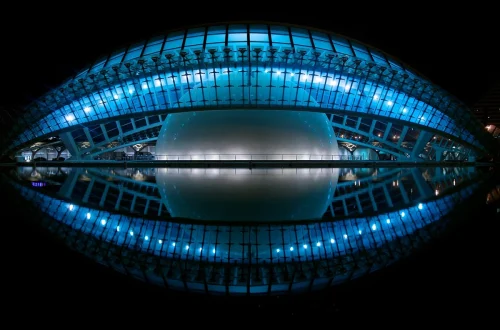
SnapRoamer.com – Smartphone photography symmetry techniques rely on practical tools such as the camera’s grid overlay, which divides the frame into nine sections with two horizontal and two vertical lines, enabling precise alignment along a central axis. For example, activating “Grid Lines” or “Composition Guides” in the camera settings provides a visual framework essential for symmetry. Additionally, shooting in a square format (1:1 aspect ratio) helps especially with circular subjects by creating equal frame dimensions on all sides. Leveling apps like LVL display a digital bubble level on-screen to ensure exact horizontality or verticality. As Eric Mueller advises, holding your breath while shooting helps prevent small body movements that can ruin symmetry. Post-processing apps like CapCut further enhance symmetry by offering AI-driven features such as automatic straightening, perspective correction, and cropping, accessible via Edit > Crop & Rotate > Perspective Correction, which refine alignment beyond the initial capture.
“Creating perfect symmetry in your iPhone photos is immensely satisfying, but shooting a perfectly symmetrical photo is much harder than it looks.” — Eric Mueller
What smartphone-specific tools help achieve perfect symmetry in photos?
Smartphones offer built-in tools like grid overlays, square aspect ratio modes, and leveling apps such as LVL to help photographers align elements perfectly for symmetry. AI editing tools in apps like CapCut further refine symmetry by cropping, straightening, and correcting perspective post-shooting.
- Grid Overlay and Square Mode: Activating the phone camera’s grid overlay is essential for symmetry. By enabling “Grid Lines” or “Composition Guides” in camera settings, users see two horizontal and two vertical lines dividing the frame into nine sections, facilitating alignment along the central axis. Shooting in square format, available on most smartphone cameras by selecting the 1:1 aspect ratio, simplifies judging symmetrical subjects, especially circular ones, by providing equal frame dimensions on all sides.
- Leveling and Breath-Holding Techniques: Leveling apps like LVL display a digital bubble level on the smartphone screen, ensuring the camera is perfectly horizontal or vertical. Eric Mueller advises photographers to “take a breath and hold it” while shooting to prevent minute body movements that disrupt symmetry. This technique is crucial because even a slight angle or phone tilt, common failure modes when not using leveling tools, can break the symmetry in highly detailed shots.
- AI Editing Tools for Symmetry: Post-processing apps such as CapCut offer AI-powered features that automatically straighten images, correct perspective distortions, and crop to enhance symmetry. CapCut’s desktop software includes menu paths like Edit > Crop & Rotate > Perspective Correction, enabling users to refine alignment beyond the camera’s initial capture. These AI tools address subtle asymmetries that manual adjustments might miss, proving invaluable for achieving perfect balance.
What are common mistakes in smartphone symmetry photography and how can they be fixed?
One frequent error in symmetry photography is a slight tilt caused by not enabling the camera’s grid overlay or neglecting leveling apps, which can be corrected by activating “Grid Lines” in Settings > Camera on iPhone or equivalent Android menus. Off-center framing often results from poor positioning; standing centrally relative to the subject is essential. Tiny body movements, including those from breathing, degrade sharpness and symmetry—Eric Mueller recommends holding your breath briefly when pressing the shutter to minimize this. For post-shooting fixes, apps like CapCut allow precise cropping and perspective adjustments via Edit > Transform > Perspective, helping restore balance in images with minor misalignments.
- Tilt and Leveling Issues: Without enabling the camera’s grid overlay or using a leveling app, photographers risk capturing images with a slight tilt. This error breaks the balance, especially in architectural shots. Smartphone settings > Camera > Enable “Grid Lines” helps maintain horizontal and vertical alignment during composition.
- Body Movement During Shooting: Tiny hand shakes or breathing-induced movements affect sharpness and symmetry. Eric Mueller recommends holding one’s breath to freeze body position momentarily. Stabilizing the phone with both hands or using a tripod mount accessory can further minimize movement.
- Post-Processing Fixes: Editing software features like cropping and perspective correction compensate for imperfect framing. Tools accessible via CapCut or native editing apps allow users to straighten horizons and realign elements, salvaging images with minor misalignments. For example, CapCut’s Edit > Transform > Perspective tool adjusts skewed angles precisely.
How do multiple smartphone lenses enhance symmetry photography?
Using multiple lenses like standard, ultra-wide, and telephoto allows creative symmetrical compositions by capturing different perspectives and framing options. For example, ultra-wide lenses emphasize radial symmetry, while telephoto lenses isolate symmetrical details with high clarity.
- Lens Types and Their Symmetry Uses: Modern smartphones like the iPhone 15 Pro Max feature a 50 MP main sensor, a 5× optical telephoto lens, and an ultra-wide lens. The ultra-wide lens captures expansive scenes emphasizing radial or geometric symmetry, such as circular plazas or domes. In contrast, the telephoto lens isolates symmetrical subjects with sharp detail and compressed perspective, enhancing clarity for intricate patterns.
- Examples with Telephoto and Ultra-Wide: Using the iPhone 15 Pro Max’s 5× optical zoom telephoto lens enables capturing architectural details symmetrically without distortion typical of wide-angle lenses. Digital zoom beyond 8.5×, however, degrades image quality, a common misconception that more zoom always improves framing. Ultra-wide lenses, conversely, are ideal for symmetrical landscapes or interior shots where the entire frame reflects mirrored elements.
What are the differences between symmetrical and asymmetrical balance in smartphone photography?
Symmetrical balance is defined by mirrored or repeated elements on either side of a central axis, creating a sense of calm, order, and formal stability. This approach is widely used in architectural photography to highlight symmetry in iconic structures like the Taj Mahal or the Eiffel Tower. Conversely, asymmetrical balance involves uneven distribution of visual weight, guided by principles such as the Rule of Thirds, which partitions the image into nine equal sections with two horizontal and two vertical lines. Asymmetry introduces dynamism, movement, and visual interest, offering a more natural and storytelling-driven composition.
| Symmetrical Balance | Asymmetrical Balance | Use Case |
|---|---|---|
| Mirrored or repeated elements on either side of a central axis | Uneven distribution of visual weight without mirroring | Formal architecture, product shots requiring precision |
| Creates calm, order, and stability | Generates visual interest, movement, and dynamism | Organic subjects, storytelling, dynamic compositions |
| Often uses centered composition | Guided by Rule of Thirds grid with 9 sections and 2 horizontal/vertical lines | Differentiated emotional impact and narrative style |
| Emphasizes formality and balance | Introduces tension and creative imbalance | Artistic and editorial photography |
Symmetry creates a sense of calm and order in a photograph, often showcased in buildings like the Taj Mahal or Eiffel Tower. Asymmetry provides a more natural, dynamic feel by using uneven visual weight, balanced by principles such as the Rule of Thirds, which divides the image into nine equal sections with two horizontal and two vertical lines.
How can symmetry techniques be integrated into smartphone video and live photo modes?
Symmetry principles can be applied to video and live photo modes by using grid overlays during recording, leveraging burst mode for capturing symmetrical frames, and employing post-processing tools to crop and align footage for balanced compositions.
- Using Burst Mode for Symmetry: Burst mode captures a rapid sequence of frames, allowing selection of the most perfectly symmetrical moment, especially useful in dynamic scenes. Activating burst mode typically involves holding down the shutter button on iOS or Android cameras.
- Editing Symmetry in Video and Live Photos: Post-processing apps like CapCut enable cropping and straightening of video frames and live photos, applying symmetry adjustments frame-by-frame or on keyframes. Grid overlays can also be enabled during video recording via camera settings to assist in maintaining alignment.
What advanced post-processing techniques improve symmetry beyond cropping and straightening?

Advanced post-processing includes perspective correction, mirroring, AI-powered alignment, and removing distractions using apps like CapCut. These techniques refine symmetry by correcting subtle distortions and enhancing visual balance beyond basic edits.
- Perspective Correction and Mirroring: Tools found under Edit > Transform in CapCut allow users to adjust the vanishing points and horizontal/vertical perspective, essential for correcting skew caused by camera tilt. Mirroring duplicates one half of an image and flips it to create flawless symmetry, often used in abstract or creative compositions.
- AI Tools for Symmetry Refinement: CapCut’s AI alignment features automatically detect asymmetries and suggest corrections, streamlining the editing workflow. Users can access this via Edit > AI Enhancement > Symmetry Alignment. This automation surpasses manual cropping by addressing imperceptible distortions and improving overall visual harmony.
How do smartphone camera features and OS updates affect symmetry photography capabilities?

Recent smartphone OS updates have significantly enhanced symmetry photography tools. For example, the latest iOS versions have refined the default camera app’s composition guides by adding customizable grid overlays and integrating AI-driven framing suggestions that assist users in achieving perfect alignment. Android phones from major manufacturers frequently roll out camera app updates introducing features like live leveling assist and real-time symmetry previews. These improvements, accessible through settings menus such as Settings > Camera > Grid Options or AI Composition Guides, empower photographers to capture more balanced and visually compelling symmetrical photos with greater ease.
For example, the latest iOS updates have refined the default camera app’s composition guides by adding customizable grid options and integrating AI-driven framing suggestions. Android devices from major manufacturers similarly offer periodic camera software upgrades introducing leveling assist and live symmetry previews, expanding shooting possibilities.