SnapRoamer.com – The best printers for travel photography depend on your priority: for professional gallery quality, the Epson SureColor P900 is unmatched; for ultra-portable snapshots, the Canon Selphy QX20 or Fujifilm Instax Mini Link+ are superior. Choosing between dye-sublimation for durability and inkjet for color depth is the critical first step for any traveler.
A single high-end 10-ink freestanding printer can cost upwards of $1,200, making the choice between pro-grade gear and pocket-sized portables a significant investment decision.
The Traveler’s Power & Connectivity Matrix
For remote travel, prioritize printers with direct SD card slots or offline USB connectivity to bypass unreliable hotel Wi-Fi. Dye-sublimation models like the Canon Selphy series are generally more resilient in high-humidity tropical climates because they lack liquid ink nozzles that are prone to clogging.
Climate Resilience: Inkjet vs. Dye-Sub
Environmental conditions dictate hardware longevity. Inkjet printers face a specific failure mode known as clogged printheads, which occurs when liquid ink dries within the nozzles due to inactivity or extreme temperature shifts. Conversely, dye-sublimation technology provides waterproof and anti-oxidation properties by embedding dye into the paper through heat and applying a protective overcoat. This makes dye-sub printers more reliable for photographers moving between desert heat and humid coastal regions.
The Zero-Connectivity Workflow
Reliable internet is a luxury in many remote destinations. To maintain a functional workflow, photographers should look for hardware that supports direct media input. A robust mobile setup includes:
- Direct SD card reader integration to bypass smartphone apps.
- USB-C or micro-USB offline connectivity for laptop-to-printer transfers.
- Dye-sublimation cartridges that do not require the frequent, messy refilling associated with liquid ink.
Top Recommendations for Every Travel Persona
Match hardware specifications to your specific needs, such as producing 17-by-22-inch professional prints or using the 0.4 lb Liene Pearl series for ultra-lightweight portability.
| Printer Model | Technology | Best Use Case | Portability Score |
|---|---|---|---|
| Epson SureColor P900 | Inkjet (Pigment) | Professional Gallery | Low |
| Canon imagePrograf PRO-1100 | Inkjet (Pigment) | Professional Gallery | Low |
| Canon Selphy CP1500 | Dye-Sublimation | Compact Wireless | Medium |
| Canon Selphy QX20 | Dye-Sublimation | Portable Stickers | High |
| Fujifilm Instax Mini Link+ | Instant Film | Social Snapshots | High |
| Liene Pearl series | Instant Photo | Ultra-light Journaling | Very High |
This technical summary compares how different technologies, from pigment-based inkjet to dye-sublimation, impact mobility and print quality.
The Professional Gallery Setup
For photographers requiring gallery-class output, the Epson SureColor P900 stands as a premier option, capable of producing 17-by-22-inch prints. While not “portable” in a backpack sense, it is the standard for high-end color depth. The Canon imagePrograf PRO-1100 serves a similar professional tier. These machines are heavy investments, and users should note that an Epson SureColor P900 roll adapter can add an extra $250 to the setup cost.
The Lightweight Snapshotter
If the goal is to share moments instantly, the Canon Selphy CP1500 offers a wireless compact solution. For even more mobility, the Canon Selphy QX20 functions as a portable dye-sub sticker printer. According to research from Digital Camera World, the QX20 provides better image quality than either Instax or Zink-based alternatives. For those needing extreme lightness, the Liene Pearl series weighs only 0.4 lb, making it an ideal pocket-sized companion for light travel.
The Journaling Enthusiast
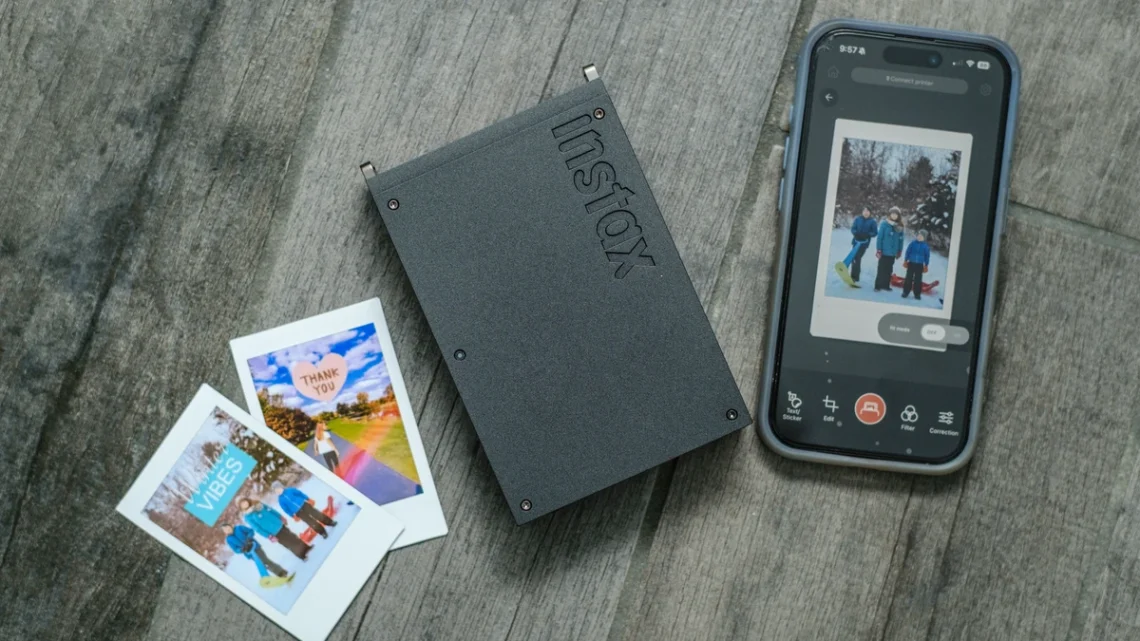
Travel journals benefit from the tactile nature of instant prints. The Fujifilm Instax Mini Link+ is a staple for this persona, providing immediate physical copies of digital shots. For those specifically looking for sticker-based journaling, the Citizen CX-02S is a specialized tool designed for event-style sticker printing.
Dye-Sublimation vs. Inkjet: Which Survives the Road?
Choose between color nuance and physical durability based on your environment.
Maintenance and Reliability
Dye-sublimation printers are more portable and compact because they do not require liquid ink cartridges. This absence of liquid makes them less susceptible to the leaks or drying issues that plague inkjet models. However, users must be cautious of dust on the rollers, a common failure mode that can degrade print quality if the device is not properly covered during transit.
Color Accuracy and Transitions
Inkjet technology generally offers superior color depth and a wider gamut, especially with pigment-based inks. However, these prints are not touch-dry immediately upon leaving the printer, which can be a liability in a fast-moving travel environment. In contrast, dye-sublimation offers smoother color transitions than inkjet, making it excellent for skin tones and gradients. As noted by a photo.net forum user, “Only a dye-sub printer can produce glossy prints comparable to mini-lab prints.”
The Real Cost of a Souvenir: Print Math for Travelers
Budgeting must account for consumables like Polaroid branded ZINK paper, which averages $0.52 per sheet.
When using ZINK technology, the cost is often higher than expected. For example, Polaroid branded ZINK paper averages $0.52 per sheet. While convenient, this cost adds up quickly when printing dozens of souvenirs throughout a trip.
Availability varies by region. While standard inkjet paper is ubiquitous, finding specific dye-sublimation ribbons or Instax film types in remote areas may require more planning than sourcing standard office supplies.
Essential Workflow Checklist for Mobile Printing
Follow these technical steps to avoid quality loss in the field.
- color correction: Essential for consistent images across different platforms and ensuring digital files match the physical print.
- Resolution Check: Always use high-resolution photos downloaded directly from your camera or phone. Avoid using heavily compressed images from social media to prevent blurry prints.
- Media Inspection: Ensure printheads or rollers are free of dust before starting a batch.
Shortcut: When using mobile printing apps, always check the “Print Settings” > “Paper Type” menu path to ensure the software matches the physical media loaded in the tray.
FAQ
Can I use a power bank to print while traveling?
It depends on the model. Ultra-light models like the Liene Pearl (0.4 lb) are designed for mobile use, whereas pro models like the Epson P900 require stable AC power. Check if your specific printer supports USB-C PD or has an internal battery before relying on a power bank.
Which printer is best for humid environments?
Dye-sublimation printers are superior in high humidity because they do not use liquid ink cartridges that can clog or dry out in extreme temperatures, a common issue for inkjet users in tropical climates.
How do I prevent blurry travel prints?
Avoid using compressed images from social media. Always use high-resolution files downloaded directly from your camera or phone to ensure maximum clarity and avoid the quality loss associated with heavy compression.