SnapRoamer.com – smartphone photography has rapidly evolved into a sophisticated art form, largely due to advances in multi-lens camera systems integrated into modern devices. Understanding how to optimize the use of various smartphone camera lenses—including telephoto, wide-angle, and ultra-wide lenses—can dramatically enhance photo quality and creative potential. This article provides an in-depth exploration of lens types, composition techniques, lighting strategies, and post-processing tools to elevate smartphone photography skills beyond casual snapshots.
Smartphones typically feature a combination of wide, ultra-wide, and telephoto lenses, each serving distinct photographic purposes. The wide-angle lens (usually the default 1x focal length) offers a balanced field of view suitable for everyday shots, while ultra-wide lenses (around 0.5x) capture expansive scenes but introduce noticeable distortion. Telephoto lenses (commonly 2x optical zoom or higher) enable close-up framing without sacrificing image quality, unlike digital zoom which crops the image and reduces resolution. Mastering these lenses’ unique characteristics allows users to select the optimal tool for various subjects and compositions.
Choosing the Right Lens for Your Subject
Telephoto lenses are indispensable for portrait photography as they minimize facial distortion commonly seen with wide-angle lenses. When shooting people, maintaining a distance of several feet and zooming optically preserves natural proportions, delivering flattering portraits with controlled background blur. Wide-angle and ultra-wide lenses excel in capturing landscapes, architecture, and group photos but require careful management of distortion—especially near frame edges—to avoid unnatural stretching or bending of subjects.
For example, Google Pixel’s ultra-wide lens produces sharp images but introduces barrel distortion, making straight lines curve outward. Photographers can counteract this effect by centering subjects and avoiding critical elements near the frame borders. Samsung’s telephoto lens with 3x optical zoom enables tight framing of distant subjects without compromising image sharpness, ideal for event photography or candid shots. Practical understanding of lens effects empowers users to anticipate how each lens alters perspective and composition.
Composition and Perspective Techniques
Applying classical camera composition rules such as the rule of thirds significantly improves smartphone photography outcomes. Most smartphones allow gridlines to be overlaid on the viewfinder, assisting in aligning subjects along intersecting points to create balanced, engaging images. Additionally, experimenting with camera angles—shooting from low ground level or high vantage points—adds dynamic perspective and can emphasize or de-emphasize subject size and mood.
Shooting upward can elongate subjects, conveying grandeur, while downward angles often create intimacy or vulnerability. Creative perspectives, including inverted shooting or framing through foreground objects, contribute to more compelling storytelling. These techniques should be combined with lens selection to reinforce intended visual effects. For instance, using a telephoto lens at eye level for portraits maintains realism, while wide-angle shots from a low angle exaggerate scale in landscape photography.
Technical Tips for Better Smartphone Photos
Lens cleanliness is a frequently overlooked factor that directly impacts image clarity and contrast. Smartphone lenses accumulate fingerprints, dust, and smudges that degrade sharpness, especially when shooting against bright light sources. Regular cleaning with microfiber cloths or lens wipes can restore optical quality and improve color fidelity.
Stabilization is critical to avoid blur, particularly in low-light or telephoto shots. Holding the phone with both hands, bracing elbows against the body, or using small tripods increases steadiness. Some smartphones offer built-in optical image stabilization (OIS), but physical steadiness remains essential for sharp photos. Manual focus and exposure controls, accessed by tapping on the screen, allow precise adjustments to the focal point and brightness, preventing overexposure or misfocused images common in automatic settings.
Utilizing Smartphone Camera Features
portrait mode leverages dual-lens hardware and software algorithms to create a shallow depth of field effect, blurring backgrounds while keeping subjects sharp. This mode differs from optical bokeh in DSLR cameras by relying on computational photography, which can sometimes imperfectly render edges such as hair strands or transparent objects. Understanding these limitations helps photographers decide when to use portrait mode or opt for natural background separation through distance and aperture simulation.
High Dynamic Range (HDR) mode combines multiple exposures to balance highlights and shadows, ideal for scenes with bright skies and dark foregrounds. Time-lapse and slow-motion features expand creative possibilities, capturing motion over extended periods or emphasizing fleeting moments. To maximize image resolution and quality, users should shoot in the highest available resolution and avoid digital zoom, which reduces pixel count and sharpness. Instead, moving physically closer or relying on optical zoom preserves detail.
Lighting and Accessories
Natural lighting remains the most effective and flattering light source for smartphone photography. The golden hour—shortly after sunrise or before sunset—provides warm, diffused light that enhances textures and colors without harsh shadows. Photographers should orient subjects to optimize natural light direction, avoiding direct midday sun that causes overexposure and unflattering shadows.
Portable LED ring lights and small clip-on lights offer controlled illumination for indoor or low-light scenarios. Ring lights provide even, shadowless lighting favored in close-up or portrait photography, while adjustable LED lights enable creative lighting angles. Managing shadows and highlights through reflector cards or diffusers can add depth and mood to images. Combining these accessories with steady shooting techniques significantly improves photo quality in challenging lighting conditions.
Macro and Low Light Smartphone Photography
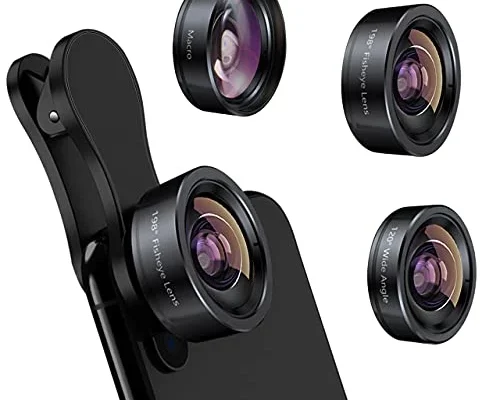
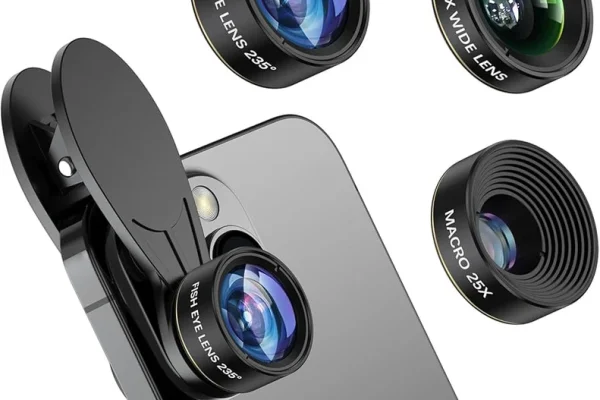
Macro photography on smartphones typically requires clip-on macro lenses that magnify small subjects such as flowers, insects, or textures. These lenses expand the phone’s focusing range, allowing close-up shots with remarkable detail. Focusing manually and stabilizing the phone are crucial for sharply capturing minute details, as even slight movements cause blurring at close distances.
Low light photography benefits from phones with larger camera sensors and advanced computational algorithms. Techniques such as using tripod stabilization, increasing exposure time, and employing night mode features reduce noise and enhance detail in dim environments. Users should minimize digital zoom in low light, as pixel cropping amplifies graininess. Combining hardware capabilities with smart shooting strategies produces clearer, more vibrant low-light images.
Post-Processing and Editing Apps

Editing apps play a pivotal role in refining smartphone photos. SKRWT specializes in correcting lens distortion and perspective issues caused by wide-angle and ultra-wide lenses, restoring natural lines and proportions. VSCO offers extensive filters and color grading tools that enhance mood and tonal balance, widely used by professional and amateur photographers alike. TouchRetouch provides powerful object removal features, enabling users to eliminate unwanted elements without affecting overall image integrity.
Post-processing complements in-camera techniques, allowing fine-tuning of exposure, sharpness, and composition after shooting. However, excessive editing can degrade authenticity, so balanced adjustments are recommended. Editing apps also support cropping to improve framing and applying subtle vignettes to direct viewer focus. Mastery of these tools extends creative control and final image impact.
| Lens Type | Typical Focal Length | Best Use Case | Common Limitations |
|---|---|---|---|
| Wide-Angle | ~26-28mm (1x zoom) | General photography, everyday scenes | Moderate distortion at edges |
| Ultra-Wide | ~12-16mm (0.5x zoom) | Landscapes, architecture, group photos | Barrel distortion, edge stretching |
| Telephoto | 50-70mm (2x-3x zoom) | Portraits, distant subjects | Lower light sensitivity, narrower field |
The table above summarizes the fundamental characteristics of common smartphone lenses, highlighting their optimal applications and inherent constraints.
FAQ

How does optical zoom differ from digital zoom on smartphones?
Optical zoom uses lens elements to magnify the subject without cropping, maintaining full image resolution and clarity. Digital zoom enlarges the image by cropping and interpolating pixels, which significantly reduces image sharpness and detail.
When should I use the ultra-wide lens on my smartphone?
Ultra-wide lenses are ideal for capturing expansive scenes like landscapes or large groups. However, avoid placing important subjects near the edges, as distortion may warp their appearance.
Can portrait mode replace a DSLR’s depth of field effect?
Portrait mode simulates depth of field via software blur, which works well for many scenarios but may struggle with fine details and complex backgrounds. DSLRs with large sensors and wide apertures generally produce more natural bokeh and subject separation.
What’s the best way to stabilize my smartphone when shooting?
Use both hands to hold the phone firmly, brace your arms against your body, or employ a tripod or phone mount to reduce camera shake. Stabilization is especially important for telephoto and low-light shots.
Which editing app is best for correcting lens distortion?
SKRWT is highly recommended for correcting wide-angle and ultra-wide lens distortion, allowing photographers to straighten lines and adjust perspective post-capture.
Smartphone photography continues to benefit from hardware innovations and computational photography advancements, but mastering lens selection, composition, and lighting remains essential. Future developments may include more sophisticated sensor arrays and AI-driven scene optimization, further bridging the gap between smartphones and traditional cameras. Photographers seeking to elevate their image quality should focus on integrating practical shooting techniques with creative experimentation and thoughtful post-processing.
For more detailed guidance on smartphone photography techniques, visit photography tips for stunning smartphone shots and pro tips for taking better showroom photos with your smartphone.