SnapRoamer.com – outdoor photography demands precise white balance management to ensure accurate color reproduction and creative expression under shifting natural light. This tutorial guides photographers through effective white balance settings tailored to various daylight scenarios, highlighting manual adjustments, practical camera controls, and post-processing techniques for optimal results. By mastering these steps, photographers can overcome common challenges like color casts and inconsistent hues, achieving consistent, vibrant outdoor images.
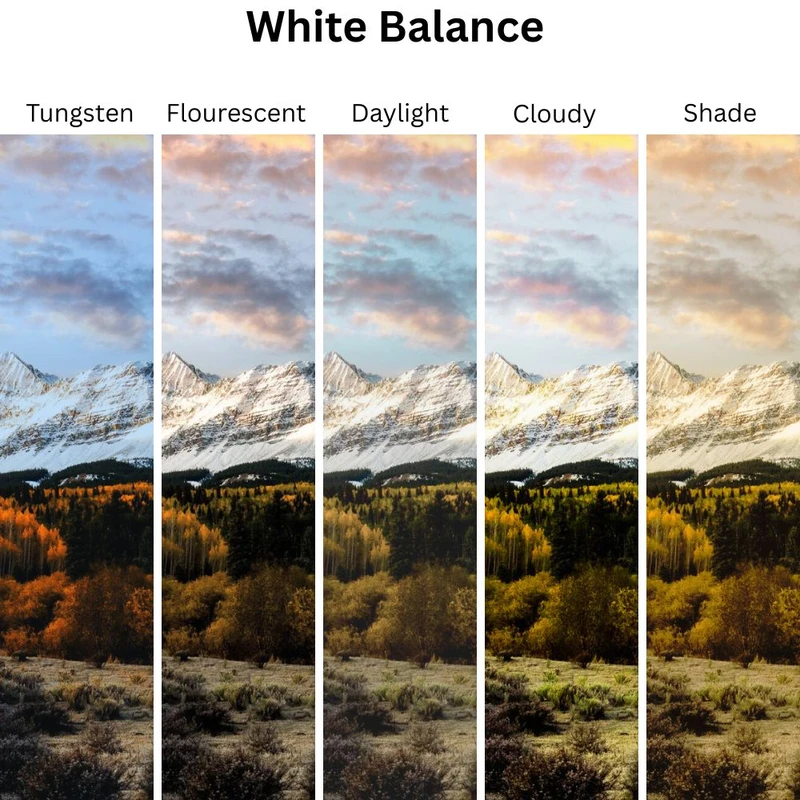
Professional photographers recommend setting white balance manually with specific Kelvin values depending on lighting: 5200-5500K for bright sunlight, 6000-6500K during cloudy conditions, and 3000-4000K for sunrise or sunset. While Auto White Balance (AWB) offers convenience, it often struggles with dynamic outdoor light, introducing unwanted color casts. Shooting in RAW enhances flexibility by enabling white balance corrections during editing, using software like Capture One or Lightroom.
Understanding White Balance and Its Role in Outdoor Photography
White balance adjusts the color temperature of your images to render whites as neutral, preventing unnatural hues caused by different light sources. Outdoor lighting varies widely—from the warm glow of sunrise to the cool tones of shade—making white balance crucial for accurate color rendition.
Cameras generally provide two primary white balance modes: Auto White Balance (AWB) and manual white balance. AWB analyzes the scene to guess the correct setting but can falter in mixed or rapidly changing light. Manual White Balance allows direct control over Kelvin temperature, offering consistency and creative freedom. Understanding when and how to switch between these modes is foundational for outdoor photography.
The Kelvin Scale and Color Temperature in Outdoor Lighting
Color temperature, measured in Kelvin (K), quantifies the warmth or coolness of light. Lower Kelvin values (around 3000K) correspond to warm, reddish light typical of sunrise and sunset, while higher values (7000K+) indicate cooler, bluish light found in shade or overcast conditions.
The following table summarizes typical Kelvin ranges for common outdoor lighting scenarios:
| Outdoor Lighting Condition | Kelvin Temperature Range | Color Characteristic |
|---|---|---|
| Sunny Daylight | 5200–5500K | Neutral, balanced daylight |
| Cloudy Conditions | 6000–6500K | Cooler, slightly bluish light |
| Shade | 7000–8000K | Cool, blue-tinted shadows |
| Sunrise and Sunset | 3000–4000K | Warm, orange-red hues |
These values serve as guidelines for manual white balance settings to neutralize or enhance colors depending on creative goals.
Step-by-Step Guide to Setting White Balance Outdoors
Evaluate the scene’s lighting: Is it sunny, cloudy, shaded, or during sunrise/sunset? Accurate identification guides your white balance choice.
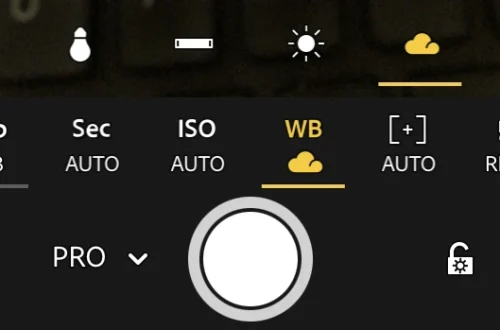
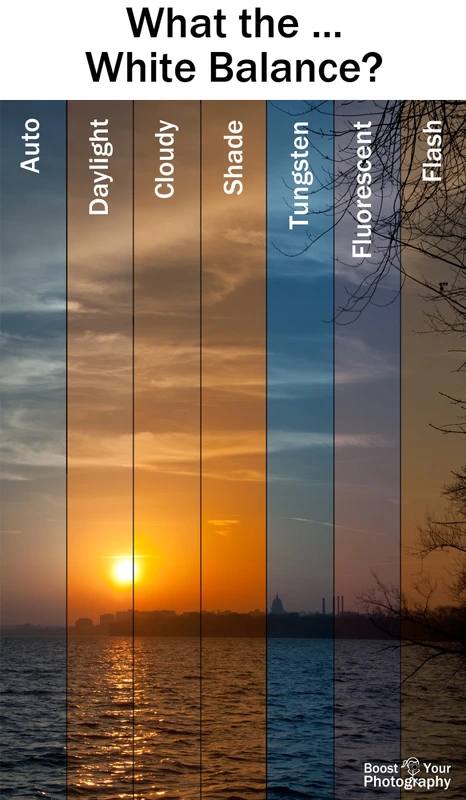
Access your camera’s white balance menu. Options typically include presets (Daylight, Cloudy, Shade), Auto White Balance (AWB), and Manual Kelvin input.
- For quick setups, select a preset matching current conditions (e.g., Cloudy for overcast skies).
- For precision, enter Kelvin values manually:
- Sunny: 5200-5500K
- Cloudy: 6000-6500K
- Shade: 7000-8000K
- Sunrise/Sunset: 3000-4000K
Review the live view or test shots for unnatural blue or orange tints. Adjust Kelvin values incrementally if needed.
Some cameras allow capturing multiple images at different white balance settings. Use this to experiment and later choose the best result.
Always shoot RAW to retain maximum color data, enabling flexible white balance corrections during post-processing without quality loss.
Managing White Balance in Changing Outdoor Light
Natural light outdoors fluctuates quickly, especially during sunrise, sunset, or intermittent cloud cover. To maintain accurate white balance:
Post-Processing White Balance Adjustments
Even with careful in-camera white balance settings, post-processing remains essential for fine-tuning colors. Shooting RAW enables nondestructive edits to white balance without degrading image quality.
Recommended editing software includes:
When adjusting white balance in software:
Creative Applications of White Balance in Outdoor Photography
White balance is not only a technical correction tool but also a creative instrument. Deliberately shifting white balance settings can enhance mood and storytelling:
Experiment with subtle white balance shifts to create unique visual effects without distorting natural colors excessively.
Essential Tools and Accessories for Accurate White Balance
Enhance your white balance accuracy in outdoor shoots with the following tools:
Using these accessories improves consistency and professionalism in color management.
Troubleshooting Common White Balance Issues
Solution: Adjust Kelvin values incrementally; use a grey card to recalibrate; check if shooting RAW for possible correction.
Solution: Switch to manual white balance; use bracketing to experiment; avoid AWB in mixed lighting.
Solution: Calibrate monitor regularly; soft-proof images in editing software; standardize white balance adjustments across workflow.
Alternative Methods and Advanced Techniques
These techniques ensure improved color fidelity in challenging outdoor conditions.
Frequently Asked Questions
What is the best white balance setting for outdoor photography on a sunny day?
Set your white balance manually to 5200-5500K to match daylight, producing natural, neutral colors without warm or cool color casts.
Can I rely on Auto White Balance (AWB) for outdoor shoots?
AWB can work in stable lighting but often struggles with rapidly changing or mixed light outdoors, leading to inconsistent color casts. Manual white balance is more reliable.
Why is shooting in RAW important for white balance adjustments?
RAW files retain unprocessed image data, allowing extensive white balance corrections during editing without degrading image quality, unlike JPEGs which apply white balance permanently.
How do I set custom white balance using a grey card?
Photograph the grey card in the current light, then use your camera’s custom white balance feature to measure that image and set an accurate white balance.
What white balance settings work best for cloudy or shaded outdoor scenes?
Increase the Kelvin temperature to 6000-6500K for cloudy conditions and 7000-8000K for shade to compensate for cooler, bluish light.
—
For deeper technical insights on outdoor white balance, visit this comprehensive guide on white balance in outdoor photography. To master professional white balance techniques, explore this expert tutorial on white balance mastery.
Mastering white balance for outdoor photography enhances both accuracy and creativity, enabling photographers to adapt to variable lighting and craft compelling images. Practicing manual settings, leveraging RAW flexibility, and employing calibration tools will significantly improve color fidelity and artistic control in your outdoor shoots.