SnapRoamer.com – Symmetry in smartphone photography plays a pivotal role in creating balanced, visually compelling images by aligning elements so both sides of the frame mirror each other. This principle enhances harmony and aesthetic appeal, achievable through natural scenes or artificial manipulation via dedicated apps. Leveraging tools like camera gridlines and bubble levels ensures precise symmetry, while post-processing techniques can further accentuate patterns and balance, elevating smartphone photography beyond casual snapshots.
Understanding Symmetry in Smartphone Photography
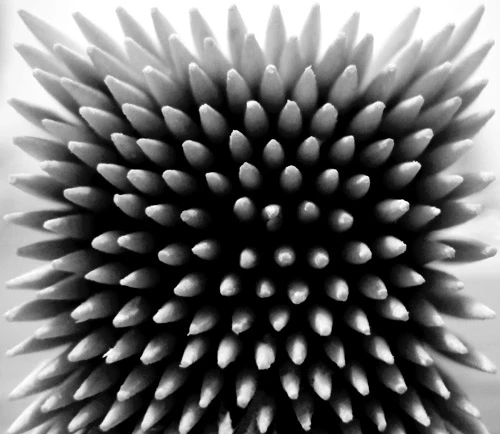
Symmetry is the visual equivalence of elements arranged evenly around a central axis, producing balance and harmony that attract viewers’ attention. In smartphone photography, symmetry can be found naturally—such as reflections in water, architectural facades, or repetitive patterns—or artificially generated using computational photography apps. Natural symmetry relies on framing real-world elements that mirror each other, often requiring deliberate positioning and awareness of perspective. Artificial symmetry, on the other hand, uses smartphone camera apps like KaleidaCam and MirrorArt to replicate and manipulate images, creating kaleidoscopic or mirrored effects that transcend the original scene.
The importance of symmetry lies in its ability to provide visual stability and a sense of order. Balanced compositions tend to evoke calmness and satisfaction, guiding the viewer’s eye smoothly across the image. However, perfect symmetry can sometimes appear static or predictable, so photographers often blend symmetrical elements with dynamic composition techniques like the rule of thirds or asymmetrical balance to maintain visual interest.
Core Composition Techniques for Symmetry
Achieving effective symmetry in smartphone photography involves mastering several composition strategies that enhance the natural or artificial balance of a scene.
Using natural elements for symmetry often means identifying reflective surfaces such as lakes, windows, or polished floors to capture mirrored imagery. Positioning the camera precisely at the midpoint of reflection is critical to achieving perfect balance. Leading lines—such as roads, bridges, or architectural features—can direct the viewer’s gaze towards the symmetrical axis, reinforcing compositional harmony. For example, a central path flanked by trees on either side creates a powerful symmetrical leading line.
The rule of thirds, a fundamental compositional principle, can complement symmetry by offsetting the symmetrical axis slightly to avoid overly static images. Placing symmetrical subjects along one of the grid’s vertical or horizontal thirds introduces dynamic tension while preserving balance. This approach is particularly effective in smartphone photography, where screen gridlines facilitate real-time application of the rule.
Framing is another pivotal technique, where natural or architectural elements are used to enclose the symmetrical subject, emphasizing the balanced structure. Doorways, arches, or overhanging branches can act as frames, enhancing depth and focusing attention on the symmetrical core.
Smartphone Tools and Apps to Achieve Symmetry
Modern smartphones come equipped with features designed to assist photographers in composing symmetrical shots with precision.
Gridlines are integral to most smartphone cameras, dividing the frame into thirds or squares. Activating gridlines helps align subjects along symmetrical axes and apply the rule of thirds effectively. Beyond basic grid overlays, some smartphones offer advanced grid modes, including golden ratio and square grids, catering to diverse compositional needs.
Bubble level tools, either integrated into camera apps or available as third-party applications, assist in maintaining straight horizons and verticals. This prevents skewed images where symmetry is compromised by tilt or perspective distortion. Precise leveling is vital when shooting architectural symmetry or reflections.
Artificial symmetry apps like KaleidaCam and MirrorArt allow photographers to experiment with computational photography by generating kaleidoscopic patterns or mirrored duplicates of images. KaleidaCam applies real-time kaleidoscope effects, producing intricate symmetrical designs that can transform ordinary scenes into abstract art. MirrorArt creates mirrored images with adjustable axes, enabling creative manipulation of symmetry beyond natural possibilities. These apps provide both novice and advanced users with tools to explore new aesthetic dimensions in smartphone photography.
Composition Formats and Perspectives for Symmetry
Choosing the right aspect ratio and perspective significantly influences the effectiveness of symmetry in smartphone photography.
Square format photography naturally complements symmetrical compositions by centering subjects and providing equal framing on all sides. Many smartphone cameras offer a square shooting mode, ideal for symmetry-focused images, as it avoids the elongated framing of widescreen formats which can dilute the symmetrical effect.
Changing point of view or perspective enhances symmetrical impact by aligning the camera precisely with the axis of symmetry. Shooting from a low or elevated angle, or directly head-on, can reveal hidden symmetrical patterns often overlooked at casual glance. Experimenting with perspectives can also blend symmetrical and asymmetrical elements, adding complexity and interest to the composition.
Combining symmetrical balance with asymmetrical elements introduces visual tension and depth, preventing images from feeling monotonous. For example, a perfectly symmetrical building reflected in water can be contrasted with a person or object placed off-center, creating layered narratives within the frame.
Post-Processing Techniques to Enhance Symmetry and Patterns
Post-processing is essential to refining symmetrical images, emphasizing balance, and correcting minor imperfections.
Adjusting contrast and sharpness enhances the delineation of symmetrical elements, making patterns more pronounced and visually striking. Increasing contrast between mirrored sections can highlight the axis of symmetry, while sharpening details ensures textures and lines are crisp.
Color correction and saturation adjustments can unify the symmetrical halves by balancing color tones and lighting disparities. This is particularly useful when shooting reflections that might have slight color shifts between the subject and its mirrored counterpart.
Recommended editing tools for smartphones include Adobe Lightroom and Snapseed, both offering precision controls for exposure, contrast, and local adjustments. Lightroom’s geometry correction tools help straighten skewed lines, reinforcing symmetry, while Snapseed’s selective editing enables fine-tuning of specific areas without affecting the entire image.
Beyond mobile apps, desktop software with advanced editing capabilities can further enhance symmetry by allowing pixel-level corrections and complex layering techniques.
Practical Tips and Avoiding Common Pitfalls in Symmetrical Smartphone Photography
Perfecting symmetry requires deliberate practice and awareness to avoid common pitfalls.
One practical tip is to use stable positioning and a steady hand or tripod to prevent camera shake, which disrupts alignment. Many smartphones support stabilized shooting modes and remote shutter controls to facilitate this.
Reflections offer natural symmetry but can be disrupted by ripples, debris, or uneven lighting. Choosing calm water surfaces or smooth reflective materials improves clarity. Additionally, architectural elements with repetitive patterns, such as windows or columns, provide reliable symmetry when aligned properly.
Breaking symmetry intentionally can add artistic flair and narrative depth. Introducing asymmetrical elements or off-center subjects can inject visual interest and prevent compositions from feeling overly rigid. Photographers should experiment with both perfect and broken symmetry to understand its emotional and aesthetic impact.
Maintaining awareness of perspective distortion is crucial, especially with wide-angle smartphone lenses. Objects closer to the lens may appear disproportionately large, skewing symmetrical balance. Using computational correction features or adjusting shooting distance helps mitigate this issue.
FAQ
What is the best way to achieve symmetry in smartphone photography?
The best way involves using camera gridlines to align elements precisely along a central axis, employing bubble level tools to maintain straight horizons, and positioning the camera carefully to capture natural or artificial reflections. Utilizing symmetry apps like KaleidaCam can also create artificial symmetry effects.
How do gridlines and bubble levels improve symmetrical compositions?
Gridlines divide the frame into thirds or squares, helping photographers place subjects accurately for balanced framing. Bubble levels ensure the camera remains perfectly horizontal or vertical, preventing tilted images that disrupt symmetry.
Can post-processing enhance symmetry in photos?
Yes, post-processing can adjust contrast, sharpness, and color to emphasize symmetrical patterns, correct perspective distortions, and unify lighting differences between mirrored sections, resulting in more striking images.
When should I break symmetry in my photos?
Breaking symmetry can be effective when aiming for dynamic, less predictable compositions. Introducing asymmetrical elements or offsetting the symmetrical axis creates visual tension and narrative interest.
Are square format photos better for symmetry?
Square formats provide equal framing on all sides, naturally complementing symmetrical compositions by centering subjects and emphasizing balance, making them ideal for symmetry-focused smartphone photography.
Symmetry in smartphone photography continues to evolve with advances in computational photography, offering new creative avenues through apps and post-processing tools. Photographers who master both natural and artificial symmetry techniques can enhance their visual storytelling and create balanced, harmonious images that stand out in an increasingly crowded digital space.
For further expert insights on composition and symmetry, see the detailed coverage at Petapixel’s guide to symmetry in photography and composition tips at Printique’s smartphone photography blog.