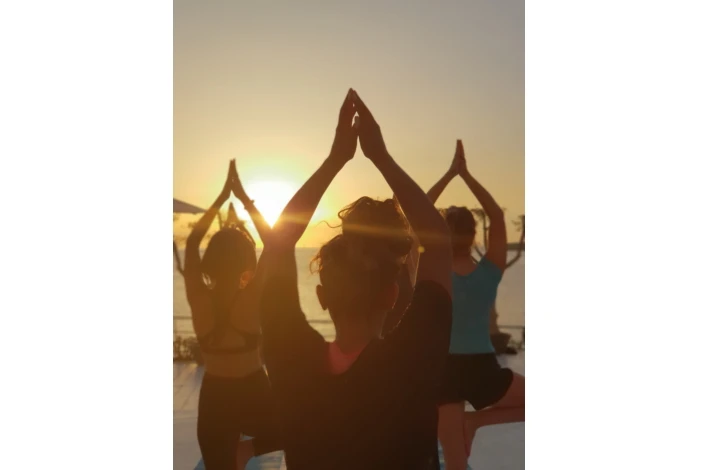
SnapRoamer.com – Golden hour occurs during the first hour after sunrise and the last hour before sunset. During this window, the sun’s low angle causes atmospheric scattering that amplifies red, orange, and yellow hues, creating a soft, warm light that is exceptionally flattering for both travel landscapes and portraits. The sun’s low angle during golden hour means its rays travel through more of the Earth’s atmosphere, scattering blue light and amplifying warm hues (meteoraphototour.com).
Mastering Computational Photography: Avoiding the ‘Fake’ HDR Look
To maintain the dramatic integrity of the golden hour, photographers often find that disabling Auto-HDR is necessary to prevent the software from over-brightening shadows and washing out the intentional warmth of the sky.
When to disable Auto-HDR
Auto-HDR can struggle with the extreme dynamic range of a setting sun. If the software attempts to pull too much detail from the dark foreground, the image loses its sense of depth.
Simulating high dynamic range with bracketing
Exposure bracketing is a technique used for sunset photos because the scene’s dynamic range is often very high and cannot be fully captured in a single image. You can achieve this using specialized tools:
- Pro Camera by Moment: This app allows for precise manual control and bracketing functionality on iPhone devices.
- Lightroom mobile: Use this for advanced tone-mapping to merge bracketed shots into a single, high-quality file.
- Snapseed: An excellent option for quick, localized adjustments to shadows and highlights after the shot is taken.
The On-the-Move Guide: Capturing Light from Trains and Walking Tours
As the photographer Robert Capa famously noted, “If your pictures aren’t good enough, you aren’t close enough.” This principle applies to mobile users who must act quickly before the light shifts.
If you are shooting from a train or bus, motion blur caused by the combined movement of the vehicle and your hands is a primary failure mode. To mitigate this, consider the following:
- Stabilization: Use both hands and press your elbows against your torso to create a human tripod.
- Burst Mode: Rapidly fire multiple shots to increase the statistical likelihood of capturing one sharp frame.
- Hardware assistance: For specialized movement, devices like the Insta360 can provide stabilized perspectives that standard smartphones might struggle to maintain during high-motion travel.
Essential Smartphone Settings for Golden Hour
To maintain image quality and prevent digital noise, keep your ISO as low as possible, ideally at 100 or 200.
Follow these specific technical steps to lock in quality:
- Set Low ISO: Aim for 100 ISO or 200 ISO to maintain maximum image quality and prevent digital noise in the shadows.
- Control Exposure: On an iPhone, use the “Tap & hold screen, lower exposure” method. By tapping the brightest part of the sky and sliding the sun icon down, you prevent the sky from becoming a featureless white void.
- Utilize Optical Compression: Use the iPhone camera 2x zoom when shooting landscapes. This helps compress the distance between the foreground and the sun, creating a more cinematic composition.
Portrait vs. Landscape: Adapting to Light Geometry
Golden hour light “wraps” around a subject, highlighting facial features, grooves, and texture in a better way than midday light.
Creating Bokeh with Backlighting
When shooting portraits, use Portrait Backlighting to place the sun behind your subject. While iPhone users cannot control the physical aperture because it is a fixed setting (matiash.com), you can simulate the effect of a wide aperture (f/2 to f/4) using the software-driven portrait mode to create “bokeh,” which makes the subject pop from the background.
Landscape Depth and Sharpness
landscape photography requires a different mathematical approach to light. Instead of focusing on a single subject, you want the entire scene to be sharp. While you cannot manually change the aperture on most smartphones, the goal is to simulate the effect of a mid-range aperture (f/8 to f/12) to ensure depth. To capture a dramatic starburst effect when shooting directly toward the sun, some advanced mobile workflows suggest simulating the look of an f/20 to f/22 aperture during the editing phase.
Golden Hour vs. Blue Hour: Choosing Your Travel Aesthetic
The choice between these two periods depends on your desired atmosphere. Golden hour provides warmth, while blue hour offers a calm, cinematic mood.
| Criterion | Golden Hour | Blue Hour |
|---|---|---|
| Color Tone | Warm (Red, Orange, Yellow) | Cool (Deep Blue, Purple) |
| Contrast | High Contrast | Low Contrast |
| Mood | Dramatic and Energetic | Calm and Cinematic |
| Shutter Speed | Faster (Handheld possible) | Slower (Tripod helpful) |
When planning for blue hour, note that the ideal conditions often include a target cloud cover of 0-40% and very low wind speeds between 0-10 mph to keep water surfaces still. Golden hour typically thrives with slightly more cloud cover (10-40%) and calmer winds (0-8 mph).
The Traveler’s Zero-Gear Kit and Failure Recovery
Success in travel photography requires preparation. Aim to arrive at your location at least 45 minutes to an hour before sunrise or sunset to set up and scout your composition (matiash.com). If overcast conditions are expected, arrive 2 hours early to account for shifting light (thegoldenhouradventurer.com).
Use these steps to recover from common technical failures:
- Fixing Hazy Photos: A fingerprint turns crisp light into a hazy glow. It’s the difference between “wow” and “why does this look foggy?” (Amateur Traveler). Always carry a microfiber cloth.
- Managing Blurry Shots: If you are shooting in the low light of blue hour, motion blur is common. If you lack a tripod, use a solid surface like a wall or a backpack to steady your phone.
- Recovering from Overexposure: If the sun has “blown out” your sky, try to re-shoot by tapping the brightest area of the screen to force the camera to underexpose the image.
FAQ
How long does golden hour actually last?
The typical duration of perfect golden hour light is 60 minutes, though magic hours can range between 30 to 60 minutes depending on location and time of year.
Can I take good golden hour photos if it is cloudy?
Yes. Even with cloudy weather, the sun can still peek through clouds occasionally, giving the image a more dramatic and colorful result.
Why are my golden hour photos blurry or hazy?
Haze is frequently caused by fingerprints on the lens. As noted by Amateur Traveler, a fingerprint turns crisp light into a hazy glow; cleaning your lens is the easiest fix for this common issue.