SnapRoamer.com – smartphone photography has rapidly evolved, with camera technology now capable of delivering professional-grade images. Central to achieving sharp, clear photos is mastering focus techniques tailored for smartphones. Despite advancements, common challenges such as autofocus inconsistencies and exposure mismanagement still compromise image clarity. Understanding and utilizing specific focus modes, exposure controls, and composition strategies can significantly elevate the quality of smartphone photos, enabling users to capture sharp, detailed images across various scenarios.
Smartphone cameras typically offer multiple autofocus modes, including single-point focus, continuous focus, and manual focus options. Each mode serves distinct purposes depending on the subject and shooting conditions. Single-point autofocus (AF-S) locks onto a precise area, ideal for portraits or macro shots where detail is paramount. Continuous autofocus (AF-C) tracks moving subjects, maintaining sharpness during dynamic scenes such as sports or wildlife photography. Manual focus, though less common on smartphones, allows users to override automatic settings for fine-tuned control, especially useful in low-light or macro photography where autofocus may struggle.
Understanding Autofocus Modes in Smartphone Cameras
Single-point autofocus enables photographers to select an exact focal point on the screen, ensuring the camera sharpens on a specific subject detail. For instance, locking focus on a subject’s eyes in portrait mode ensures the most critical feature remains crisp. This mode is particularly effective when combined with portrait mode’s software-driven background blur, which further isolates the subject by reducing distracting elements.
continuous autofocus is designed to maintain focus on moving subjects by constantly adjusting the lens as the subject shifts position. This mode is essential for action or wildlife photography, where maintaining sharpness throughout movement is challenging. Smartphones with advanced AI-driven continuous autofocus can predict subject movement, improving tracking accuracy. However, continuous autofocus may struggle in very low light or with fast erratic motion, requiring supplemental techniques like burst mode shooting for best results.
Manual focus on smartphones, accessible through specific camera apps or professional modes, grants users granular control over focus distance. This is useful in macro photography, where the depth of field is extremely shallow, and autofocus can mistakenly shift to the wrong area. Manual focus also aids in achieving hyperfocal distance for landscapes, maximizing scene sharpness from foreground to background. Although more demanding technically, manual focus empowers experienced photographers to tailor sharpness precisely.
Practical Tap-to-Focus and Exposure Adjustment Techniques
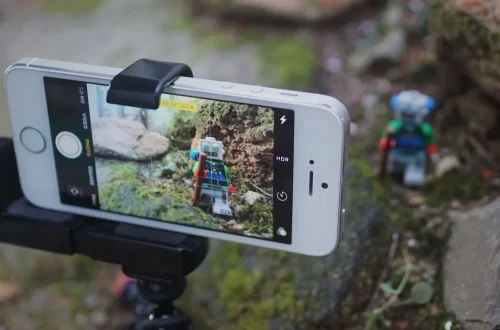
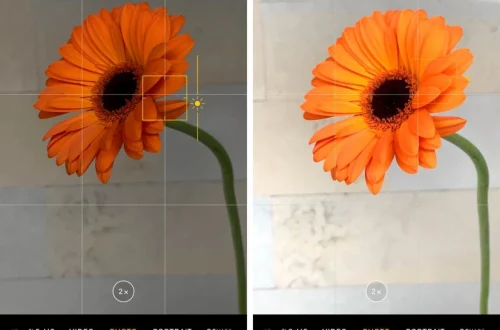
Tap-to-focus remains the most intuitive method to control focus on smartphones. By simply touching the screen where the subject appears, users can direct the camera to prioritize that area. Most modern smartphones also allow locking focus by holding the tap, preventing refocus during composition adjustments or slight movements. This method is particularly effective for static subjects or scenes requiring precise sharpness.
Exposure adjustment complements focus control by balancing light intensity to avoid overexposed or underexposed images. After tapping to focus, dragging the on-screen brightness slider manually adjusts exposure compensation, enabling correct light levels on the selected focus point. This ensures that the subject remains well-lit without sacrificing detail. Smartphones with HDR (High Dynamic Range) modes automatically optimize exposure across the frame but may still benefit from manual tweaks in challenging lighting.
Portrait mode integrates focus and exposure control with computational photography to enhance subject emphasis. It typically uses single-point focus on the subject’s face and applies digital background blur (bokeh effect) to mimic DSLR results. While effective, users should ensure proper lighting and avoid cluttered backgrounds to maximize the mode’s impact.
Composition and Lighting to Complement Focus
Gridlines, often based on the rule of thirds, assist photographers in composing balanced images that highlight the focal point naturally. Activating gridlines on smartphones, such as the Samsung Galaxy series, guides placement of the subject along intersecting lines, improving visual interest and directing viewer attention. Proper composition reinforces the effect of sharp focus by situating the subject in prominent frame positions.
Natural lighting remains a cornerstone for sharp smartphone photography. Diffused daylight provides even illumination, enhancing texture and color without harsh shadows. Avoiding the built-in flash reduces glare and unnatural highlights that degrade image quality. Clean lenses and steady hands or tripods are critical to maintaining sharpness, as smudges or motion blur directly impact autofocus efficacy and final image clarity.
Action and Macro Photography Focus Tips
Burst mode enhances chances of capturing sharp photos during fast action by taking multiple shots in rapid succession. This is particularly useful when continuous autofocus alone may not suffice due to unpredictable subject movement. Reviewing burst shots allows selection of the sharpest frame, increasing success rates in sports or wildlife photography.
Macro photography demands precise focus due to extremely shallow depth of field. Single-point autofocus or manual focus is essential to lock sharpness on minute details such as insect eyes or flower petals. Smartphone cameras equipped with dedicated macro modes or lenses optimize focus distance, but user technique remains critical to avoid focus shifts. Combining macro focus with natural lighting and steady support yields the best results.
The hyperfocal distance technique, often overlooked in smartphone use, maximizes depth of field in landscape shots by focusing at a calculated distance to keep foreground and background acceptably sharp. Though challenging to apply without manual focus controls, some advanced camera apps provide hyperfocal distance guides or presets.
Common Mistakes to Avoid for Improved Sharpness
Digital zoom degrades image quality by cropping and enlarging pixels rather than optical magnification, resulting in softer, less detailed photos. Users should minimize digital zoom use, instead opting to physically move closer or crop images post-capture.
Overreliance on automatic settings can lead to suboptimal focus and exposure. While smartphone AI improves many shots, manual adjustments such as tap-to-focus and exposure compensation empower users to adapt to complex scenes and achieve superior sharpness.
Cluttered backgrounds compete with the subject for focus and viewer attention. Simplifying the scene or using portrait mode to blur backgrounds enhances subject prominence and perceived sharpness.
Editing and Post-Processing to Enhance Photo Sharpness

Post-processing refines sharpness and exposure beyond what in-camera focus achieves. Basic editing steps include adjusting contrast, brightness, and clarity sliders to enhance detail definition. Sharpening filters selectively increase edge contrast, improving perceived sharpness without introducing noise.
Popular smartphone photo editing apps such as Camera+ and Adobe Lightroom Mobile offer advanced tools for manual exposure adjustment, selective sharpening, and noise reduction. These apps support non-destructive editing workflows and enable precise control over image enhancement. Editing should complement good focus technique rather than compensate for poor capture.
| Focus Technique | Best Use Case | Advantages | Limitations |
|---|---|---|---|
| Single-Point Autofocus (AF-S) | Portraits, macro photography | Precise focus on subject detail, excellent subject isolation | Not ideal for moving subjects |
| Continuous Autofocus (AF-C) | Action, wildlife, sports photography | Maintains focus on moving subjects | Can struggle in low light or erratic motion |
| Manual Focus | Macro, low light, hyperfocal landscapes | Complete control over focal distance | Requires technical skill, less intuitive |
| Tap-to-Focus | General use, static subjects | Easy to use, quick focus adjustment | May require locking to avoid refocus |
| Burst Mode | Fast action and unpredictable movement | Increases chance of sharp shots | Consumes storage, requires selection of best frame |
FAQ
What is the best focus mode for smartphone portraits?
Single-point autofocus (AF-S) is ideal for portraits as it locks sharpness on specific facial features, typically the eyes, ensuring the subject stands out clearly. Combining this with portrait mode’s background blur further isolates the subject for a professional look.
How does tap-to-focus improve smartphone photo sharpness?
Tap-to-focus allows users to manually select the focal point on the screen, directing the camera to prioritize sharpness on that area. Locking focus after tapping prevents unwanted refocusing, which maintains clarity on the intended subject.
When should I use continuous autofocus on my smartphone?
Continuous autofocus (AF-C) is best for subjects in motion, such as sports, wildlife, or children playing. It continuously adjusts lens focus to keep the moving subject sharp throughout the shot.
Why should I avoid using digital zoom on smartphones?
Digital zoom crops and enlarges the image digitally rather than optically, leading to a loss of detail and softer photos. Moving closer to the subject or cropping after capture preserves image quality better.
Can editing apps make up for poor focus in smartphone photos?
While editing apps can enhance sharpness and exposure, they cannot fully compensate for out-of-focus images. Good focus technique during capture remains essential for clear, professional-quality photos.
Mastering focus techniques in smartphone photography requires understanding the strengths and limitations of available autofocus modes, practical use of tap-to-focus and exposure adjustments, and integrating composition and lighting principles. Combining these methods with action-specific tools like burst mode and macro focus strategies significantly improves sharpness and clarity. Post-processing using advanced editing apps complements these efforts, allowing photographers to realize the full potential of their smartphone cameras.
For further detailed insights on focus modes and smartphone photography tips, visit Master Your Photography’s focus modes guide and Printerpix’s smartphone photo tips.